

[Round 4] Do Not Miss the Opportunity with Alert Settings: How to Use Notifications by Leveraging Time Axis and Trend State
Even if you don’t stick to the chart, the waves will “teach you”
“I missed a good setup…”
This is a common concern in discretionary trading, butMT4 Wave Master (WVM)can handle this issue as well.
WVMreal-time identifies the trend state (start, continuation, reversal, trendless),and you can receive alerts on any timeframe.
This time, we will introduce thehow to use the alert feature of Wave Master and practical usage examples.
Leverage the time frame to aim for overlaps
For example, after receiving a “continuation” alert on a higher timeframe (1-hour), if a “start” alert also appears on a lower timeframe (15-minute),you can narrow it down as a buying dip or selling into strength opportunity.
▼ Figure: Timeframe-based alert usage examples
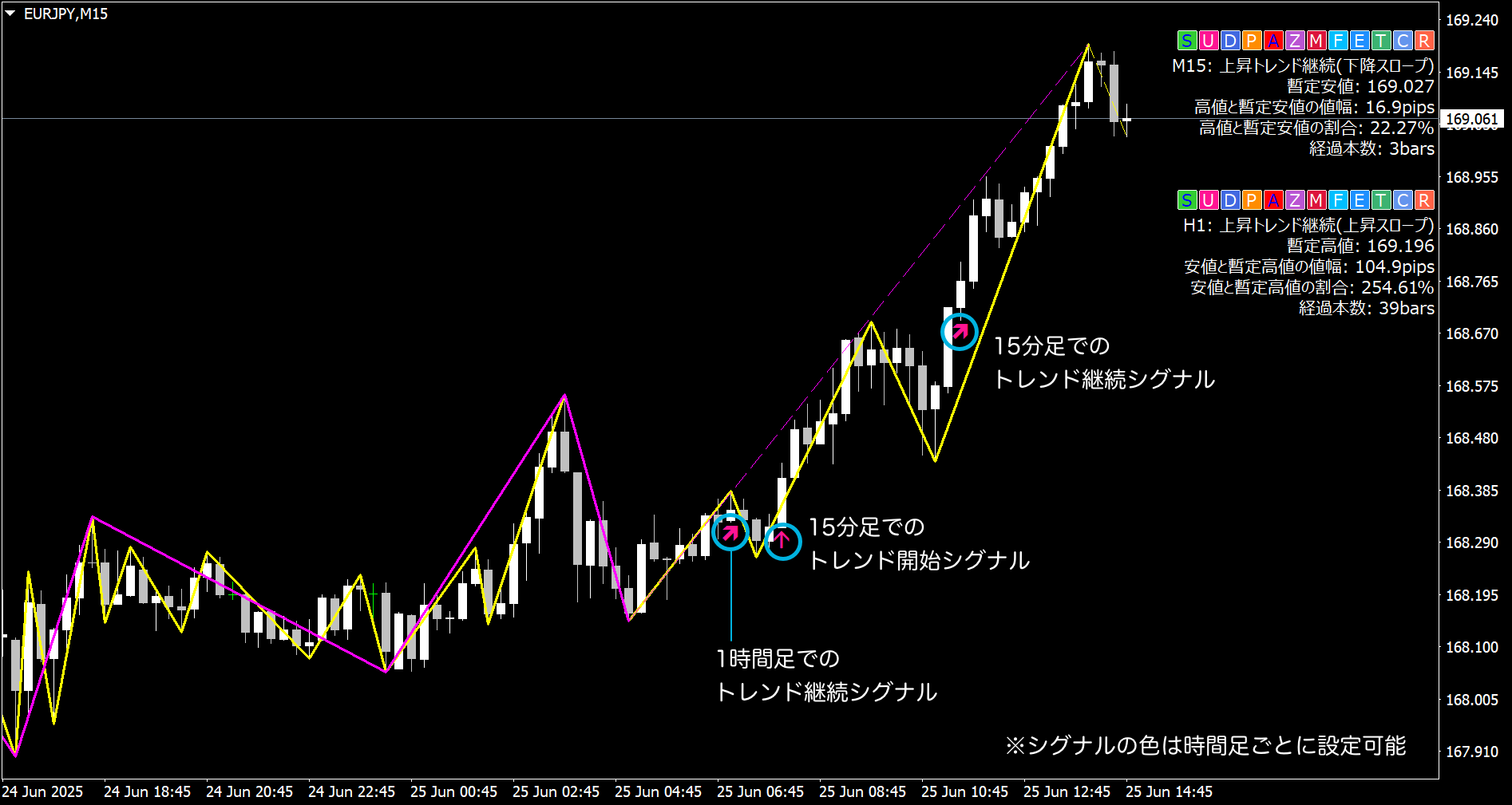
By systematizing the flow of checking the chart based on alerts,you can efficiently focus only on points with an edge.
When you receive a notification, confirm in a standard way
- If you get a “continuation” or “start” notification on the 1-hour chart, open the chart and confirm the directional sense
- Then if you receive a “start” notification on the 15-minute chart, check the candlestick patterns and recent waves
- If the conditions align, consider buying on dips (or selling into strength)
In this way,you can patternize decision-making from the alertsto improve the accuracy of discretionary trading without being swayed by emotions.
To reduce unnecessary notifications
With WVM,you can individually ON/OFF the trend states to be alerted (start, continuation, reversal, etc.).
For example, by limiting alerts to only “continuation,” you reduce minor reversal noise and can check the chart at a pace that matches your style.
WVM’s alert feature isa tool that translates the sense of reading waves into action.
Next time, we’ll take another step and introduce using WVM tobuild a trading planand how to combine it with other tools.
? Please also check out past articles
- ?【Episode 1】Weapons supporting discretionary judgment - Visualizing wave analysis with Wave Master
- ?【Episode 2】Environmental recognition indicated by wave overlaps - Aligning timeframe with Wave Master
- ?【Episode 3】Catching the “trend state” with Wave Master for entry decisions