

[Session 3] Entry decisions that leverage the "trend state" captured by wave masters
Are you missing the trend state?
MT4 Wave Master (WVM) differs from traditional tools not only in “wave visualization.”
“Trend Start,” “Trend Continuation,” “Trend Reversal,” and “Trendless (Non-Trend)”are four states that can be judged in real time, which is a major strength.
This time, we will introduce how to use these “trend states” to make entry and no-trade decisions.
? Target for entry: focus on trend continuation signals
On higher timeframes,Trend Start or Continuationis indicated, and if similar conditions appear on lower timeframes (especially “continuation”),the basis for a buy-on-dips or sell-on-rebounds is strengthened.
▼ Figure: Example of confirming trend state with WVM
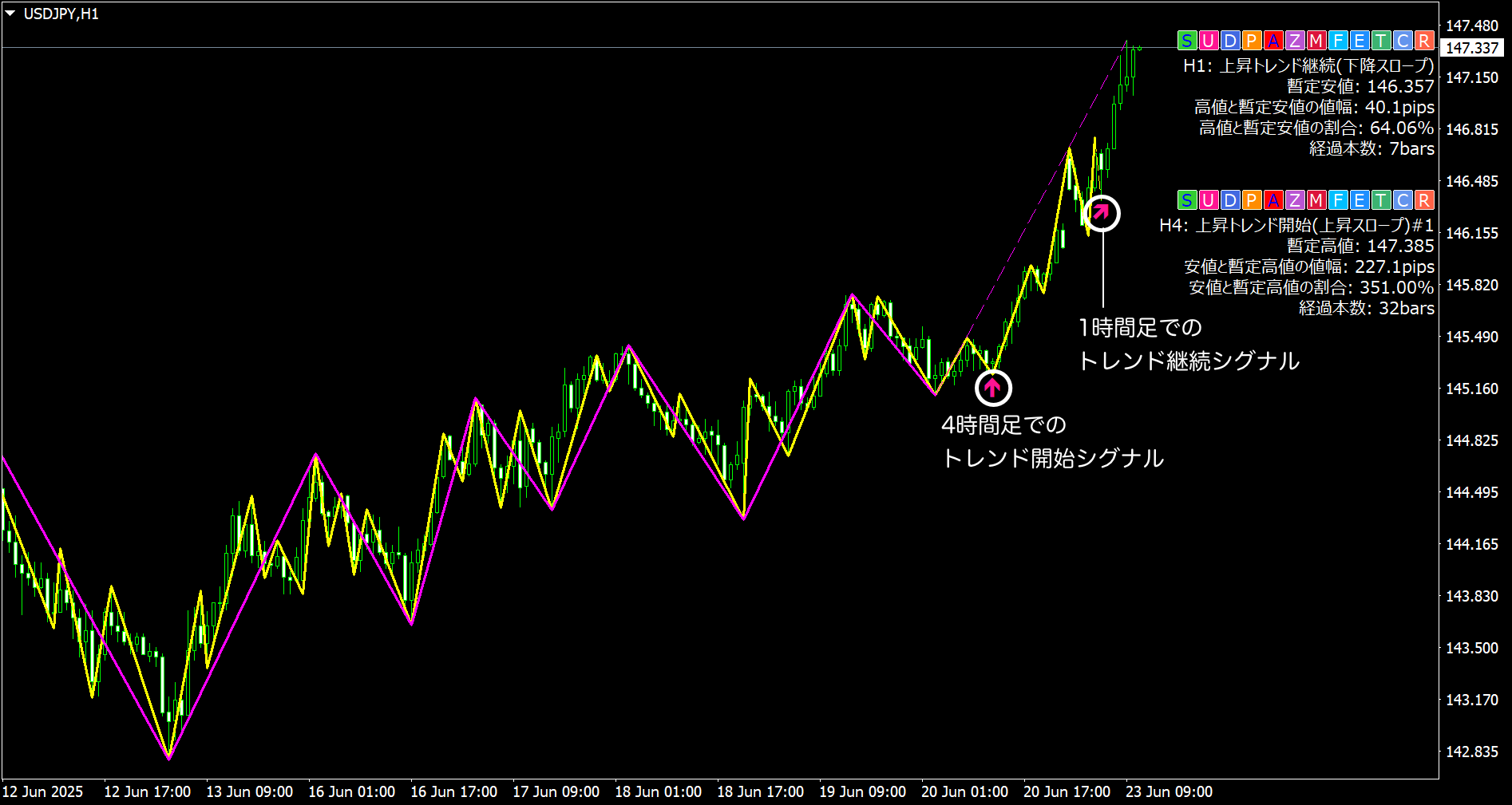
At this time, theTrend Continuation Signalshown by WVMis a favorable entry timingand can move you away from judgment based on feeling alone.
? When to refrain from entering: signs of “Trendless” or “Reversal”
On the other hand, when WVM shows“Trendless” or “Trend Reversal,”the market may be directionless and indecisivepossibility arises.
If such states are made explicit, the decision to stay out becomes clear and helps avoid unfavorable trades.
? A trade pattern is formed, reducing judgment variance
- If the higher timeframe shows a trend Start or Continuation,
- and the lower timeframe shows the same state, consider entering,
- if the lower timeframe shows Reversal or Trendless, skip.
This allows you to judge entries with a consistent rule without being swayed by the chartand reduces the bias in discretionary trading.
From next time on,we will also introduce tips for alert settings with timeframes and practical market applications. Please stay tuned.
? Please also check out previous articles
- ? [Episode 1] A weapon to support discretionary judgment ~ Visualizing wave analysis with Wave Master
- ? [Episode 2] What the overlapping waves reveal about environment recognition ~ Catching timeframe coherence with Wave Master