
[For preservation] How to register and use Bcrumena (Beakuru Menna) Wallet and what are the actual reviews like!?
Bcrumena (Beakurumena) Wallet registration method explained!
With that wish in mind,we've summarized everything with photosin this article.
It provides clear explanations with photos for registration methods, usage, and settings, so
if you want to use the Beakurumena Wallet, please refer to this.
However, some of you might be wondering, what exactly is the Beakurumena Wallet?
Therefore, we have described its features, future prospects, and third-party opinions.
If you’re unsure about using a wallet, please use this as a reference.
Overview of Bcrumena (Beakurumena) Wallet
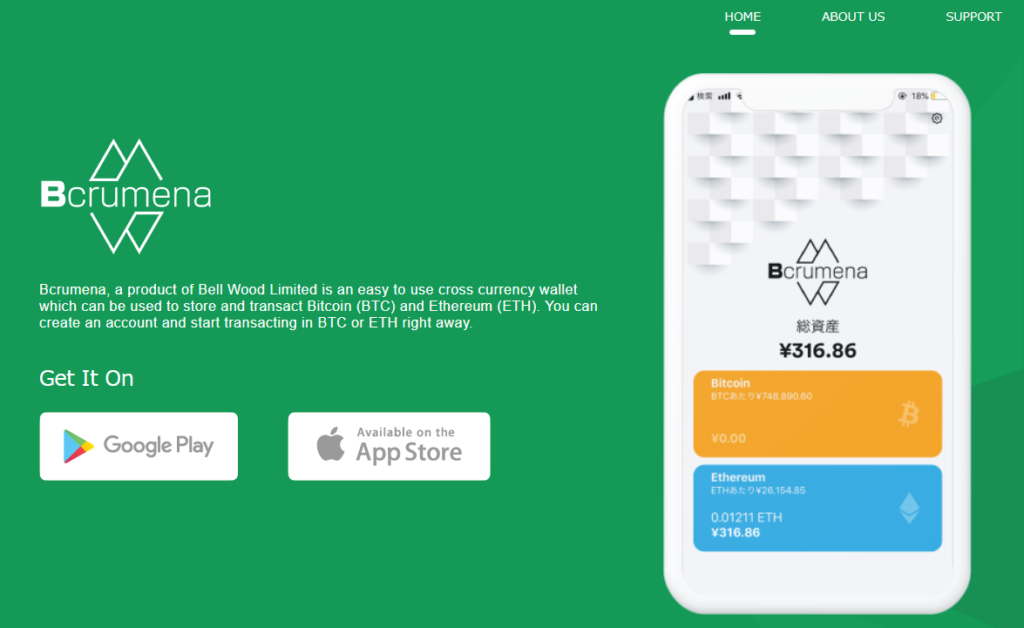
Source:Bcrumena Official Site
| Wallet name | Bcrumena (Beakurumena) |
| Supported currencies | |
| Developer | BELL WOOD LTD (Exchange) |
| Developer's exchange | BELL WOOD |
| Official site | Bcrumena |
| Release month | November 2018 |
| iOS download | Here |
| Android download | Here |
| Support | Here (You can also go to the page from the official site) |
Features of Bcrumena (Beakurumena) Wallet
The main feature of the Bcrumena Wallet is that you can start using it immediately by just setting a password initially, without registration or sign-up.
Some wallets require signing in every time you want to use them, so a user-friendly wallet is very handy in everyday life.
For example, if you need to send money right away, signing in each time would be cumbersome.
With Beakurumena Wallet, however, everything you set initially—password and access credentials—is stored automatically on the deviceso you can securely store cryptocurrency.
Therefore, it’s great that Beakurumena Wallet can be used immediately after the initial password is set.
However, a note: the keyword issued during registration (photos below) is necessary to recover Beakurumena Wallet if your device is lost, damaged, or the wallet is updated, so be sure to store it separately.
That’s the main feature of Beakurumena Wallet.
Next, let’s look at how to register for Beakurumena Wallet!
Registration method for Bcrumena (Beakurumena) Wallet
The registration method for Beakurumena Wallet is simple if you follow the steps in the photos, so please refer to this.
First, access the official Beakurumena site.
The official site isHere←
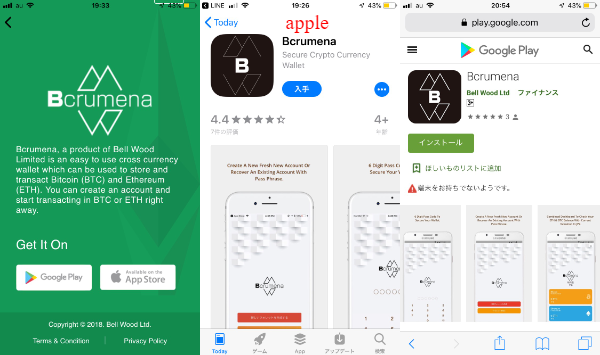
※ Even if you don’t access Beakurumena’s official site, you can download from the download link in the overview, so rest assured.
After proceeding to the download link, install according to your device.
(Don’t try to install the Android version if you are using iOS, lol)
Once installation is complete, proceed as shown in the following photos.
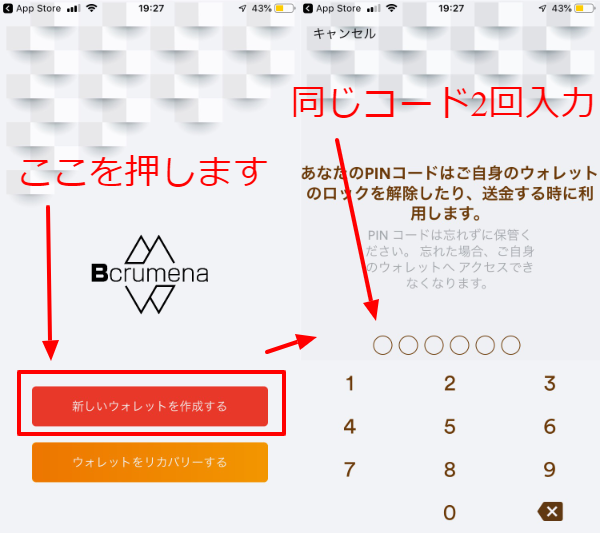
To confirm,
- Create a new wallet
- Enter the code
in that order.
As shown in the photos, the PIN code must beentered twice.
If you enter the code only once, you’ll need to enter the same code again.
Be sure to choose a 6-digit PIN that you won’t forget, andremember itremember it.
Now, after entering the PIN twice, a keyword will be issued.
It’s the square area at the bottom in the photos.
This keyword is essential if the device is lost, stolen, damaged, or Beakurumena Wallet is updated, so be sure to save it.
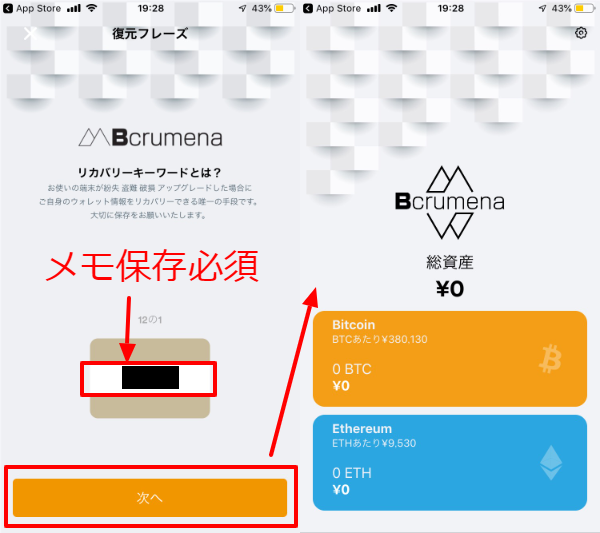
It’s important, so I’ll say it again.
Please be sure to save the keyword!
Once you’ve saved the keyword, registration of the Beakurumena Wallet is complete.
See? Registration of Beakurumena Wallet is simple, right?
Usage of Bcrumena (Beakurumena) Wallet
Now that you’ve successfully registered Beakurumena Wallet, let’s actually use it!
Currently, it supports only Bitcoin and Ethereum, but the usage for both is the same (colors differ, lol)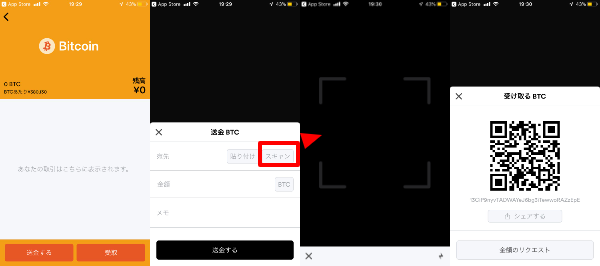
The image above shows Bitcoin, and the bottom shows Ethereum.
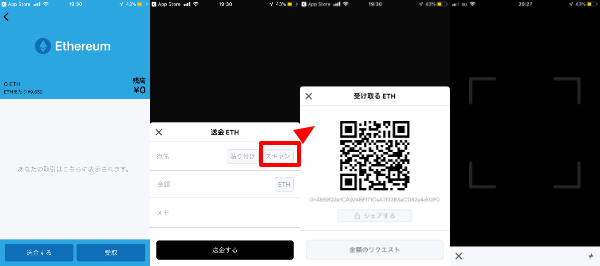
There are Send and Receive buttons, and the usage is
- Enter destination address
- Scan the QR code
These are the two methods.
Please use according to the recipient.
For me, when sending to someone far away, I would enter the address,
and for someone nearby (a restaurant or a friend I’m with), I would scan the QR code.
(Obviously, right? lol)
Next, let’s look at “Settings” which can be hard to understand when using Beakurumena Wallet.
Settings method of Bcrumena (Beakurumena) Wallet
The settings of Beakurumena Wallet may be a bit difficult to understand.
From the top-right of the photo below,the gear buttontakes you to the settings screen.
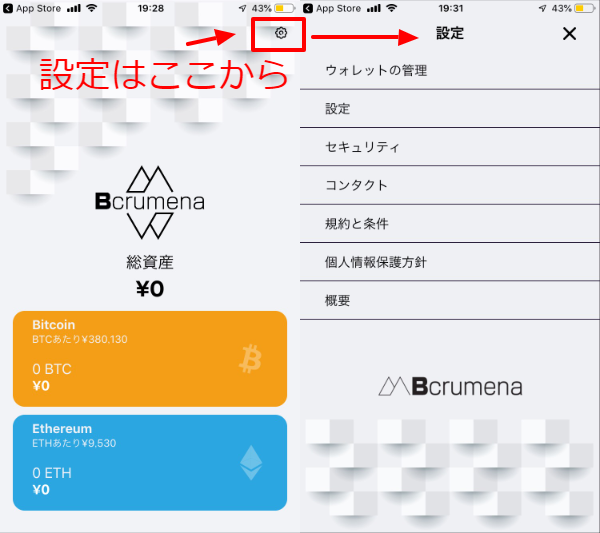
There are seven settings items in Beakurumena Wallet.
- Wallet management
- Settings
- Security
- Contacts
- Terms and conditions
- Privacy policy
- Overview
Settings may not require you to adjust much, but if you’re using Beakurumena Wallet, it’s worth a quick look.
Wallet management
First, wallet management.
ウォレット.png)
In wallet management you can set whether to display supported currencies.