
【Q42】Where is the custom indicator?
Q42. Where is the Custom Indicator?
A42. It is distributed on the Internet
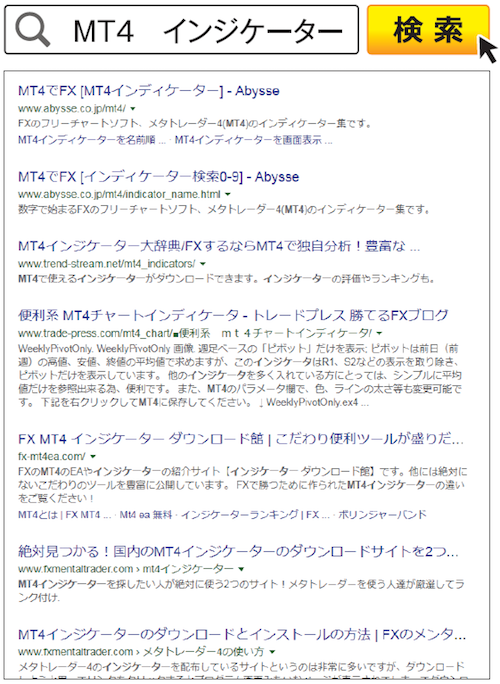
If you search Google for “MT4 indicators,” sites that collect many indicators appear at the top. Visit these and gather ones that suit you.
Solve MT4 questions with the list of 43 questions!
<Introduction>
- 01. Table of contents
- 02. Not only chart analysis—things you can do with MT4
- 03. Basic knowledge before and after MT4 installation and initial settings to start analysis
<Q&A>
- Q1. How do I open a chart?
- Q2. The chart isn’t a candlestick chart
- Q3. How do I switch the time frame?
- Q4. How do I go back in time on the chart?
- Q5. The chart moves by itself
- Q6. Can I view multiple charts?
- Q7. Sometimes there is a sound. Can I stop it?
- Q8. How do I change the chart colors?
- Q9. What are the basic colors?
- Q10. Which items can have their colors changed?
- Q11. I want to display multiple charts side by side
- Q12. How many charts can I place side by side?
- Q13. How to enlarge one of the arranged charts?
- Q14. How to insert a technical indicator into a chart?
- Q15. How to insert a moving average?
- Q16. How many moving averages can be displayed?
- Q17. How to delete a technical indicator?
- Q18. How to insert Bollinger Bands?
- Q19. How to insert RSI?
- Q20. How to enlarge the sub-window?
- Q21. How to delete a sub-window?
- Q22. How to insert Stochastic?
- Q23. How to display multiple oscillators?
- Q24. Is it hard to read if there are too many sub-windows?
- Q25. How to save my own chart analysis setup?
- Q26. Can I also save chart combinations?
- Q27. How to draw on the chart?
- Q28. How to move a drawn line?
- Q29. How to delete a line?
- Q30. Can I draw a short diagonal line?
- Q31. Can I draw a horizontal line at a nice round price?
- Q32. Please tell me how to draw Fibonacci retracement
- Q33. How to draw shapes?
- Q34. How to draw arrows?
- Q35. Tell me about automated trading
- Q36. How can I create an EA?
- Q37. Is MetaEditor the English version?
- Q38. How to run an EA?
- Q39. Do I need programming skills to use an EA?
- Q40. How to use custom indicators?
- Q41. What is a custom indicator?
- Q42. Where is the custom indicator?
- Q43. How is MT5 different from MT4?
FX攻略.com Official Site—Come visit too!!

“FX攻略.com” is a domestic monthly FX specialty magazine founded in 2008 (monthly issue on the 21st / [print] 750 yen [digital] 600 yen). It condenses the basics of investing and the essence of FX on its pages while delivering the latest information. If you haven’t read it yet, please pick up a copy at bookstores nationwide (also sold online)!
■ FX攻略.com Official Site
http://fx-koryaku.com/
■ FX攻略.com Official Twitter
https://twitter.com/fx_koryaku_com
■ FX攻略.com Official Facebook
https://www.facebook.com/fxkoryaku/
FX攻略.com MT4 Special

This MT4 feature is for those who are interested in MT4 but feel it’s difficult, from FX攻略.com’s official site.
FX攻略.com editors are giving away the【MT4 Start Manual】to all applicants!!!!
For details on how to obtain the manual, please check the following:MT4 Comprehensive Feature | A Beginner’s Guide to Meta Trader 4