

[Devastating Power] Sky-High Speed – “A method to lighten MT4 in 1 minute, taught!!


Due to its great popularity,
Arriving at the station on how to lighten MT4.

For those who have added indicators and feel that “MT4 is heavy…”,
we will introduce easy methods to lighten it.
Estimated time: about 1 minute
Steps
- Open MT4
- Click the “View” tab at the upper left
- Select “Market Watch” and click “Hide All”
This stops updating unnecessary data on the chart, making MT4 lighter.
Note: Market depth information is constantly updating, so reducing unnecessary data can lessen the load.
Please give it a try!
Proceed by referring to the images.
This will create a smooth and comfortable MT4!
Give it a try.
Now, we will actually use the images.
Please click the MT4 upper left display.

Select the market display items
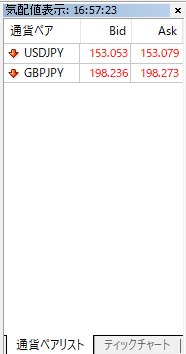
As shown above, currency pairs appear, soright-click on the currency pair list screen.
If you do this, you will see items like the following; choose “Hide All”
↓↓↓

That’s all.
With this, unnecessary currency pairs’ updates are reduced, lowering the load.
It’s quite easy to make MT4 lighter, so give it a try.
To make MT4 even more comfortable.
Also,
【Bonus ①】
News flowing into MT4 is also updated periodically, soit’s good to turn it off.
How to turn off news delivery
- Open MT4
- Click the “Tools” tab at the top of the screen
- Select “Options”
- Open the “Server” tab
- Uncheck “Enable News (□)”
This stops automatic news updates, making MT4 lighter.
Even beginners can do this easily, so please try it!
(As with this, stop news delivery as well. News is constantly updated, so turning it off if unnecessary will further lighten performance.)
【Bonus ②】
How to mute MT4 alert sounds
If alert sounds bother you while using MT4, you can easily mute them. By adjusting the volume, you can mute MT4 sounds while listening to music during trading.
Steps
- Check the speaker icon at the bottom right of the computer screen
- Right-click on the speaker icon
- Choose “Open Sound Settings”
Here,you can adjust volume for each application.
- Set MT4 volume to zeroso the alert sounds disappear.
- Music and sounds from other apps can remain audible.
Tips
With this method, you can mute only MT4 alerts while still enjoying music during trading!
Detailed image explanations below↓↓↓
Right-click on the speaker area at the bottom right of your computer screen.

Then in the image below, select Open Volume Mixer

Once opened, you can adjust in “Volume Mixer”.
For example, when you only want to listen to music, mute only the “MT4” volume
and you can adjust volume like this, so please try.
Also, if there are other useful MT4 features, I’ll keep sharing them.
Well then, that’s all for today.
See you later.
Voices of customers who purchased
~~~~ many decorative lines ~~~
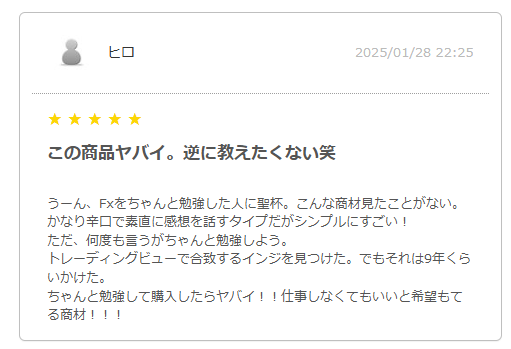
“This product is amazing. I’m hesitant to tell others, haha.”
From these words, we’re honored that you felt the speed and power of the product.
Also, knowing that a serious trader like Hiro would say so is our greatest encouragement.
“I’m thrilled that others may not be told about it” is the developer’s joy.
I myself thought not to spread it too much, but I released it on GoGoJungle with the hope that it could help beginners or those struggling to win.
We’re grateful for Hiro’s knowledge and experience in FX, and for the high praise; it fills us with gratitude.
天地爆速 is designed to support professional trading while building on solid basic knowledge.
As you said, with the right knowledge, we’re confident it can maximize its potential.
In the future, we hope Hiro’s trading will blossom further and that we can help a little toward better results.
Thank you for your continued support.

~~~~~~~~~~~~~~~~~~~~~~~~~~~~~~~~~~~~~~~~~~~~~~~~~~~~~~~~~~~~~~~~~~~~~~~~~~~~~~~~~~~~~~~~~~~~~~~~~~~~~~~~~~~~~~~~~~~~~~~~~~~~~~~~~~~~~~~~~~~~~~~~~~~~~~~~~~
To the professional trader lucky
Thank you for your hard work.
Recently, after consulting with lucky many times, I decided to purchase and began demo trading with 1 million yen virtual funds from January 17.
“天地爆速” is amazing!
Not only on the 1-minute chart, but also usable on higher time frames. After recognizing the higher timeframe environment, I traded on 5, 15, and finally 1-minute, and in just two weeks yesterday, from USD/JPY only, it grew from 1 million to 1.66 million.
Of course, the lot size is large (2 to 5 lots), so this is only for reference. I use proper stop losses as appropriate, but still win far more than I lose.
It’s only a reference, but after thorough study of lucky-sensei’s manual and relentless trading (though scalping), this result. Even with real money, it’s risky; but I think there is a reasonable chance of success.
I plan to study for about six months before moving to real trading, but I’m sure trading will be fun and full of excitement.
Of course, this market isn’t easy, so capital management is essential; you can’t rely on indicators alone. But it provides trading guidance with high win rate and high probability.
From now on, I genuinely want to practice to become a truly successful trader.
Sorry for imposing, but could you possibly end the product sales?
Reply Message
There are many other buyers who don’t want it widely spread, and we have received many requests to stop selling the product; we will consider this further and respond accordingly. (We may stop selling without notice, so please understand.))
Please continue to enjoy trading and work toward your goals. We are rooting for you.
Said to be number 1 in Gogojungle all rankings for 20 weeks in a row since last year?

Certified Technical Analyst Supervising
(*Explanations of reliability 100% available*)
For beginners and those losing, overturn the conventional wisdom and test the market’s answers.
天地爆速 product page here↓↓↓