

"ATS-13 RCI" Last week's performance ~2024/11/30
Good evening, everyone. This is ATS BASE.
In this post, we introduce weekly trading results based on the settings extracted by auto-search of ATS-13 RCI.
Please take a look right away.
Last week's results!
(Trading with margin 1,000,000 yen / 0.3 Lots)
Period covered: 2024/11/25~2024/11/30
In one week,3,?円 profit was achieved!
With only “0.3 Lots,” profits are possible every week!
Results up to last week:
Positive20,637円(11/18-11/23)
Positive55,370円(11/11-11/16)
Positive15,207円(11/4-11/9)
Positive35,505円(10/28-11/2)
Positive972円(10/21-10/26)
Positive49,746円(2024/10/14~2024/10/19)
Positive14,600円(2024/10/07~2024/10/12)
continues to achieve good results!
There are several trading methods using “ATS-13 RCI,” but
we will also explain when to enter and close using this system.
Additionally, we will publish which settings were adopted.

Last week's settings【November 23】
[Settings image 1]
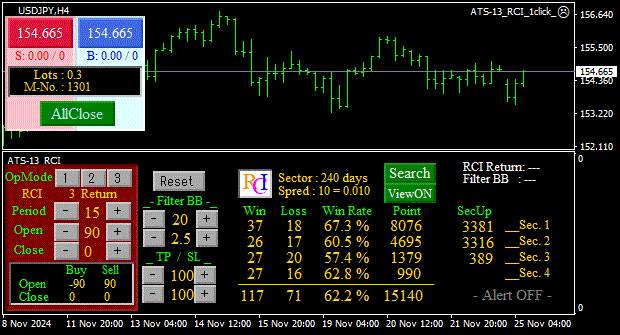
Enter/Exit conditions
USDJPY H4
Number of RSI bars: 15
BUY entry (Open): Enter when RSI turns up after being below -90
BUY exit (Close): Exit when RSI turns up after being above 0
--------------------------------------------------------------------
Sell entry (Open): Enter when RSI turns down after being above 90
Sell exit (Close): Exit when RSI turns down after being below 0
[Settings image 2]

Enter/Exit conditions
EURJPY H1
Number of RSI bars for calculation: 24
BUY entry (Open): Enter when RSI turns down after being below -70
BUY exit (Close): Exit when RSI turns up after being above 10
--------------------------------------------------------------------
Sell entry (Open): Enter when RSI turns up after being above 70
Sell exit (Close): Exit when RSI turns down after being below 10
Quite a conservative setting, isn’t it?
Using these settingswe tried the patterns in the section below
“3. Intermediate/Advanced Swing and Day Trading”
ATS combines hundreds of patterns of mode (In, Out, Return), period, Open/Close levels, TP, SL,
and more, to automatically extract patterns that win in trends, by exhaustive testing on historical data.
Settings that are hard to find manually can be found automatically.
We can discover them automatically.
Last week's results!
[Trading history image]

In one week,6,655円 profit was achieved!
Entry was modest as well.
If we were more aggressive, we might have done better, but
we'll proceed without forcing it.
The three trading methods are introduced at the end of this article.
Results up to before that!
(Trading with margin 1,000,000 yen / 0.3 Lots)
Period covered: 2024/11/18~2024/11/23 (1 week)
Settings at that time are here
+20,637円
Period: 2024/11/11~2024/11/16 (1 week)
Settings at that time are here
+55,370円
Period: 2024/11/4~2024/11/9 (1 week)
Settings at that time are here
+15,207円
Period: 2024/10/28~2024/11/2 (1 week)
Settings at that time are here
+35,505円
Period: 2024/10/21~2024/10/26 (1 week)
Settings at that time are here
+972円
Period: 2024/10/14~2024/10/21 (1 week)
Settings at that time are here
+49,746円
Period: 2024/10/07~2024/10/12 (1 week)
Settings at that time are here
+14,600円
Three trading methods
*The images are reused from the “ATS-12 RSI” version.
The specifications are the same.
1. Beginner: One-shot Trade
【Trading Method 1】High-win-rate, solid day-trade mode too!Enter on the first signal, exit at the scalp mode exit point. A high-win-rate, solid trade is possible.
※ We recommend this method until you get the hang of it and can win consistently.
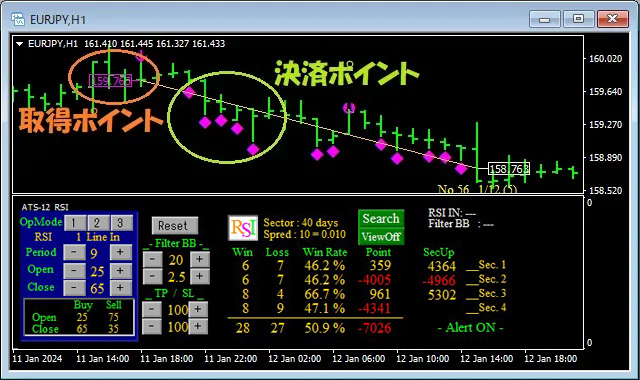
This method trades only once between the start flag and the end flag. The points gained are modest, but among the three, it has the highest win rate and is the most reliable. First, set the parameter “ScalMode_Flag” to ON “true.” The chart will display scalp-friendly entry/exit points.
① The first flag is the entry point.
② Then exit at the scalp exit point.
③ If the end flag appears while holding a position, forcibly exit then.
At first, after entering at ①, when the ② point is displayed, it is more prudent to exit while in profit.
As you become accustomed, aim for the 2nd and 3rd points, and subsequent scalp exit points.
■ About the settings: The values on the score panel do not need to be as high as the other two methods.
2. Intermediate: Scalping Trade
【Trading Method 2】Scalping mode!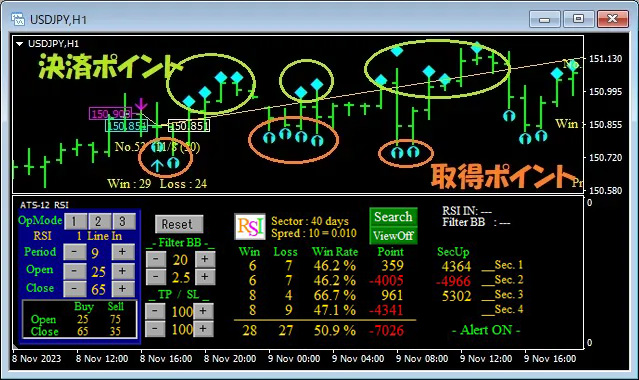
This method involves several trades between the start and end flags as a scalping approach. Depending on the case, it may yield the most points among the three methods.
First, set the parameter “ScalMode_Flag” to ON “true.” Scalping entry/exit points will be displayed.
① When scalping entry points are displayed, enter a position.
② Exit at the scalp exit point.
③ Trade several times until the end flag is displayed.
④ If an end flag appears while holding a position, forcibly exit and wait for the next opportunity.
※ For entries, we may use two main approaches within this method.
One is to enter one position and wait for the exit point.
The other is to add positions with very small lots at each entry point and exit all at the exit point, repeating.
Either approach can yield results. Until you get used to it, start with small lots and explore which method fits you best.
After you get used to this method and start earning profits, try implementing it with higher-level settings using related systems. You can expect even greater results.
■ About the settings: This method requires high-level settings. It’s recommended to have the included “ATS-13 RCI AutoSearch.”
3. Intermediate/Advanced: Swing & Day Trading
【Trading Method 3】Basic Swing/Day Trading
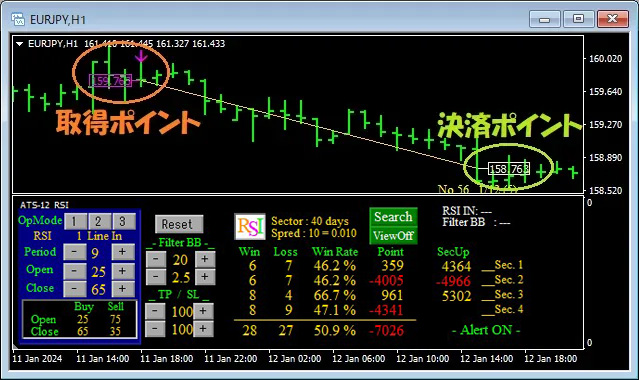
This method buys on the start flag and sells on the end flag, a simple approach.
Set the parameter “ScalMode_Flag” to OFF “false,” and hide scalp signals. ① Enter a position at the start flag.
② Exit at the end flag.
Entry and exit are very simple, but the settings are actually crucial.
If you trade prudently as signaled, the score panel values will reflect the exact results.
Also, per trade, this method yields the largest profit or loss.
In other words, this method is simple but demands the highest level settings.
■ About the settings: This method requires the highest level settings. It is recommended to have the accompanying “ATS-13 RCI AutoSearch.”
This post focuses on the following table’s■section.
Using RSI, we will introduce a portion of the data extracted from ATS to match the current trend.
We will revisit how to read and utilize this data at the end of this article!
(Paid version) |
(Total 8 sessions) (Free) |
(Free) |
(Free) |
||
| ATS-12 RSI | [From here] |
Free公開中! [From here] |
to public [From here] |
Good trend continues [From here] |
|
| ATS-13 RCI | [From here] |
Free公開中! 【Click here】 |
to公開! |
|
|
| ATS-11 Ma | [From here] |
Scheduled to start! |
[From here] |
Performance公開中 [From here] |