

Functionality Part 2
Trader A (Ace).
Thank you for viewing!
Part 2 of the Feature Overview is about parameter settings.
The parameter setting screen is as follows.
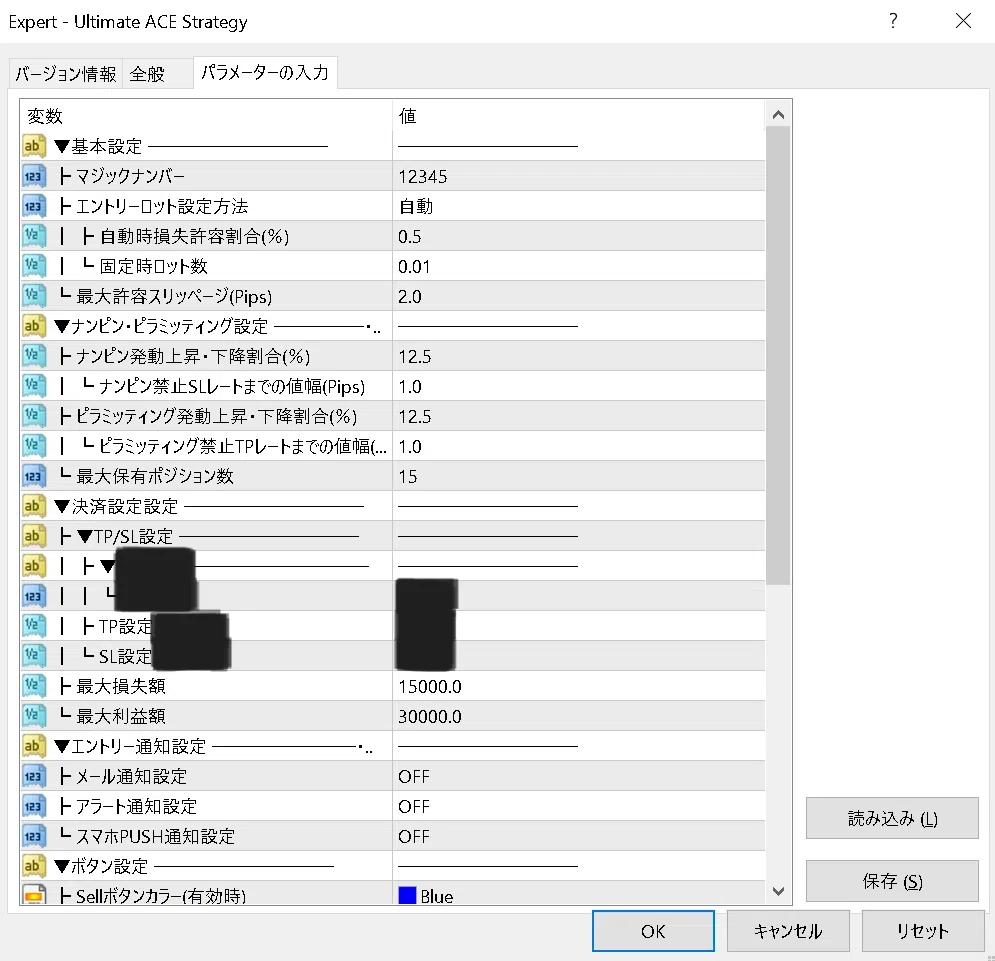
First, set the entry lot in the “Basic Settings.”
In simple interest (single-entry), select “Fixed” in “How to set entry lot,” and enter the desired lot size.
In compound interest, select “Automatic,” and enter the percentage of loss you are willing to tolerate relative to your account balance in “Automatic loss tolerance (%)”; depending on the stop loss you set, the appropriate lot size will be calculated.
Next, the “Namping / Pyramid Setting.”
You can input arbitrary percentages for nappe (averaging down) and pyramiding, such as 10% fluctuation in the stop-loss range for averaging down, or 15% fluctuation for pyramiding, allowing you to customize both nappe and pyramiding..
You can also set extremely conservative options like 50%, and depending on how you set your risk-reward ratio, you can enter numbers well over 100% or 200% to intentionally avoid nappe or pyramiding., and even choose not to nappe or pyramid.
Maximum number of positions you can hold can also be set.
Next, the “Settlement Settings” take-profit and stop-loss settings.
Take-profit and stop-loss are set using a certain indicator. Details will be touched on in the after-purchase manual, so part of the image has been blacked out.
Of course, you can set them to any desired width, and while this is a feature of MT4 itself, after setting, you can manually move them to the desired position such as the most recent high/low, if you wish.
In addition, you can set a maximum loss amount or maximum profit amount to trigger automatic full settlement when reached..
With everything taken care of, you can freely customize to suit your own trading method.
We have already received strong praise from purchasers, saying it is “very interesting.”.
Please consider it positively.
Product for sale: 【FX Semi-Autonomous EA】 The Ultimate Nap Down × Pyramid Strategy
Click here