
How to set up MT4 indicators
Introducing an indicator into MT4 is easy. It may take time and be a bit confusing until you get the hang of it, but once you’re used to it, you can do it in just a few minutes.
Now, the installation method of the indicator.installation methodIt is.
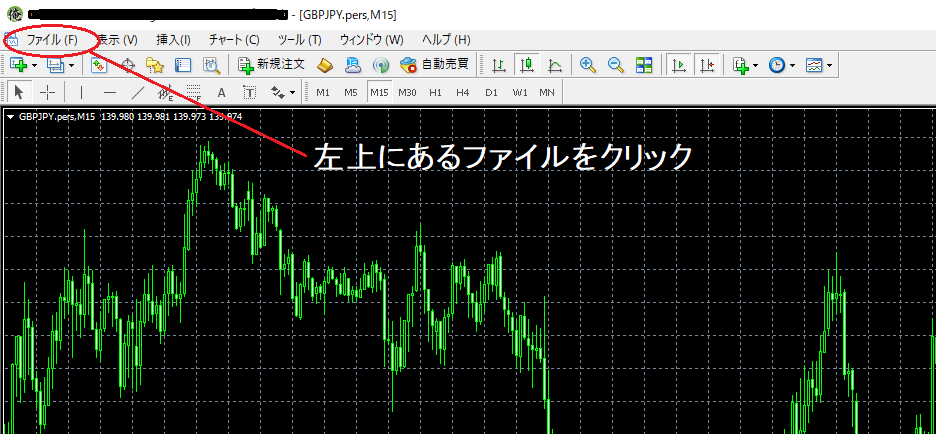
① First, in the top-left of MT4, click “File” and then select “Open Data Folder.”

② Next, in the folder, select the “MQL4” file.

③ Then select the “Indicators” file. ※ This is where you save the indicator.

④ After copying the indicator you want to install into MT4, paste it anywhere in the indicators folder, then close the file.

⑤ In MT4, click the navigator star icon located at the upper left; the left side screen will appear, then right-click in the blank area within the Navigator to display the screen, and click the second from the bottom “Update.”
※ Merely saving the indicator in the “indicators” file will not reflect changes, so you need to update MT4.
※ Alternatively, you can update by restarting MT4. Simply close MT4 once and launch it again.

⑥ Once you confirm the indicator is in the Navigator, drag and drop the indicator onto the chart of the desired timeframe where you want it displayed. /> Please.

This completes the setupsetup.
⑦ In the indicator’s parameters, you can adjust the settings
On the chart where the indicator you want to adjust is loaded, right-click to display the chart options, and from the top, select “Visible Indicators.”

⑧ When the screen above appears, select the indicator you want to modify and click the “Edit” in the top right.
Then, as shown below, the indicator’s information will be displayed, so select the top tab “Inputs.”

⑨ The parameter input screen like the one below will appear. Here you can change various settings of the indicator.

MT4 settings become easy once you get used to them.