

Coincheck's smartphone app is easy to use
Coincheckopening an account willmake the mobile appusable as well.
➡︎Here are other features of the Coincheck Exchange
The Coincheck app supports both iPhone and Android.
You can quickly launch the app to check prices or view asset trends
even when you’re out and about.
Compared with a PC, this part is easier.
Coincheck uses the catchphrase “the easiest place to buy Bitcoin in Japan,” and the app is designed with that in mind.
◯ App top page
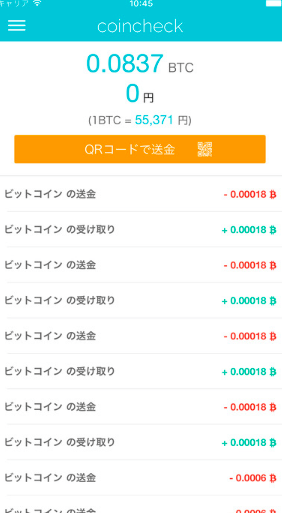
The top page shows trade history and the amount of Bitcoin you hold.
From this top page, click the tab at the top left toopen the menu screen.
◯ Menu screen

The menu screen can perform most of the same tasks as on a PC.
・Depositing Japanese yen
・Buying currencies such as Bitcoin
・Viewing the total assets for each currency
・Converting Bitcoin to Japanese yen
etc.
◯ Currency purchase screen

This is the currency purchase screen, but
it is very easy to read.
At the top, currency names line up, and you check them
and enter the quantity at the bottom.
A good thing about Coincheck is that you can purchase directly from Japanese yen
including Bitcoin and other currencies.
In other words, you don’t need to go Japanese yen ➜ Bitcoin ➜ other currencies.
Including this, it feels like the ability to purchase easily is exactly this.
◯ Chart screen
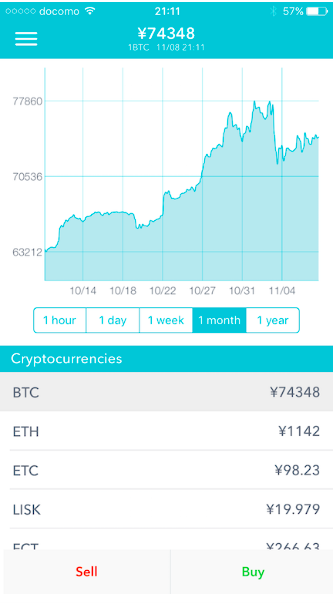
Finally, the chart is
at the top, and the currencies are shown belowper-unit price is shown.
The chart ranges from short periods from 1 hour to 1 year
so you can view price movements on mobile as wellwith sufficient detail.
That’s my impression after using the app.
For more details on specific features, please refer to the page below,
and I’d appreciate it if you could take a look.
➡︎Here is an article about how easy the Coincheck mobile app is to use