

Introduction!!! How to use MT4 Indicators
Introduction!!! How to Use MT4 Indicators
Indicators include(i) Trend-type indicators (ii) Oscillator-type indicators. (There are) representatives: (1) Moving Averages, (2) Envelopes. (ii) representative is (3) Stochastics.
Using in Envelopes Reversal EA(i) Trend-type indicators (ii) Oscillator-type indicators. We will explain how to use indicators with examples.
Representative indicators
Moving Average
It is a line formed by averaging the closing prices over a fixed period.
Moving averages are trend-type technical indicators, generally used to identify the trend..
Moving averages are Simple Moving Average (SMA), Exponential Moving Average (EMA), Smoothed Moving Average (SMMA), Linear Weighted Moving Average (LWMA). There are four types.
All of my EAs use the Exponential Moving Average (EMA).
Envelop
It is a line with the moving average displaced upward and downward by a fixed percentage. Envelopes symbolize a envelope and wrap the price from above and below.
By using envelopes, you can visualize how far the price deviates from the moving average. By looking at the deviation from the moving average, you can make buy/sell decisions..
Stochastics
An oscillator-type indicator that determines whether the current price is overbought or oversold based on past highs and lows. Stochastics has two lines and ranges from 0% to 100%. When the line is above 70%, it is considered “overbought”; when at or below 30%, it is considered “oversold.”
Indicator Parameters
Next, I will explain the parameter settings for the three indicators. Indicators allow parameter changes.
First, the simple flow to check the default parameter values is described below.
① Insert the indicator on the chart →② Right-click the chart →③ Click “Indicators in use (L)” →④ Click the indicator name you want to check →⑤ In the “Parameters” tab, you can confirm the current settings.
Next, I will tell you the parameters for the three indicators, but these values are specifically for the “Envelope Reversal EA.”
Moving Average
Period: 20 Moving average applied price: Exponential Applied price: Close

Envelope
Period: 20 Moving average applied price: Exponential Applied price: Close Deviation: 0.1%

Stochastics
※ For Stochastics, change the settings of “Parameters” and “Levels Display.”
(i) Parameters
%K period: 3 %D period: 2 Slowing: 2 Price field: Low/High
Moving average type: Exponential

(ii) Levels Display
Lower: 20% Upper: 80%

That completes the parameter settings.
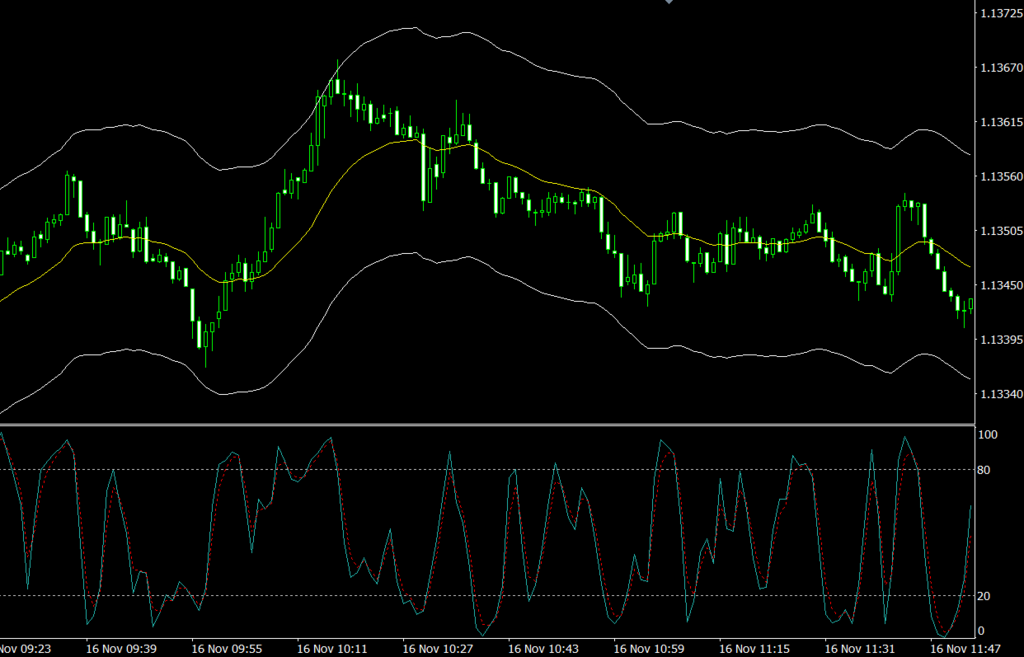
On a 1-minute chart of EURUSD with each indicator inserted, it will look like the chart below.
Next articlewill discuss the meaning of using these three indicators in the Envelope Reversal EA.