

【ForexTester】Project time setting, display in Japan time
This article targets FX verification software ForexTester6, ForexTester5, ForexTester4.
■ Set the project to "New York Close" and "US DST"
ForexTester historical data (Standard/VIP) is saved in GMT+0.
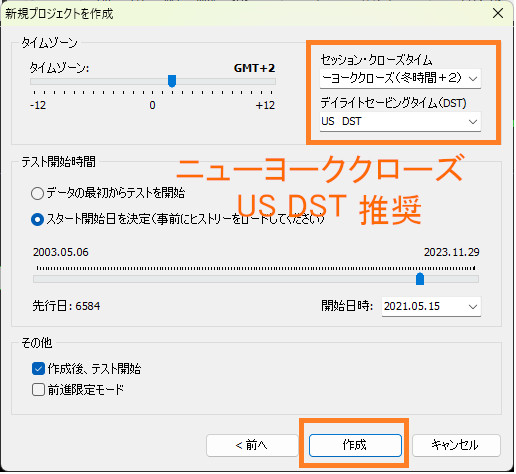
When aligning with MT4/MT5 chart times, please set the time zone to "New York Close" and "US DST".
The settings at project creation are as follows.
New York Close uses the time when the New York market closes as the start of the day (0:00).
One week of daily bars is displayed as 5 bars evenly distributed over 24 hours each.
Traders around the world analyze charts using this time setting as the standard.
If this setting is not used, daily bars will be six per week, and the shapes of daily charts and 4-hour charts, candle prices, and indicator results will change.
【When using Basic Data】
With Basic Data (Forexite), the data is not saved in GMT+0, and even after adjusting the time zone, there is a 1–2 hour discrepancy.
In conclusionIt is impossible to have daily bars of 5 per day throughout a year Therefore, this data is not suitable for verification.
【When importing historical data】
Historically data imported from other trading tools (MT4, MT5, etc.) remains as charts, so time zone and DST are often already adjusted.
If that is the case,Set to "GMT+0, no DST".
■ Japan time is chart time plus 7 hours (winter) or plus 6 hours (summer)
The times displayed on charts set to New York Close and US DST are not Japan time.
If you add 7 hours in winter and 6 hours in summer to the chart display time, you get Japan time.
In MT4, the difference between server time and PC time (Japan time) is as follows.
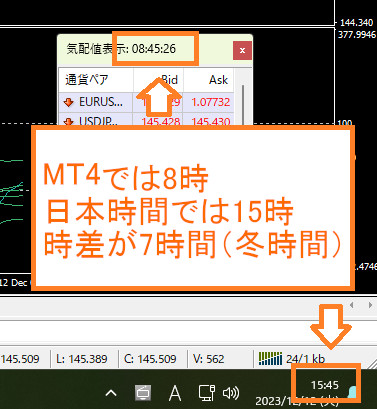
MT4 server time is 8:00, while Japan time is 15:00, a 7-hour difference.
In the United States, the period from the second Sunday in March to the first Sunday in November is daylight saving time, and otherwise it is standard time.
With Forex Tester’s basic functionality, while the chart time is set to "New York Close" and "US DST", it is not possible to display only the shown time as Japan time.
The same times are displayed on the chart as MT4/MT5.
■ How to understand Japan time
We offer「ForexTester Japan Time Display & Time Difference Adjustment Indicator」which allows you to intuitively recognize Japan time.
It can display various time-related information, including Japan time.
The display image is as follows.
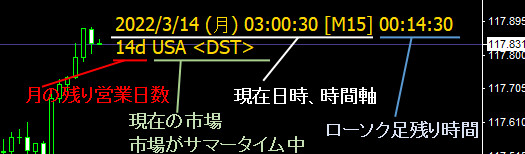
We are selling it on GogoJungle, so please consider it.
https://www.gogojungle.co.jp/tools/indicators/15984
We also sell various other handy indicators, so please check GogoJungle's sales page.