

#155 How to display GOLD on MT4
Hello! This is lucky.
Because there were inquiries about trading GOLD,
this time, how to display GOLD in MT4! (`・ω・´)ゞ
I will explain it quickly!
A must-see for beginners who want to trade GOLD!
In this article, I will explain how to display GOLD in MT4.
To trade GOLD, you will use MT4.
If you are a beginner in trading or interested in GOLD, please take a look!
What many people don’t know is that GOLD can be traded on MT4 as well.
Actually, you can display GOLD on MT4 too!
Regarding GOLD display, it varies depending on the broker you handle.
In MT4, you will see either “GOLD”or “XAUUSD”.

The steps are two simple steps
【Step 1】
From the left-top bar in MT4, select Display
and choose Quotes (Watch List).
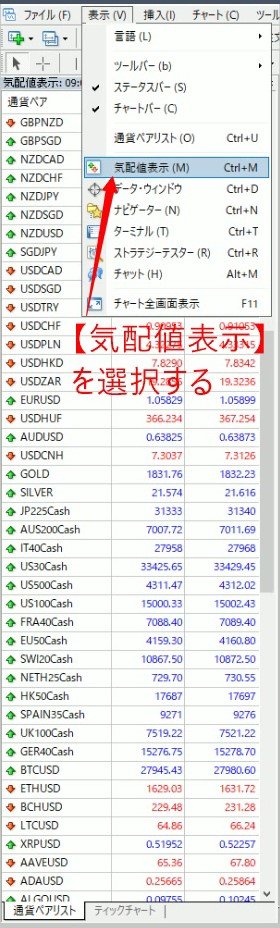
Then a list of currency pairs will appear.
If it still doesn’t appear, just in case,
try the method for Step 2.
【Step 2】
Hover the cursor over the quotes display and right-click to reveal items like the image below, then select “Show All”.
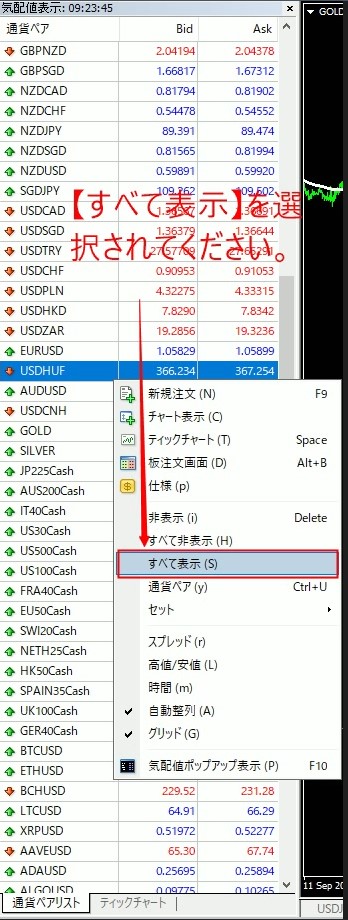
By doing so, all tradable currency pairs and instruments will be displayed, so please choose either “GOLD” or “XAUUSD” and display it on the chart.
If it still isn’t present, it means your MT4 broker does not support it.
Since each MT4 broker handles different currency pairs,
please check whether it is included using the above steps.
【Useful tip right now】
Since it’s a good opportunity,
here’s some handy knowledge from lucky that you can use right away!!
That is!
“How to make MT4 lighter”
The setup takes less than a minute, so please try it.
How to do it
In the quotes display item just select “All hidden”.
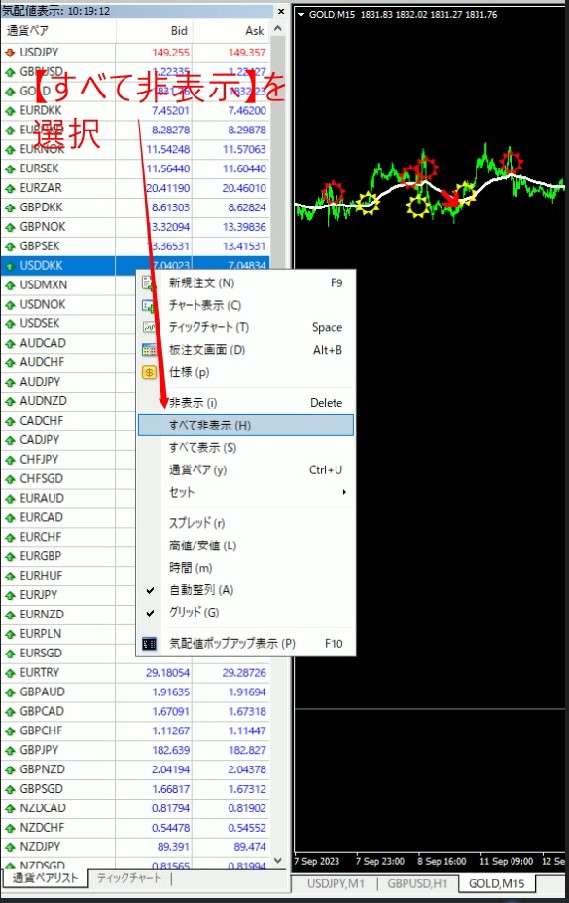
Then,
only the currency pairs you currently use on the MT4 chart will remain visible.
Even just hiding rarely used currency pairs will make MT4 faster, so please try it.
Also, if you want to show all currency pairs again,
select “Show all”.
There are past articles teaching how to speed up MT4 as well,
so if you want even more speed, read those articles and lighten MT4.
↓↓↓↓
#11 How to speed up MT4 in just 1 minute — Station
#12 Part 2: Speeding up MT4 in one minute — Station
And now, the GoGoJungle special video project is trending!
Lucky’s Special Gift Episode 4 has been released!

If you view the special video of GoGoJungle x Lucky by subscribing to the newsletter,
you will obtain the password for the free special presents content.
For those who don’t know how to receive it,
I’ll lay out the steps here.
It is only available at GoGoJungle.
【Receiving method is simple in 2 steps】
Step 1
In GoGoJungle’s screen, click the speaker icon.
Here↓↓↓↓


Step 2
Title
【Special Video】 Free Special Contents Included! The life-changing trading method that made me famous in FX
Click and select it.

Watch the video and obtain the password.
And,
here you can get it by entering the password in the 4th free gift.
That’s all.
Thank you for your attention.
Well then. (`・ω・´)ゞ