
[mBDSR (Product ID11836) Purchase Bonus] The 11th bonus indicator: "mBDSR that uses five moving averages as a filter"

【mBDSR (Product ID 11836) Purchase Bonus】 11th bonus indicator: “mBDSR filtered by 5 moving averages”
https://www.gogojungle.co.jp/tools/indicators/46520
The conventional MA filter version of mBDSR supported only when the number of moving averages used as filters was 2. This bonus indicator supports when the number of MA used as filters is 5.
Note that explanations for the 1st to 10th bonus indicators are available at the site below.
【mBDSR (Product ID 11836) Purchase Bonus】 10 indicators: “mBDSR filtered by 4 to 11 RCIs” and “Indicator displaying RCIs from 4 to 11”
https://www.gogojungle.co.jp/tools/indicators/46485
◆ Introduction (Indicators included in this product)
To use the indicators included in this bonus, you first need to rename the files.
For details, please refer to the help files included in the download.
mBDSR_MA_special_offer_help20230924.txt
This bonus includes the following indicators.
【mBDSR_MA5_VAP】: mBDSR filtered by 5 MA lines (indicator)
For the basic concept of mBDSR filtered by moving averages, please refer to the following Investment Navi+ article.
“mBDSR Moving Average Filter Version” released!!
As the number of MAs increases, the number of possible settings also increases. Rather than sticking to the initial settings, we hope you will use it with your preferred configurations based on trial and error results.
◆ Usage example on the 1-hour chart
Illustrated using a setting that emphasizes SMA12 and SMA20.
Conventional MA 2-filter
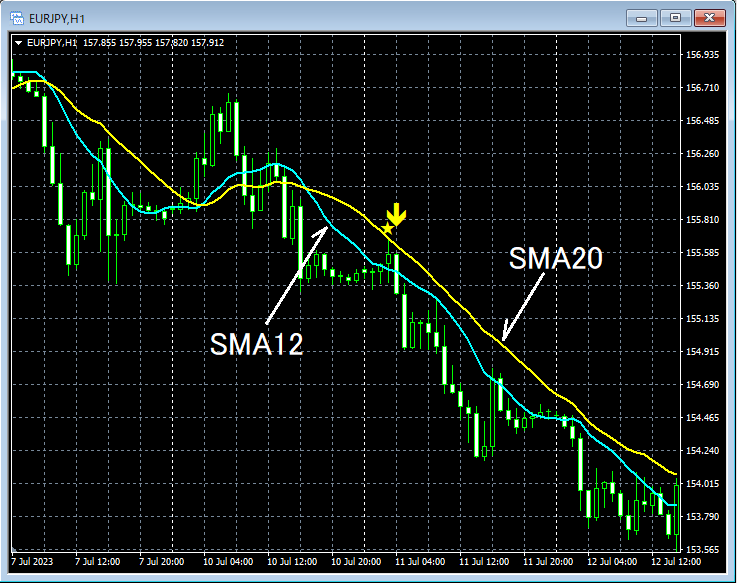
SMA12, SMA20
mBDSR (MA2-filter: SMA12, SMA20) signal
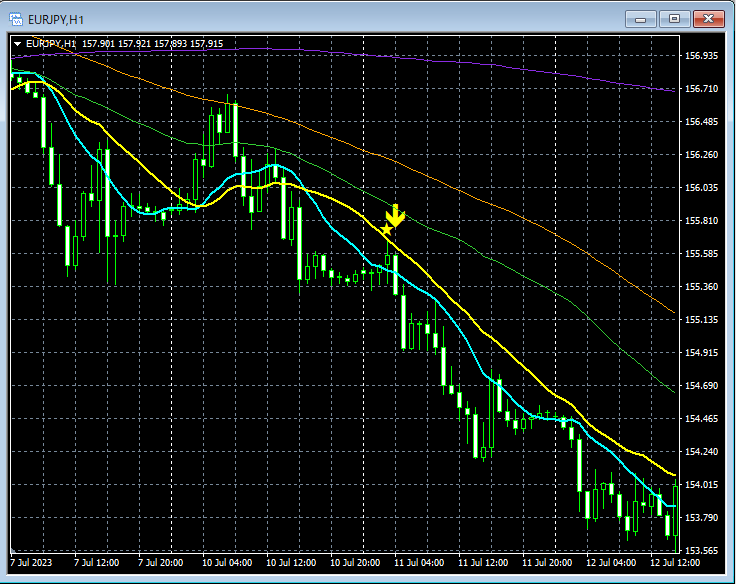
MA 5-filter
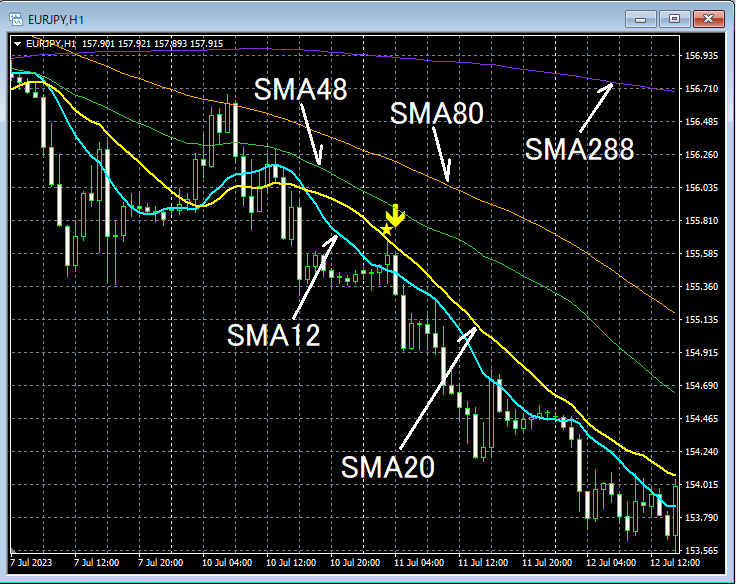
mBDSR (MA5-filter: SMA12, SMA20, SMA48, SMA80, SMA288) signal
1-hour chartSMA48 approximately treated as 4-hourSMA12 and, additionally, the 1-hour chartSMA80 approximately treated as 4-hourSMA20 and, furthermore, the 1-hour chartSMA288 approximately treated as dailySMA12 and, if you do so, the chart appearance may change.
◆ Usage example on the 15-minute chart
Illustrated using a setting that emphasizes SMA12 and SMA20.
Conventional MA 2-filter
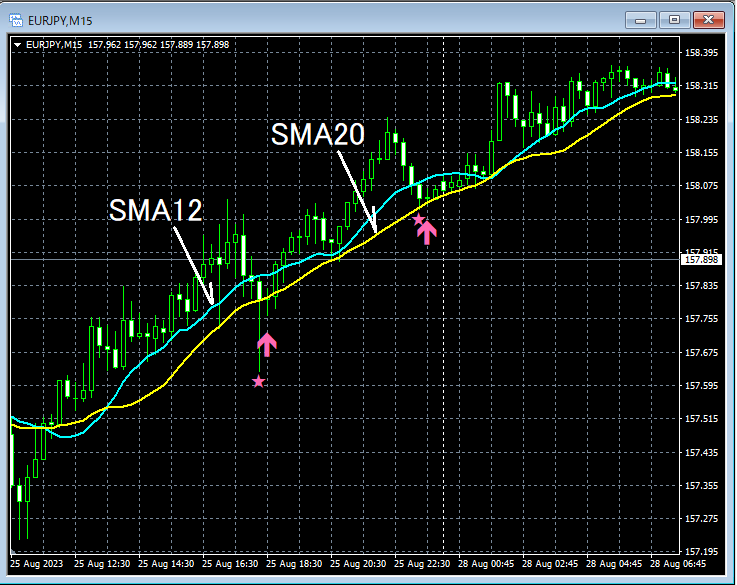
SMA12, SMA20
mBDSR (MA2-filter: SMA12, SMA20) signal
MA5-filter
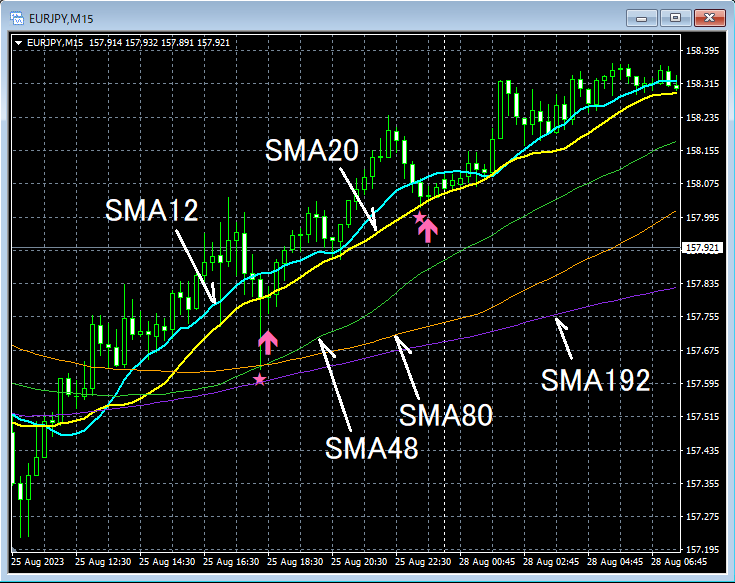
mBDSR (MA5-filter: SMA12, SMA20, SMA48, SMA80, SMA192) signal
15-minute chartSMA48 approximately treated as 1-hourSMA12 and, additionally, the 15-minute chartSMA80 approximately treated as 1-hourSMA20 and, furthermore, the 15-minute chartSMA192 approximately treated as 4-hourSMA12 and, if you do so, the chart appearance may change.
◆ Usage example on the 5-minute chart
Illustrated using a setting that emphasizes SMA12 and SMA20.
Conventional MA 2-filter
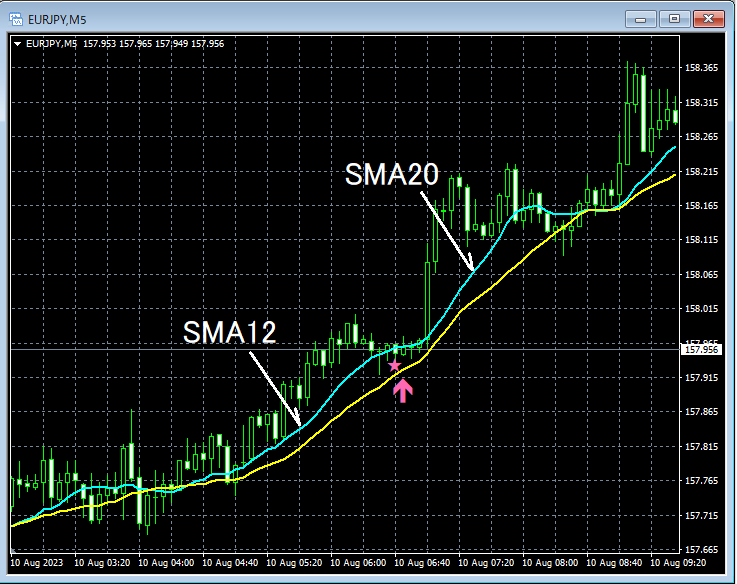
SMA12, SMA20
mBDSR (MA2-filter: SMA12, SMA20) signal
MA5-filter
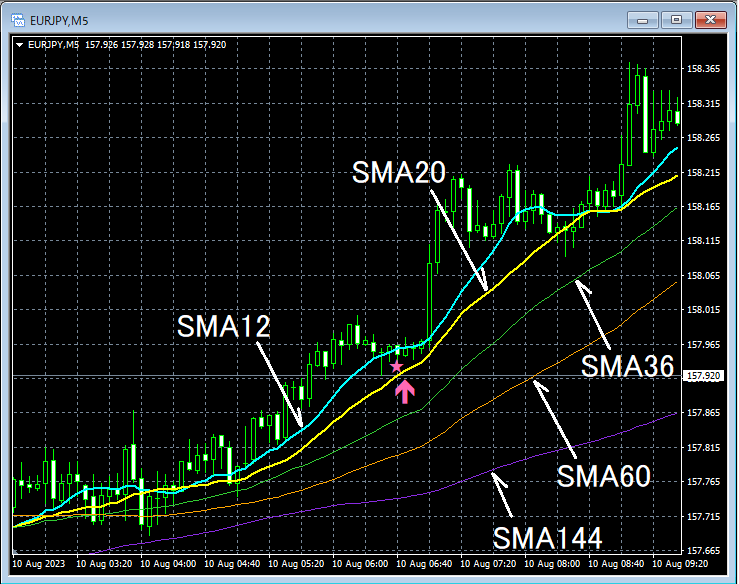
mBDSR (MA5-filter: SMA12, SMA20, SMA36, SMA60, SMA144) signal
5-minute chartSMA36 approximately treated as 15-minuteSMA12 and, additionally, the 5-minute chartSMA60 approximately treated as 15-minuteSMA20 and, furthermore, the 5-minute chartSMA144 approximately treated as 1-hourSMA12 and, if you do so, the chart appearance may change.
◆ Setting items for filtering with five MAs
As shown below, you need to check "Allow DLL usage".
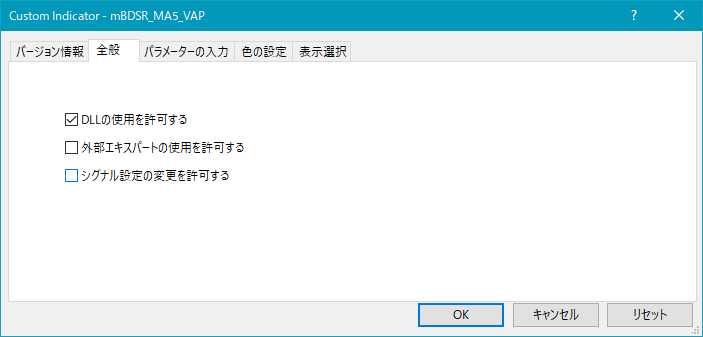
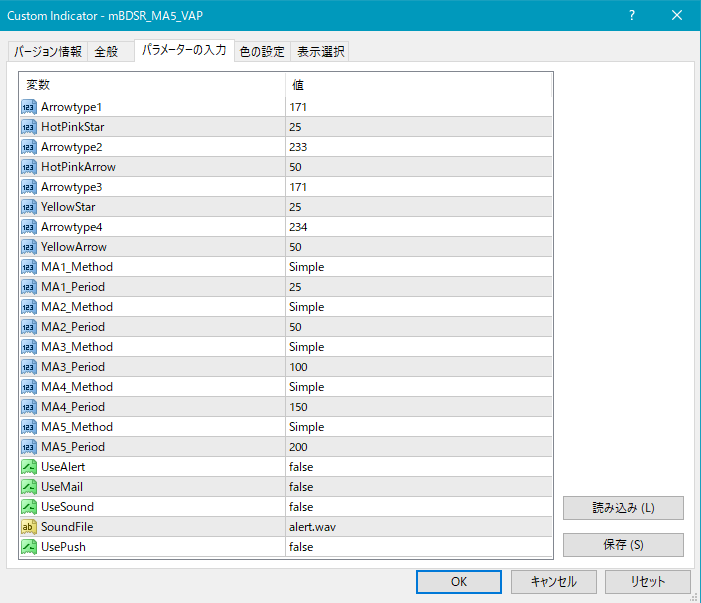
Settings for star and arrow appearance
MA1_Method: Choose the type of the first moving average
Simple (SMA: Simple Moving Average)
Exponential (EMA: Exponential Moving Average)
Smoothed (SMMA: Smoothed Moving Average)
Linear weighted (LWMA: Linear Weighted Moving Average)
MA1_Period: The period of the first moving average
MA2_Method: Choose the type of the second moving average
Simple (SMA)
Exponential (EMA)
Smoothed (SMMA)
Linear weighted (LWMA)
MA2_Period: The period of the second moving average
MA3_Method: Choose the type of the third moving average
Simple (SMA)
Exponential (EMA)
Smoothed (SMMA)
Linear weighted (LWMA)
MA3_Period: The period of the third moving average
MA4_Method: Choose the type of the fourth moving average
Simple (SMA)
Exponential (EMA)
Smoothed (SMMA)
Linear weighted (LWMA)
MA4_Period: The period of the fourth moving average
MA5_Method: Choose the type of the fifth moving average
Simple (SMA)
Exponential (EMA)
Smoothed (SMMA)
Linear weighted (LWMA)
MA5_Period: The period of the fifth moving average
Settings for the display position of stars and arrows
The display position of stars/arrows may be too close to the candlesticks or, conversely, too far, potentially going off-screen. You can adjust the height at which these marks are displayed using the following setting values. Higher values move the marks away from the candlesticks.
Star (pink) → HotPinkStar
Arrow (pink) → HotPinkArrow
Star (yellow) → YellowStar
Arrow (yellow) → YellowArrow
Additionally, by changing the values of the items below, you can modify the shapes of the stars and arrows.
(Default pink) Star → Arrowtype1
(Default pink) Arrow → Arrowtype2
(Default yellow) Star → Arrowtype3
(Default yellow) Arrow → Arrowtype4
Also, the symbols that can be used in place of stars/arrows and their corresponding numbers are listed in the table below.
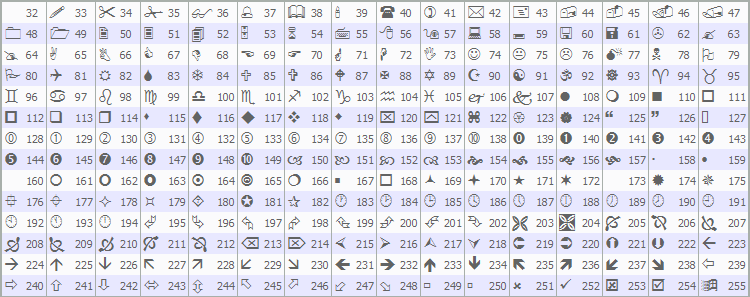
For changing stars/arrows, please refer to the Investment Navi+ article below.
https://www.gogojungle.co.jp/finance/navi/359/19177
Settings related to the Alert feature
UseAlert:
If you want to notify signal occurrences via an alert dialog as shown below, choose
true, otherwise false.
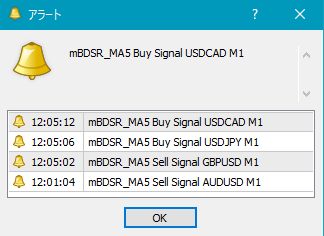
UseMail:
If you want to notify signal occurrences by email, choose true, otherwise false.
UseSound:
If you want to notify signal occurrences by alert sound, choose true, otherwise false.
SoundFile:
Enter the filename of the sound to use for alerts.
UsePush:
If you want to notify signal occurrences via push notifications, choose true, otherwise false.
An example of MT4-side settings when using email notification for signals
Tools → Options → E-Mail
Image
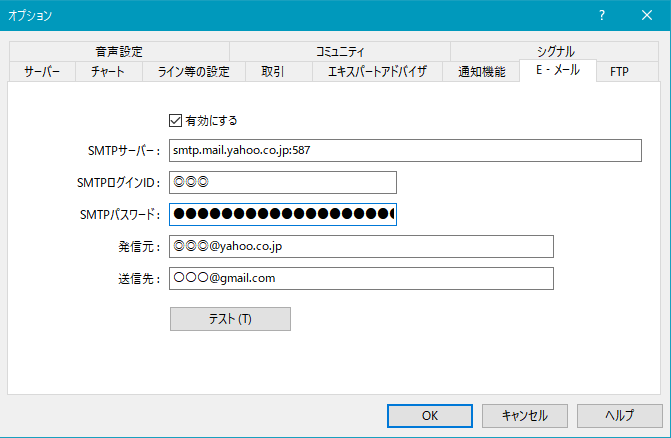
※ It seems necessary to restart MT4 after changing settings.
◆ Regarding the Blacksun indicators (list)
=========================================
Blacksun Indicators (List)arePlease refer to this Investment Navi+ article.https://www.gogojungle.co.jp/finance/navi/articles/33779
=========================================