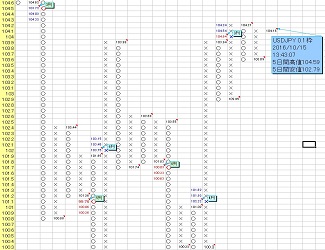
[There is a setup procedure video] The MT4 and the "Market Prediction Tool" can now link (synchronously).
「Market Forecast Tool」Sales Page
MT4 (Meta Trader 4) and the “Market Forecast Tool” can now link (synchronize).
As a result, you can select currency pairs and instruments from the MT4 form’s dropdown, and each currency pair, Nikkei 225 futures, and crude oil ($) daily, 4-hour, hourly, and 30-minute P&F and MACD can be generated automatically in one go, much faster and more smoothly than before.
The setup procedure (video) is shown below.
Setup Procedure Video 1(Steps ①–⑨: Create CSV files for USD/JPY 1-hour, 4-hour, and daily)
Setup Procedure Video 2(Steps ⑩–⑬: Create daily P&F for USD/JPY)
① Launch MT4 and in the top menu bar go to [Tools] → [Options] → in the [Server] tab, check [Enable DDE server] in the [Options] dialog box.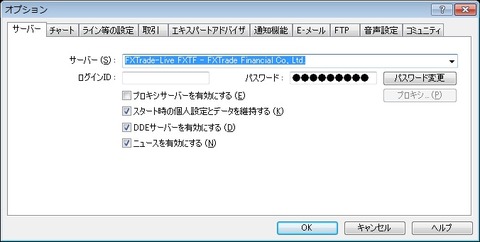
② Copy the mq4 file saved locally on your desktop by right-clicking.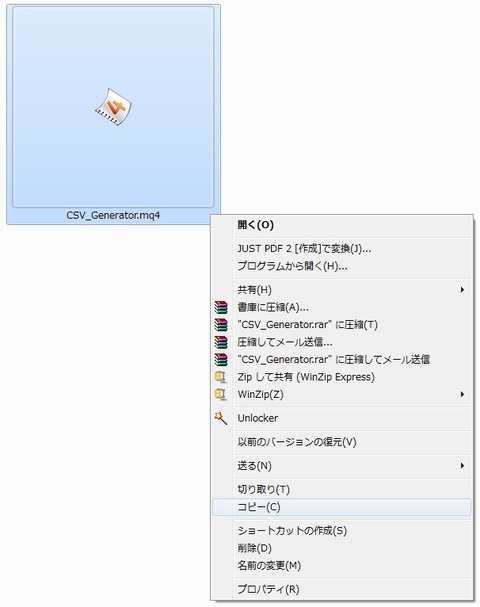
③ In MT4, from the top menu, click [File] → [Open Data Folder]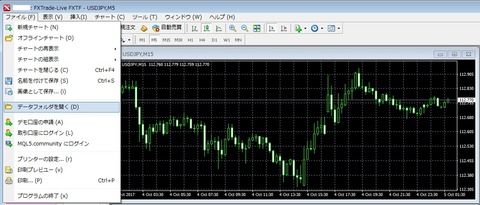
④ Open [MQL4] → [Indicators], right-click and choose [Paste] to place the mq4 file in the folder.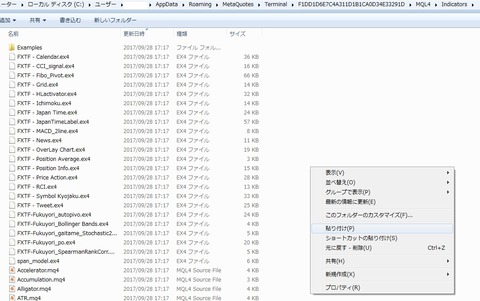
⑤ From MT4’s bottom-left [Navigator] window, select the [Indicators] outline and in the right-click menu choose [Refresh] and click.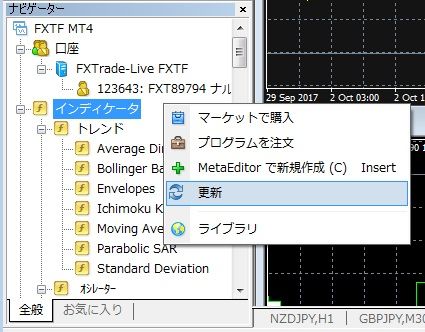
⑥ In the [Navigator] window under [Indicators], the mq4 file you pasted will appear. Left-click to select it and drag & drop onto the right chart.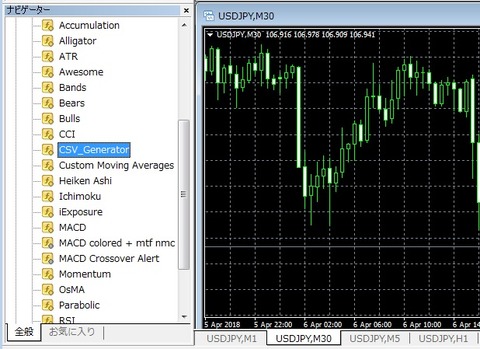
⑦ The [Custom Indicator] dialog opens; on the [Common] tab check [Allow DLL imports].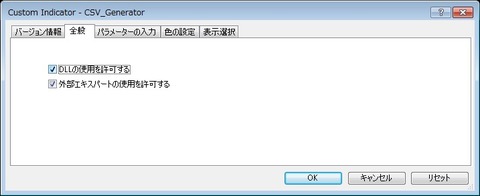
⑧ Open the [Inputs/Parameters] tab and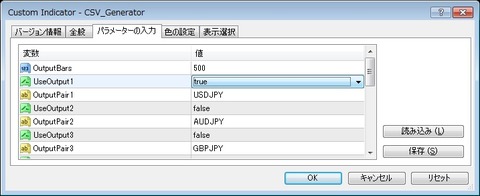
OutputBars: set to [500].
UseOutput1: If you want to simultaneously output the CSV data for the adjacent [OutputPair1], select [true]; if not, select [false] (use the ▼ button to choose).
OutputPair1: If [UseOutput1] is true, the CSV data for the currency pair entered here will be output simultaneously.
If you want to output a currency pair other than the default shown, manually enter it in uppercase (e.g., “USDCAD”).
UseOutput2: If you want to output the CSV data for the adjacent [OutputPair2], select [true]; otherwise [false]
OutputPair2: If [UseOutput2] is true, the CSV data for the currency pair entered here will be output simultaneously.
If you want to output a currency pair other than the default shown, manually enter it in uppercase (e.g., “USDCAD”).
⑨ As shown below, the currency pair CSV data selected by the above steps will be created in [MQL4] → [Files] folder.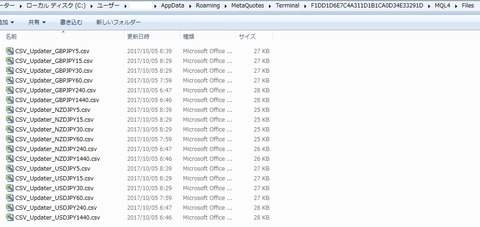
⑩ Launch the [Setup] form (shortcut: [Ctrl + T]),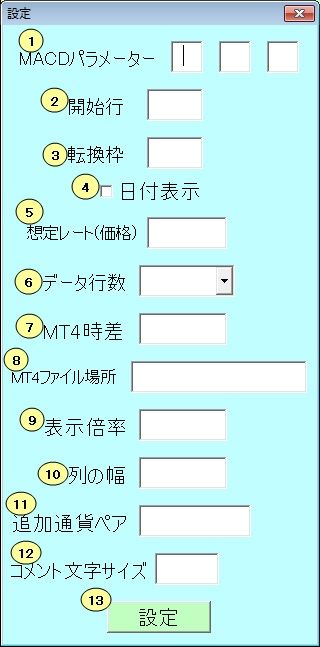
7. In the [MT4 Time Difference] item, enter the time difference between your MT4 and Japan time (enter “0” if there is no difference).

Paste the copied address into [MT4 File Location] (Ctrl + V), then click the [Setup] button.
Then click to close Excel after performing steps such as [File] → [Save As] and [File] → [Exit].
⑪ Open Excel again, and if the [Currency Pairs] sheet shows the currency pairs moving, the setup is 정상적으로 completed.
⑫ Excel again, and if the currency pairs are moving on the [Currency Pairs] sheet, the setup is functioning correctly.
⑬Launch the [MT4] form,
Note: The shortcut for the [MT4] form is set to [Ctrl + Shift + T].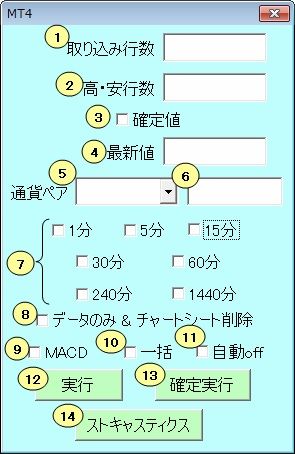
If you want to create a P&F for USD/JPY on the daily chart,
1. Enter the number of rows to import (≤ 500) (not required if unchanged from last time).
The more rows you import, the heavier the load on the PC, so 100–200 is recommended.
2. Enter the number of rows used to determine highs/lows (the value on the [Basis Frame] sheet under “High/Low Rows”). If unchanged, no action is required.
5. From the dropdown list, select [USDJPY].
7. Check the checkbox to the left of [1440 minutes].
12. After configuring steps ①–⑪, click to run with real-time latest values.
13. After configuring steps ①–⑪, click to run with fixed values only.
Important matters when using the ‘Market Forecast Tool’
1. Please refer to page ① below and enable macros in your Excel.
③ Please refer to page ③ below and show file extensions.
Windows 10 - Show/Hide file extensions
How to show file extensions in Windows 10
2. Open a Rakuten FX account and enable Rakuten FX’s P&F charts.
If you find the Market Forecast Tool difficult, we recommend mastering how to use Rakuten FX’s P&F charts first.
The logic of Rakuten FX’s P&F charts and the Market Forecast Tool is essentially the same; the Market Forecast Tool adds predicted values to Rakuten FX’s P&F chart.
Many users use both Market Forecast Tool and Rakuten FX’s P&F charts together.
Also, for Rakuten FX’s P&F chart usage, you can expect support by phone from Rakuten FX.
3. For those who want to learn about Points & Figures, firstRakuten FX’s P&F Chart Explanation Page ① and② are concise but high quality and recommended.
For those who want to learn more, see “If you want to learn more about Points & Figures (Secret Chart)”
,Kawaguchi Kazuteru “Points & Figures”
is excellent, so we recommend reading it thoroughly.
5. For yen-based currency pairs, focus on the daily target zone with high probability of reaching: daily around 0.02–0.05 yen, 4-hour 0.01–0.02 yen, 1-hour 0.005–0.01 yen, 30-minute 0.005 yen, etc., and build your strategy around these.
Basically, the smaller the basis frame, the higher the target reach rate but the profit per target is smaller; the larger the basis frame, the lower the reach rate but the profit per target is larger.
Also, longer timeframes tend to have higher target-reach rates with larger basis frames.
For beginners, it might be best to analyze first on daily → 4-hour → 1-hour (and, if possible, 30-minute) charts, in that order.
In the beginning, it may be enough to analyze only the daily, 4-hour, and 1-hour (and optionally 30-minute) charts for yen pairs.
If you can avoid misleading signals, even just daily, 4-hour, and 1-hour (and optionally 30-minute) charts can accumulate substantial profits (some people make good profits only with the daily P&F).
7. The P&F reliability for USD pairs is lower than that for JPY pairs.
Please be aware of this when using.
8. The [Basis Frames] sheet contains standard preset values, but these are not absolute.
Adjust (add/delete/modify) for each currency pair or instrument based on historical reach data to suit your preferences.
8.2. Depending on MT4 you use, the generated P&F may differ slightly.
It may be worth trying a few MT4s to find one that suits you.
9. First, on this page [Setup Procedure Video Included] MT4 (Meta Trader 4) now links (synchronizes) to Excel data import settings,
Please read the Q&A about the Market Forecast Toolto resolve questions.
10. If you cannot open .xls files with your current Excel, please refer to the pages below.
Cannot open .xls files in Microsoft Office Excel 2010
Also, search using phrases like “Excel (your Excel version) xls cannot open” to find related pages.
11. When data import from MT4 does not create CSV files in the [Files] folder, try
1) Restart the PC
2) Restart MT4
3) Remove and re-add the [CSV_Generator.mq4] indicator
4) Check/restore network connection
Please try the above four steps several times.
If none of the above works, please try on another PC or another network.
If it still does not work, the issue may be with MT4 itself.
If reinstalling MT4 and repeating the steps still does not create the CSV file, please try another company's MT4.
We have confirmed that Rakuten FX, YJFX, Forex Finest, and *** MT4 work normally (CSV files are created even on demo accounts, so demo accounts with Forex Finest or *** are recommended).
※ Some brokers do not create new CSV files when the market is closed on weekends. In that case, please try again when the market is active on a weekday.
17. Before making an inquiry, we would appreciate it if you read the page “Q&A about the Market Forecast Tool.”
Also, before you begin practicing, some people ask many questions, which is inefficient and unhelpful.
Trading rules such as entries, stops, and take profits, like sports, are learned through practice.
Especially beginners are advised to practice sufficiently with demo accounts or small-funded accounts like SBI FX Trade until they can consistently generate profits.
※ Answers to questions are provided in order of those with fewer cumulative questions and who write more politely.
In other words, as your number of questions increases, it may take longer to answer. We recommend solving issues yourself where possible.
Also, due to the growth of users, there may be delays in responses. If you can solve problems yourself, you may get faster resolution.
Additionally, solving issues yourself helps improve your problem-solving skills, which will benefit you in the future.
Providing as much detail as possible in your questions enables more accurate answers.
If you determine that images do not convey the issue well, please capture the error with video software and send the video file.
※ We will discontinue support for users who send offensive or inappropriate content that lacks common sense.
Also, if a solution resolves your problem, please drop us a quick note.
We are curious whether our answer was delivered effectively and whether the trouble was resolved.
※ We may charge for support if you repeatedly ask many questions in a short period.
※ Please note that we cannot answer questions about personal matters or accept tasks via email.
※ Asking multiple questions at once may slow down responses.
It is faster to ask questions one by one starting with higher priority.
※ If you ask successive questions, previous questions are considered resolved and may be invalidated.※ We apologize, but we cannot answer questions seeking investment advice (entry or decision-making judgments).
Providing investment advice without the Financial Instruments and Exchange Act’s authorization is prohibited by law.
18. The information listed in the “Helpful” category (especially Rakuten FX’s P&F charts) is special information provided only to purchasers.
Please do not post it on product reviews or forums.
19. If you engage in obstruction of business or harassment, we may stop providing all services.
Please convey your requests or complaints directly to me, and I will respond as much as possible.
If you read this page and the pages below, you will understand what is related to the tool and what is not (PC-related issues) and repetitively asking questions is considered harassment.
Q&A about the Market Forecast Tool
Please be advised.