

#11 How to speed up MT4 in just 1 minute - the station
Hello! I’m Lucky.
“A method to lighten MT4 in just 1 minute” station
I’d like to discuss this theme.
If you already know it, please skip this station.
For those who don’t know,
this will be truly eye-opening, so I’ll explain it.
Now, suddenly,
you may have heard that MT4 can become heavy when you add a lot of indicators, right?
In such cases, wouldn’t it be nice to have a way to lighten it immediately, as shown in the balloon in this image?

There is such a method!

And it isn’t difficult; it’s recommended.
I’ll explain the method in detail, so please follow along.
Easy method to lighten MT4
First, open MT4. At the top, click the item labeled“Tools.”Please.
This is it, ↓↓
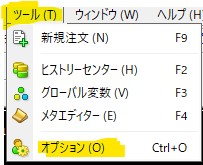
Next, select Optionsto do so.
Then the next screen will appear, I think.
Next, click Chartsand you’ll see the same screen as below.
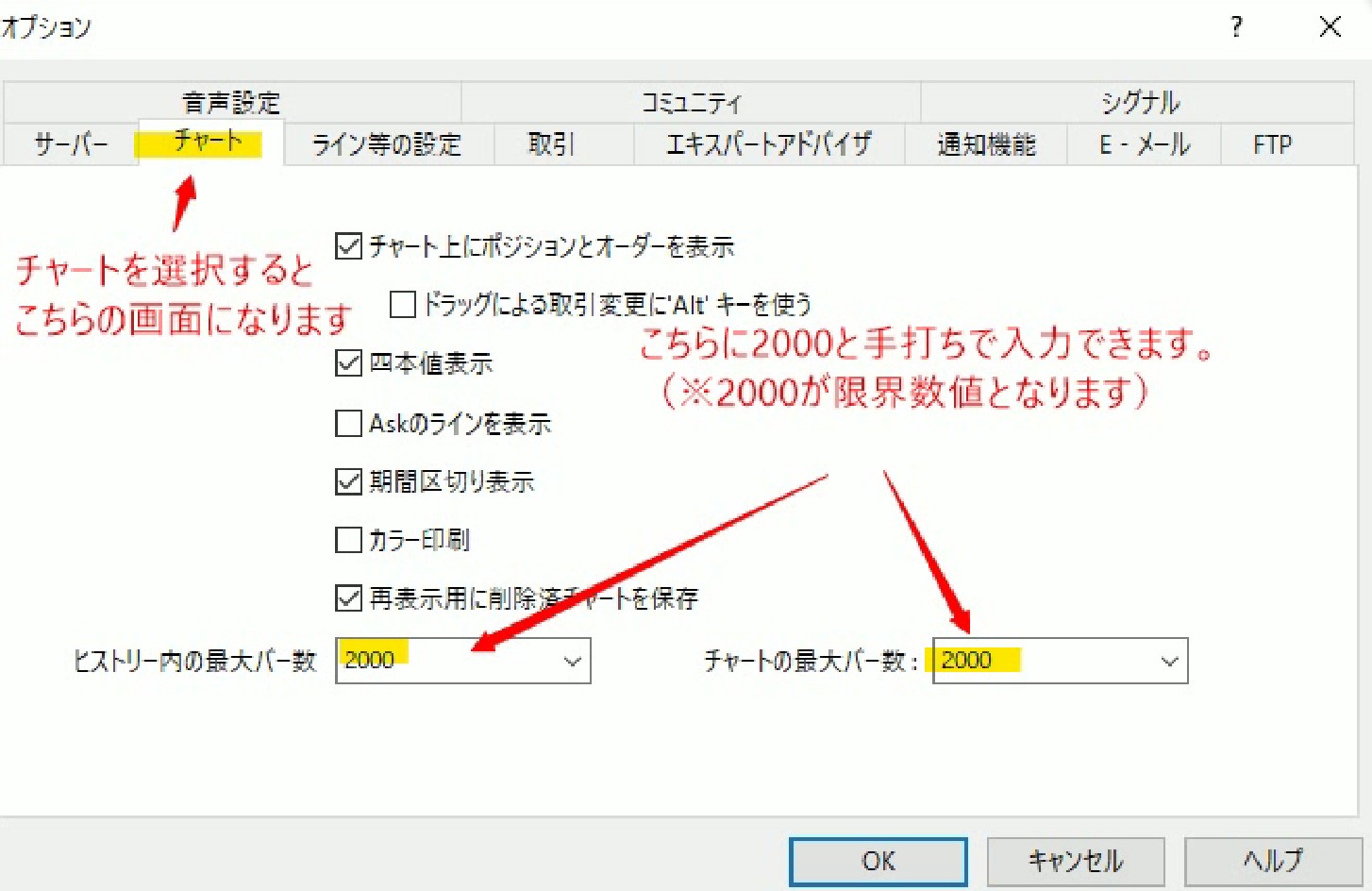
Then,change the values for Maximum bars in History and Maximum bars in Chart.
Click the v mark, and the set values go up to 5000, so
if you want to lighten it further,
manuallyenter 2000and set the value.
Finallyclick OK to finish.
That’s all.
I think you can do it in about a minute, so try changing it quickly.
I’ll bring more MT4 comfort-life information next time as well, so stay tuned!
[Today's Summary]
Textbook available on GoGoJyan
[Devastating Power] Repaintless Arrow Multi-Time Frame
The above method will lighten it.
(As of 2022.10.21) It has been tested to work normally without issues.
Please use it as a reference.
Investment Navigator and Learnable Textbook Here ⇩⇩
Reviews of the textbook ⇩⇩