
The MT4 demo account is grayed out and cannot be created
From MetaQuotes, MT4 can no longer be downloaded.
Until recently, it could be used if there was an installer EXE, but recently when you run it, the download does not start and stops.
However, FX brokers continue to allow downloads, so you can use those, but each broker has a few restrictions, and when you try to create a demo account, the account type field is gray and cannot be entered as shown in the screen below.
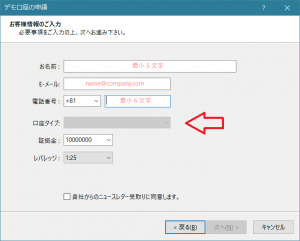
Many brokers require applying for a demo account from the WEB, so it cannot be obtained from MT4.
It would be fine to obtain it from WEB, but each broker requires downloading their own MT4, which is troublesome, and having many MT4 icons lined up on the desktop is also annoying.
In particular, MetaQuotes has a lot of historical data, so many people would like to create a demo account.
Only MetaQuotes would allow bulk download of historical data up to the period before 2000 from the History Center.
Here is how to enable input in the gray area for the account type.
It's simple: just rename (or delete) the following file. Please proceed at your own risk.
C:\Program Files (x86)\(Broker Name)\config\terminal.lic
After that, start MT4 and proceed to apply for a demo account; the gray-out on the account type will be removed.
Additionally, to apply for a MetaQuotes demo account, from the demo account application, on the server list screen, enter "MetaQuotes-Demo" in the "Add new broker" field and search. (Even typing "Meta" will auto-search.)
Select MetaQuotes-Demo and press Next to obtain a demo account on the spot.
With this method, you can have accounts from various brokers in a single MT4.
As a bonus, the icon files are as follows, so you can also change them to your preference.
C:\Program Files (x86)\(Broker Name)\terminal.ico