

What to do if a DLL error occurs
In the OneClickFX series, authentication and image retrieval are performed immediately after startup, which may cause a DLL error and a forced stop right afterward.
If the following error appears in the History tab of the MT4 Strategy Tester, solving it by allowing the use of DLLs will resolve the issue.
“DLL is not allowed”
Open the Options window from Tools → Options in the menu, and check the box for “Allow DLL imports” on the Expert Advisors tab.
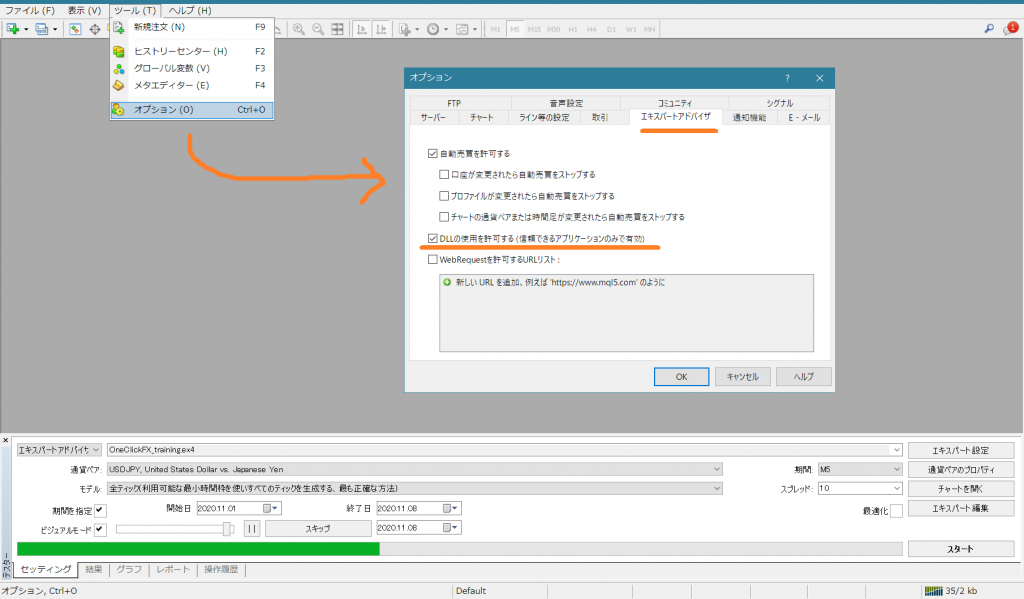
Press OK, and after changing the settings,restart MT4,DLLs will be allowed.
If the following error appears in the History tab of the MT4 Strategy Tester, solving it by allowing the use of DLLs will resolve the issue.
“DLL is not allowed”
Open the Options window from Tools → Options in the menu, and check the box for “Allow DLL imports” on the Expert Advisors tab.
Press OK, and after changing the settings,restart MT4,DLLs will be allowed.