Erefolo Stock Scanner Extension - How to Upgrade
The Eleforo Stock Scout Extension continues to undergo functional improvements and updates.
To use the updated version,
- delete the Eleforo Stock Scout Extension installed in Chrome
- download the file from your GoGoJom purchased page
- install the Stock Scout extension in Chrome (the same steps as a new installation)
this operation is required.
1. Delete the Eleforo Stock Scout Extension installed in Chrome
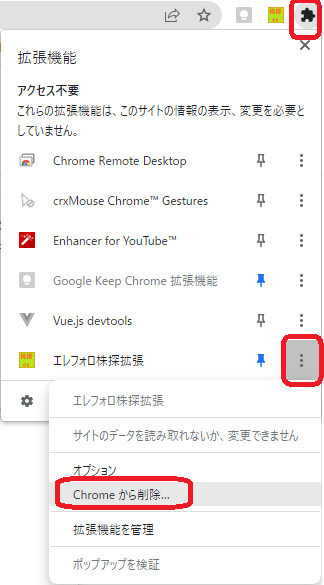
Click the puzzle-piece icon at the top-right of the Chrome browser screen,
and perform “Remove from Chrome” on the Eleforo Stock Scout Extension.
2. Download the file from your GoGoJungle purchased page
The download page for the Eleforo Tools All-in-One Pack purchased can be displayed by the following steps.
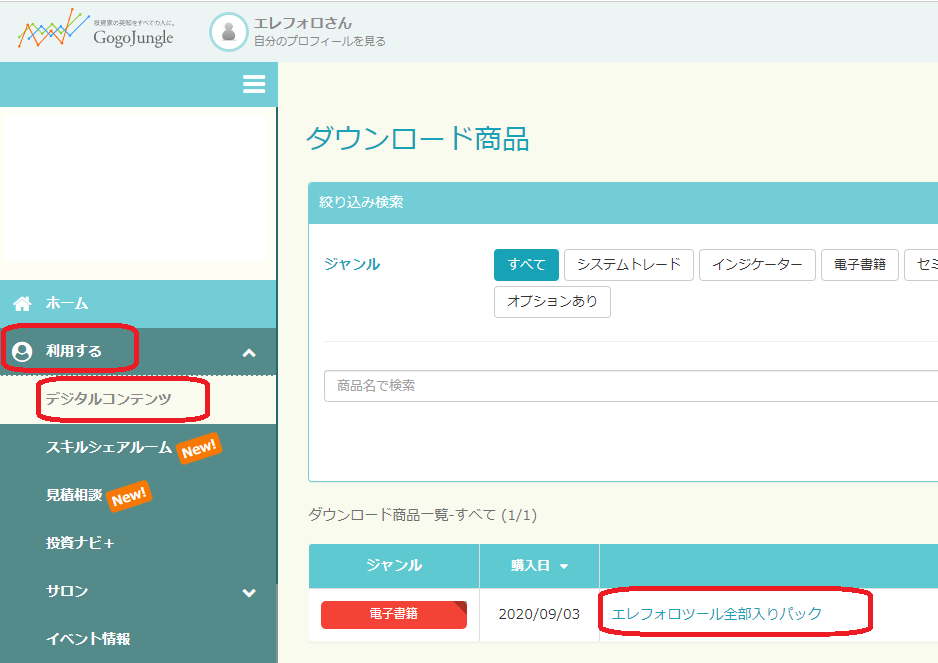
• Open GoGoJungle My Page
• In the left menu, select Use > Digital Content
• From the Downloaded Products list, select Eleforo Tools All-in-One Pack
Alternatively, it can also be displayed from the following URL.https://www.gogojungle.co.jp/mypage/download
3. Install the Stock Scout extension in Chrome
From here on, the steps are the same as for a new installation.
For details,【Eleforo Stock Scout Extension Installation Method】please refer to it.