Financial Instruments Business Operator Kanto Finance Bureau Director (Kinsho) No. 1960 / Membership Association Investment Trusts Association, Japan Membership No. 012-02323Go to GogoJungle Home
I am a systems engineer. While working as a company employee, I have had several gaps, but I have been involved in FX since around 2005, and have been creating EA and indicators as a hobby since around 2007. In the early days I didn’t know MT4, and I mainly placed web orders from a PC; when I was outside, I remember placing orders by phone or i-mode (laughs). Things have become more convenient in various ways, but I will continue to strive to improve my trading environment, so pleaseよろしくお願いします.
Special operation deployment begins with combat personnel, Yukichi, Yukichi, Yukichi, others, a total of 11 members.
Although a mere 11-strong unit, the hidden abilities of the combatant "Yukichi" will "multiply"...
■110,000 yen challenge [Week 8] Report
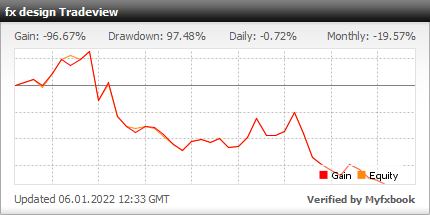
・Real results are公開 on Myfxbook
【Week 8】 100,000 yen challenge results ・From September 27, 2021 (Monday) to October 1, 2021 (Friday) ・Account balance 71,137 yen → 32,082 yen (−39,055 yen)
Oh no, I planned to win but ended up large loss...
This week's improvements paradoxically worsened; signals came late, but a lot of signals appeared and I entered entries one by one, resulting in this outcome... At the beginning of the week it was doing well, but after that nothing worked.
There are many things I regret: once a signal appears, I open charts for multiple pairs at once due to a feature update; I entry without analyzing each currency pair → lose lol
I got a bit lazy. Really, what a hassle. And reaching this point, even if I enter, there is almost no room to take stop losses, so although funds are not zero, there is no room to take risks. From here on, it feels like I am going to lose, unless a miracle of a no-lose streak occurs, it might be tough. Not just no losses, but trades that are straight wins where the market never goes against me even a little during entry would be needed to keep going.
I should have taken things more seriously, or been more careful; rather than something just in the development stage, I’m completely underestimating by trading with only signals under development.
While refining the signals, I will trade seriously when I am watching the trades! For now, I have to do my best with what I can in the current environment. It might be too late though!! haha
【Products for sale】
Currently released on fx design is "Trailing Stop Designer." Unlike tools that are configured with numerical values, this is a tool where you design directly on the chart with the mouse.
I personally thought it was visually clear, but... There are few tools in MT4/MT5 that use GUI operation rather than parameter settings, so ironically it may be hard to convey the image.
Please take a look at how I use "Trailing Stop Designer" in the 110,000 yen challenge to understand the feel of operation and how the lines behave after being designed.
Not trading-related, but YouTubers and instructors who regularly share their trading scenarios During design, there are trendlines and pips displayed at each point of the lines, Since it can be moved easily with just mouse operation, it might be good for conveying information as well, you know lol