Financial Instruments Business Operator Kanto Finance Bureau Director (Kinsho) No. 1960 / Membership Association Investment Trusts Association, Japan Membership No. 012-02323Go to GogoJungle Home
I am a systems engineer. While working as a company employee, I have had several gaps, but I have been involved in FX since around 2005, and have been creating EA and indicators as a hobby since around 2007. In the early days I didn’t know MT4, and I mainly placed web orders from a PC; when I was outside, I remember placing orders by phone or i-mode (laughs). Things have become more convenient in various ways, but I will continue to strive to improve my trading environment, so pleaseよろしくお願いします.
Special operation deployment begins with combat personnel, Yukichi, Yukichi, Yukichi, others, a total of 11 members.
Although a mere 11-strong unit, the hidden abilities of the combatant "Yukichi" will "multiply"...
■110,000 Yen Challenge【Week 4】 Report
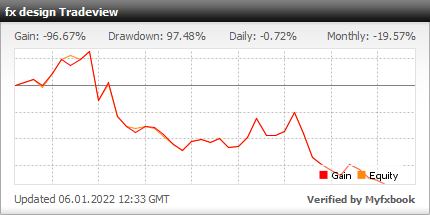
・Real results are公開 on myfxbook
【Week 4】 110,000 yen Challenge Results ・August 30, 2021 (Mon) ~ September 3, 2021 (Fri) ・Account balance 73,071 yen → 63,736 yen (−9,335 yen)
We are on a losing streak.
This is bad! Very bad!! lol
When I can trade well technically, I think I’m close to a signal… and I end up losing, huh lol Sometimes I wish this intuition would hit, but it doesn’t hit at all. In a sense, if you think of it as a contrarian indicator, the win rate would be amazing, but intuition doesn’t hit lol
There were parts where I played with indicators again, but this week I managed to stay within the range without giving in to desperation, which might be a just-barely-positive mindset, or perhaps I should reflect a bit more…
By the way, recently I’ve been thinking, “Even though I know the technicals are going well, why don’t I abandon my intuition?”
My technicals aren’t showcased, so you might not know what they are at all, but in short, they’re extremely complex lol On YouTube and elsewhere, there are many simple explanations like “this is enough!” or “just moving averages!”, which are easier to understand and attract viewers. It might be easier to grasp and more approachable, perhaps?
Anyway, my chart environment is the complete opposite of such simple charts lol
What am I using, well…
Indicators commonly called indicators, such as moving averages, Bollinger Bands, etc., with multiple variants of the same thing
Similar to above, but since I don’t want to change the chart’s timeframe too often, there are versions that convert periods into different timeframes
Many objects like trend lines, horizontal lines, Fibonacci, etc.
As you can see, the chart is cluttered, and it isn’t easy to understand at a glance. It takes time to think about it all. While deciding, if there’s movement on the chart or the time of economic indicators is approaching, I feel like clicking and trading, lol
But is cluttering bad? Not necessarily; for my own technical approach, these lines are necessary, so none are truly unnecessary.
So this week I created a signal tool for myself. Just because a signal appears doesn’t mean I enter; I haven’t turned it into an automatic trading EA, but it’s a tool that makes it easier to trend in the short term after a signal.
It somewhat backs up my chaotic and difficult chart environment. Also, where to enter, whether signals change before entry, where take profit and stop loss targets are, I want to refine which signals are valid up to entry and what would invalidate a signal, and integrate parts of my previous technicals into a coherent system.
For now, two consecutive losses!! Will this become everyone’s prey and make a juicy blog!? lol Please add to favorites and keep watching how next week’s results turn out! lol
【Products for sale】
Currently released at fx design is “Trailing Stop Designer.” Unlike tools where you set values numerically, this tool lets you design directly on the chart with the mouse.
I personally thought it was visually intuitive, but… There aren’t many tools in MT4/MT5 that let you set parameters via GUI rather than through settings, so maybe the concept is hard to convey.
If you look at the actual use of “Trailing Stop Designer” in the 110,000 yen challenge, I’d be happy if you could understand the feel of操作 and how the lines behave after design.
Not as part of trading, but some YouTubers and instructors who regularly share their own trade scenarios can move trends lines and pip values at each point with just mouse operation, which might be easy to communicate as well
There is also a free trial version available until 2021/10/2, so please try it!
Also, this time we’ve started a GoGoJungle follow & retweet campaign to give away 3 copies of “Trailing Stop Designer Alert for MT4” to three people. Much appreciated☆ (,人゜∀゜*) ☆ Thanks
As fx design is newly launched, we’d be happy if more people could learn about it through this opportunity!! Please participate in the follow & retweet campaign!!
★★★★★★ Campaign details ★★★★★ Follow & Retweet Campaign: The winners will receive fxdesign’s Trailing Stop Designer Alert for MT4 (alert version) to 3 winners by lottery ①@Gogojungle_fxonFollow ② Retweet the following post 【Deadline】 Until Monday, September 6, 21:00pic.twitter.com/uP3CFmwLDN