Essential smartphone app for EA traders: Coloma for EA
It would be wonderful if you could check EA's trading performance on a smartphone app even when you're out.
Moreover, being able to view it by each magic number would make it the best tool for EA traders.
A smartphone app like thisColoma for EAhas been released from the “Coloma” personal investor service, which develops cutting-edge machine learning systems and financial information services!
Key features of Coloma for EA
1. You can check the EA's performance without opening a PC!
No PC or remote desktop is needed to check performance. You can easily view the operating status in the app.
2. Performance can be displayed per EA!
In addition to trade history and open positions, you can check the operation results by each EA, something the standard app couldn't do. Filtering by magic numbers is not required.
Getting started is just three simple steps!
I actually installed it by following the steps.
First, install the mobile app Coloma for EA and register as a member.
Twitter and Google social logins are also available. This time I logged in with Twitter, and it was easy in just a few seconds.
After logging in, go to My Page and copy the Coloma ID.
A new MT4 chart for Coloma for EANewon a 1-minute chartDisplay the chart and install the measuring EA (ColomaMonitor.ex4).
At this time, paste the Coloma ID mentioned above into the parameters.
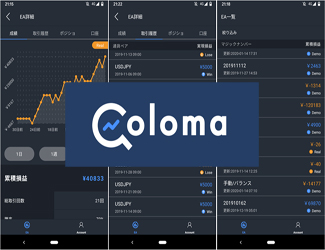
With just this simple operation, you can now view real-time, detailed trading results per EA as shown in the image below.
Here is the official documentation for the integration steps
Main features of the listing page
Display multiple EAs in a list
Show cumulative profit
Filter by Real / Demo accounts
Main features of the detail page
Graph display of cumulative profit
Number of trades and win rate
Average profit and loss
Payoff ratio
Profit factor, etc.
and more.
Coloma for EAIf you're an EA trader, start by installing it!