【A must-see for scalpers】 The highly popular developer Dr. Neko, the ultimate indicator!
Among discretionary traders, I think there are many who want to master scalping trading.
There are various ways to learn scalping, but I tried the “Kiwami” released on New Year’s Day, and I’d like to introduce it to you all!'Kiwami'.
 .
.
The developer is EA, popular for'Neko Doctor'.
There probably aren't many users who don't know it.
This'Kiwami'isa trading-assistance tool designed for discretionary traders.


First, regarding how to display it, what’s important here is
【MT4 demo account, and limited to one account is what this means.
It cannot be loaded on real accounts or multiple demo accounts.
When placing the downloaded file into MT4's data folder, MT4's data folder, it’s important to save it in.Experts rather than in
As for how to use it,
'Kiwami' overlaid on the demo account chart and displayed side-by-side with the real account chart
and when a signal appears on the demo account, manually enter/close on the real account.
On the demo account, you will stack automated trades like an EA
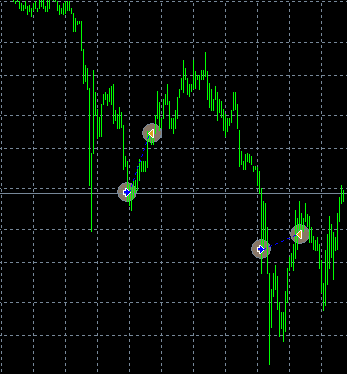
(Note: since this is for USD/JPY on the 1-minute chart, please apply it to the USD/JPY M1 chart.)
Signals appear frequently, so it’s perfect for those who want to trade at high frequency.
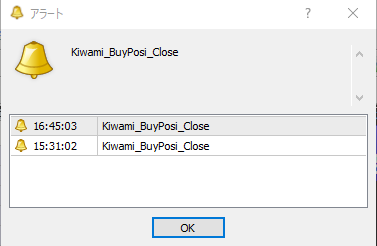
Signals can be configured with alert sounds and email notifications in addition to pop-ups.
I tried it too, andthe signal appears at the moment the candlestick forms and it does not repaint, so I found it easy to enter.
If you are swayed by online comments or tend to chase positions, using this indicator as a reference for testing could be a good idea.
'Kiwami'
By the way, FXsome brokersprohibit scalping (short-term trading), so please be careful!
▼Recommended accounts are here▼


My EA FOREX EXCHANGE - Open a New Account



AvaTrade Japan K.K. - Open an Account




↓For the usual indicator installation method (quite varied...), you can check this video below ↓
※Note: Save this 'Kiwami' in the "Experts" folder!
Written by Kuwabara