[With step-by-step instructions] MQL5 HPC is attractive because it's cheaper than the official cloud network! With a simple setup, you can build a blazing-fast backtesting environment using high-capacity CPUs.
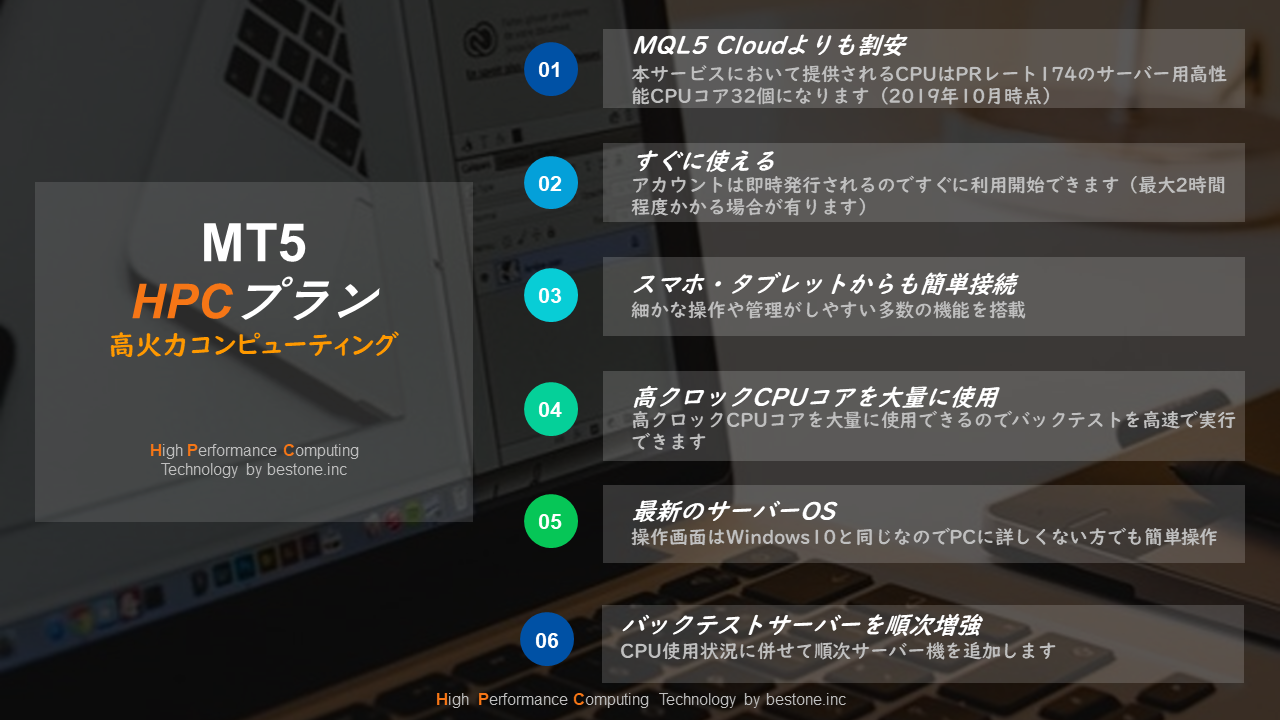
A new service listed by the familiar "Best One" on GogoJungle is the "MQL5 HPC (High Performance Computing) Plan." This service allows MT5 backtesting to be performed at ultra-high speed on a VPS (Virtual Private Server), and three plan types are available with different usage days. All plans can be used at bargain prices.
■Main features of MQL5 HPC
① 32 CPU cores
It is equipped with an Intel Xeon E3-1270 V6 4.20GHz 32-core.
② Use a large number of CPU cores simultaneously
Backtest tasks are automatically allocated to the 32 CPU cores.
③ Operable from a WEB browser
You can log in to the virtual desktop from a web browser and operate it.
④ Operable from smartphones and tablets
You can easily connect and operate by simply using the dedicated application.
⑤ You can monitor performance
You can view up to 365 days of data. You can check details by multiple timeframes and per CPU core.
⑥ Avoid outages with generator and UPS
The generator detects outages and starts automatically. The UPS protects the equipment's power for the time until power is supplied from the generator.
⑦ Easy to cancel
You can cancel immediately once your tasks are finished.
■Cheaper than the MQL5 Cloud Network!
Notably, you can use it at a price cheaper than the MQL5 Cloud Network. For MT5 backtests, you can speed things up by using the paid service MQL5 Cloud Network, but when you compare it with this service, the performance difference is obvious.MQL5 HPC offers significantly higher performance and cost-effectivenessto use.
■ Backtesting can be executed at high speed
With MQL5 HPC, you can run a single backtest using 32 high-clock CPU cores, enabling ultra-fast processing. Additionally, servers will be incrementally enhanced according to CPU usage. This means you can fully utilize CPU capacity for backtesting.
■ You can use it immediately even if you are not tech-savvy
After purchase, an account is issued immediately, so you can start using it right away (it may take up to about 2 hours). The operation screen is the same as Windows 10, so even those not familiar with PCs can operate it.
■ 3 plans available according to usage days!
Three plans are provided according to usage days, making it easy for users to try. The contents are the same; only the usage days differ. How about starting with the 7-day plan to test its effect?
7-day plan 600 yen (tax included)
https://www.gogojungle.co.jp/tools/indicators/21474
15-day plan 1200 yen (tax included)
https://www.gogojungle.co.jp/tools/indicators/21476
1-month plan 2560 yen (tax included)
■ How to use MQL5 HPC
Step 1: Start MT5

▲ After logging into the virtual desktop, double-click the MT5 icon to start it. If asked, "Would you allow this app to make changes to your device?", click "No".
For how to log into the virtual desktop, refer to Step ④ in the article "VPS Beginners Won't Get Lost! From Purchasing to Connecting the Affordable Virtual Desktop "RDS" — Steps Illustrated!" inside which the flow up to usage is described. See Step ④ for reference. You can log in using the same procedure.VPS Beginners Won't Get Lost! From Purchasing to Connecting the Affordable Virtual Desktop "RDS" — Steps Illustrated!
Step 2: Open the Strategy Tester
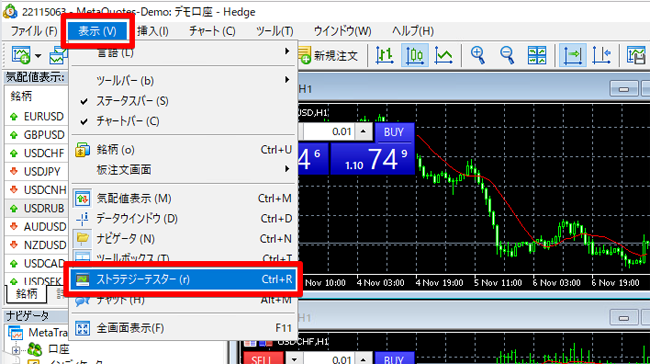
▲ On MT5, click the top tab "View" → "Strategy Tester". You can also display the Strategy Tester using the shortcut key (Ctrl+R).
Step 3: Open the screen to add the agent
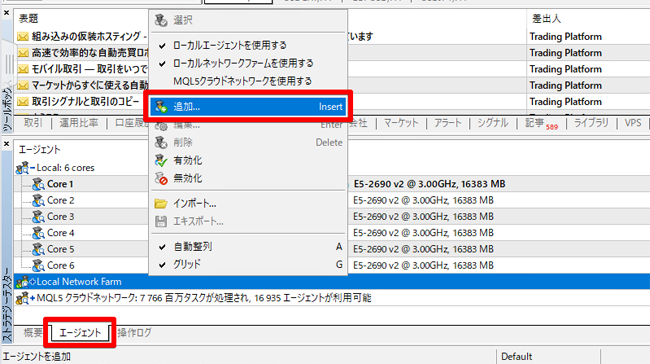
▲ The Strategy Tester appears at the bottom of MT5, so select the "Agents" tab. Right-click on "Local Network Farm" and click "Add".
Step 4: Add the agent
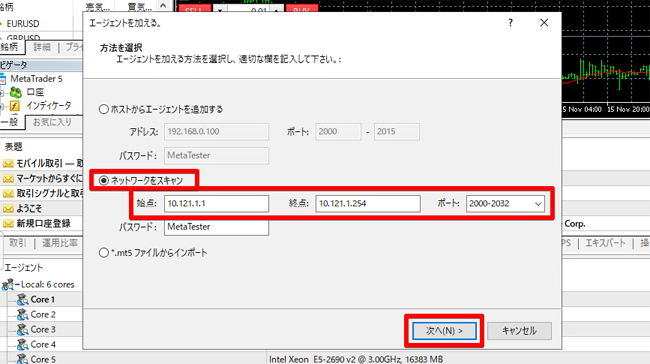
▲ A screen to add agents will appear, so choose "Scan Network" and enter the start address "10.121.1.1", end address "10.121.1.254", and port "2000-2032", then click Next.
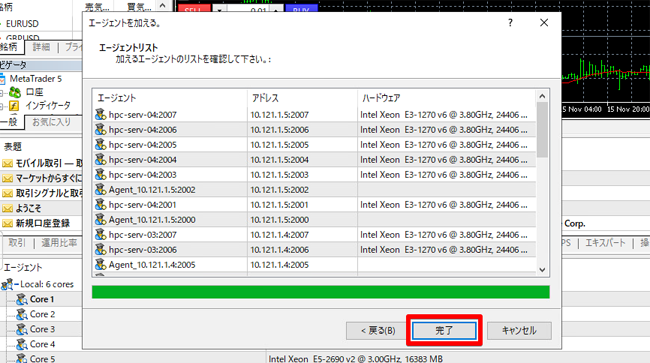
▲ You will then detect available backtest servers and be able to assign backtest tasks, so click Finish.
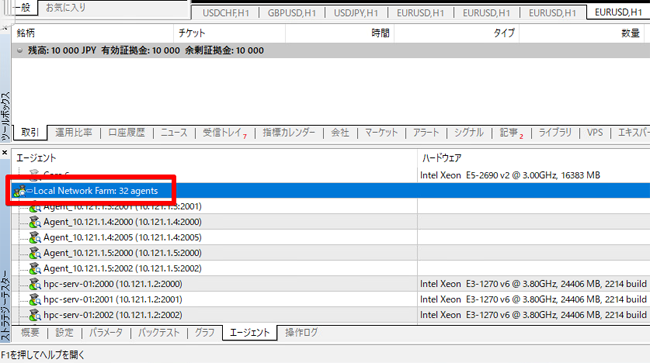
▲ You can see that the number of agents has increased to 32.
Step 5: Uncheck "Use Local Agent"
▲ Finally, right-click on "Local Network Farm; 32 agents" and uncheck "Use Local Agent". Make sure the "Use Local Network Farm" checkbox is checked.
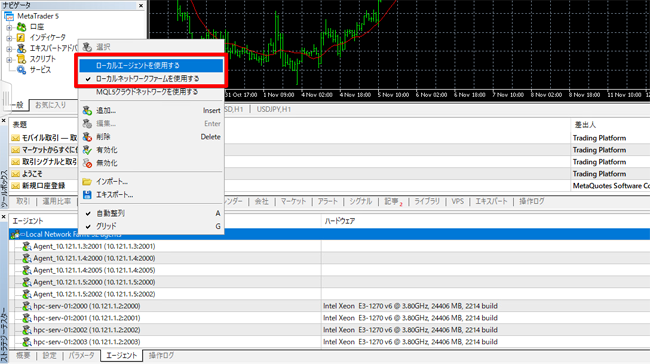
The backtest server setup is complete. You will be able to run ultra-fast backtests by assigning backtest tasks to 32 CPU cores.
Login- Backtest server setup The full flow can be seen in the video below, so please参考 it as well.so please refer to it as well.

MQL5 HPC High-Power Backtest [7-day Plan]
https://www.gogojungle.co.jp/tools/indicators/21474