
Semi-discretionary and semi-automatic trading EA - About the principles of the market EA (free of charge).
0
Principles and Principles of the Market EA 1.07: How to Use It Explained. [cc id=24719] [cc id=24719] Principles and Principles of the Market EA 1.07: How to Use It Explained. [cc id=24719]
Discretionary Trading and System Trading
Usually, EAs used in FX refer tocompletely automatic tradingas system trading. Based on a predetermined logic, they execute trades mechanically. However, such EAs can extract and recognize technical indicators and numbers from charts, butit's difficult to recognize chart patterns like a human. On the other hand, a discretionary traderrecognizes chart patternsand, from past experience,recognizes high-probability situations, but may miss entry triggers due to lack of concentration or may make profits too early or stop losses too late,making it hard to trade mechanically.What kind of EA is the Market Principles EA?
The difference between the Market Principles EA and a general EA is that from entry to exit,a general EA trades automatically, butin the Market Principles EA, the discretionary trader selects entry methods and exit logic, and based on thatthe EA executes trades mechanically.with a simple UI operation, you can instantly draw exit points and Fibonacci retracements on the chart!to help realize the discretionary trader’s trading strategy. It’s a new type of EA never seen before.Description of various UIs of the Market Principles EA

①~② Manual Entry Buttons and Lot
① = When you press the “BUY” button, you go long. When you press the “SELL” button, you go short. ② = Determine the lot by the number in “LOT.” 1.0 lot = 100,000 units③ Exit Logic Button


④ How to Initiate


 The entry lines are drawn by the UI, and when any of them reaches the trigger, the entry occursand everything is cleared (disabled). This is to prevent unintended averaging down.
⑤ Manual Exit
With these horizontal lines or trend lines, you can determine the exit point. As a premise, if there is a line in the profit direction at the current rate, it is line-touch only. If there are lines both in the profit direction and in the negative direction, you can choose between line touch and close via a closing price break.For details on how to utilize this,click here

 [cc id=24720]
⑥ Clear all lines and indicators

indicator (excluding Market Principles (stocks))

Trade history (excluding Market Principles (stocks))
Displays combinations of indicators, win rates for long and short by currency pair, and average pips gained.
Description of various parameters
We will explain the parameters of the Market Principles EA by category.Common / Parameter Settings

When selecting the “ELLIOT WAVE” logic — parameter settings

When selecting the “CHART PATTERN” logic — parameter settings

Trade rules when selecting the “ELLIOT WAVE” logic
We explain the rules for TPSL and partial settlements and stop movement timing when the Elliott Wave logic is selected.1. TP and SL
(1) Scenario aiming for the third wave target value T/P ... third-wave target value of the Elliott Wave (calculated by proprietary logic) S/L ... starting point of the first wave of the Elliott Wave (2) Scenario aiming for the fifth wave target value*
The Market Principles (stocks) does not target the fifth wave.
*When the third wave is confirmed and the fifth-wave target value is displayed on the chart
T/P ... fifth-wave target value of the Elliott Wave (calculated by proprietary logic)
S/L ... second wave of the Elliott Wave
(2) Scenario aiming for the fifth wave target value*
The Market Principles (stocks) does not target the fifth wave.
*When the third wave is confirmed and the fifth-wave target value is displayed on the chart
T/P ... fifth-wave target value of the Elliott Wave (calculated by proprietary logic)
S/L ... second wave of the Elliott Wave
2. Movement of S/L and partial settlement
Example when long entry at 112.463, third-wave target at 113.333, stop at 111.769 (1) Break-even by width from cost price to target price × 0.5 (modifiable by parameter)
 (2) Partial profit-taking at width × 0.7 (modifiable; below, called 70% trigger). After 70% trigger, move S/L to the midpoint between cost and 70% trigger
 (3) Move S/L to 10SMA when width from cost to target is ×0.9
3. Others
When RSI reaches 80 for long positions held, or 20 for short positions held, execute full settlement (RSI full settlement activation true).Overall

Trade rules when selecting the “CHART PATTERN” logic
We explain the timing rules for TPSL and partial settlements and stop movement when the Chart Pattern logic is selected.1. TP and SL
T/P ... chart pattern target value, highest reach S/L ... the next open price after breaking the red “□” on the chart pattern for long at the bottom or for short at the top, at the close This makes it easier to target near the range’s edge.<Video: Entry aimed at Chart Pattern to Loss Cut>[video width="1912" height="936" mp4="https://kinchanbbh.com/wp-content/uploads/2019/01/0968550a76c3c993ce18511f18e19304.mp4"][/video]2. Movement of S/L
(1) Break-even at width from cost price to target price × 0.5 (2) Partial profit-taking at width from cost price to target price × 0.53. Others
When RSI reaches 80 for long positions held, or 20 for short positions held, execute full settlement (RSI full settlement activation true).
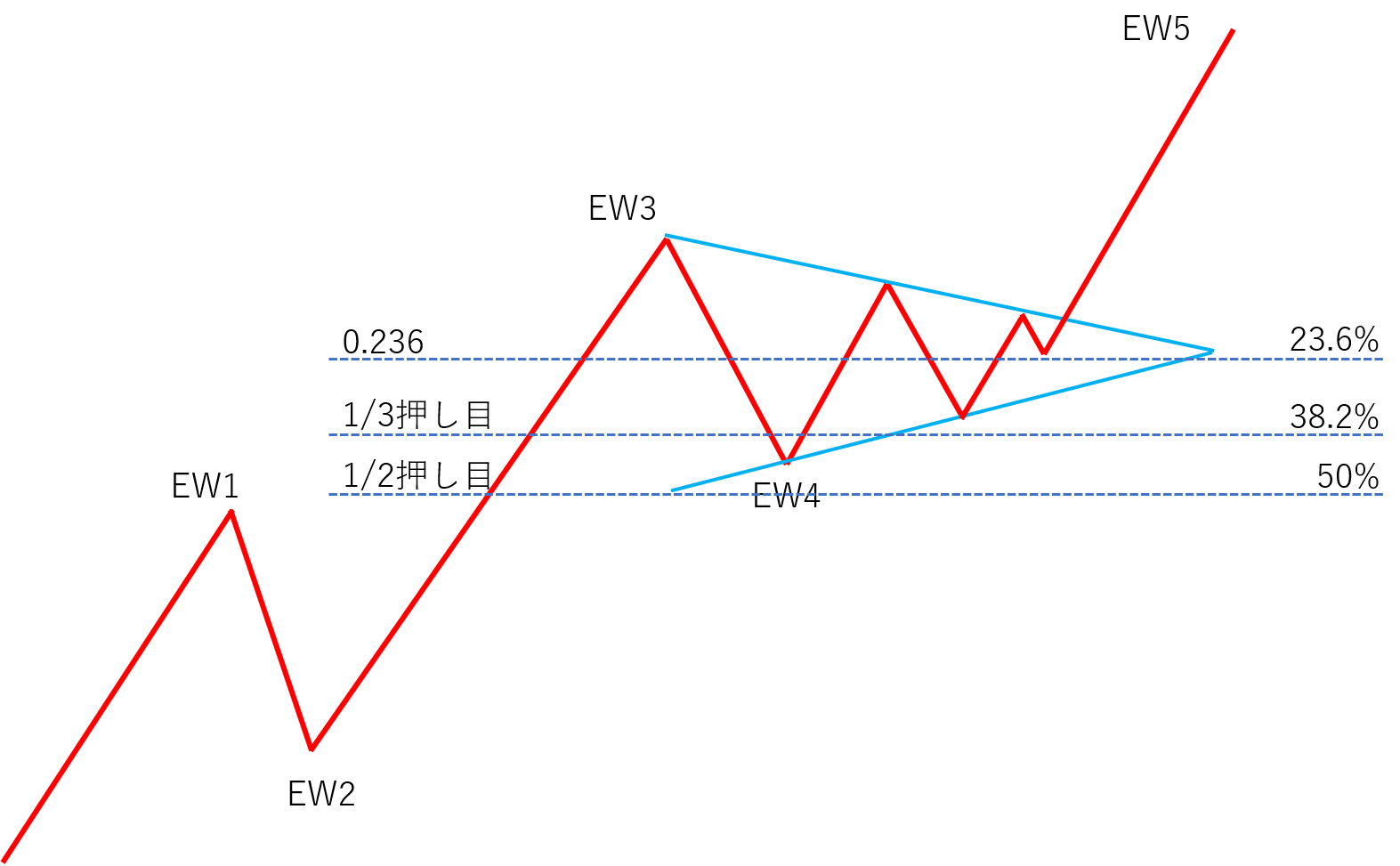
About Elliott Wave Theory
Here, we explain how to utilize this Elliott Wave Theory with the Market Principles EA. First, please watch the video below: “How to capture the first wave of the Elliott Wave on the right side of the chart.”How to capture the first wave of the Elliott Wave on the right side of the chart (video)
https://youtu.be/EdAqWJDSXg4How to produce Elliott Waves using the Market Principles EA (video)
After finishing the video “How to capture the first wave of the Elliott Wave on the right side of the chart,” please watch this video. https://youtu.be/UArThj1EuWEAbout Chart Patterns
The Market Principles EA can output target values for chart patterns such as pennants, flags, ranges, and triangles quickly and instantly. The method is very simple—surround the real bodies of the candlestick clusters in consolidation with a [□]. https://youtu.be/8eth1uc-KLUHow to receive the Market Principles EA for free
Click the button below and complete the required procedure.
× ![]()