
【Video】FX攻略.com August 2019 Issue Announcement
FX攻略.com August 2019 issue contents are introduced by Editor-in-Chief Ebizawa. This time, we have the cooperation of Subaru Hachiya, who is making her first appearance in this magazine!
How to change your video environment
1. How to watch on a large screen

Click the icon at the bottom-right of the embedded video screen to display it maximized on the monitor screen, allowing you to watch in a large screen. If you want to revert, click the same icon at the bottom-right.
2. How to watch in high quality

Click the “gear” icon at the bottom-right of the embedded video screen, then select the “Quality” section to make a choice. Choose the highest quality available (1080p or 720p) to watch in high quality. Also, you can change playback speed in the “Speed” option from 0.5x to 2x.
3. How to watch with changed playback speed
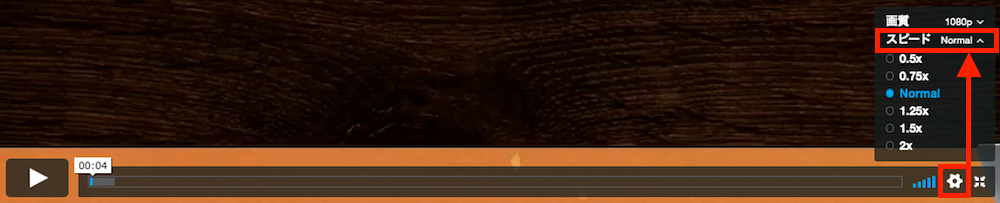
Click the “gear” icon at the bottom-right of the embedded video screen, then select the “Speed” section to make a selection. Playback speed can be changed between 0.5x and 2x.