

【Three buttons on the remote control are sufficient】The more someone tries to master all functions with a gold 1-minute chart, the more they hesitate at the entry and exit points
The TV remote has countless buttons lined up. Still, the things you press every day are probably power, channel, and volume. Even if you don’t know the rest of the buttons, you won’t have trouble watching TV.
However, when seated in front of the chart, many people feel they must “master every button.” If you’re wondering where to enter and where to place stops and take-profits on Gold’s one-minute chart, try recalling this remote control story.
Trying to memorize all the buttons slows down the essential操作
For example, imagine a scene where you look up each setting item every time you add an indicator, trying to confirm the meaning of numbers that appear all over the screen. While you’re investigating, the Gold feet move forward one after another, and the moment to decide to enter or pass won’t wait for you.
The cause of hesitation often isn’t missing knowledge, but not deciding in advance where to touch each time. People don’t have to search for the power button on the remote because the touch feel of the place is familiar.
Decide in advance to touch only three places each time
Gold Trade Navigator is a sign tool for MT5 that narrows down to these “frequently used buttons” from the start. It can be used on XAUUSD one-minute and five-minute charts and operates with the default settings.
Three spots to see on screen
- The mark attached to the candle where the signal is confirmed (buy is below the candle, sell is above it; just wait until the mark appears)
- The line of entry price and the colored bands for stop loss and take profit 1-3
- The “Market State” panel (alerts in gold for “Attention” or “High” trading costs, so you can skip trading)
In addition, there are panels for performance summaries, weekly results, the next signal forecast, and the contents of signals. These are like buttons deep in the remote; you can open them whenever you want. The panels can be closed, and if you switch to “Simple Display,” the marks and color boxes can also be hidden. When a signal is confirmed, you’ll be notified by sound and message, so you don’t have to keep watching the screen.
Choosing a Channel Is Up to You
Just as the remote won’t decide the program for you, this tool won’t place orders on your behalf. It is a display tool to assist trading decisions, not an automated trading system. It does not guarantee profits, and the panel’s performance is calculated from past charts, so actual trading results may differ. Ultimately, you decide to buy or pass while you’re in front of the screen.
What appears on the screen are ordinary words like “Buy,” “Sell,” and “High/Medium/Low,” and their meanings can be confirmed one by one in the Japanese manual. Rather than learning all functions before starting, why not begin by viewing the three places in the same order each time?
Summary of this article
- Hesitation tends to arise more from not having fixed places to touch than from lack of knowledge
- Decide in advance that you will look at only three things: the mark, the color band, and the market state
- Other features are kept as buttons deeper in the remote, to be used only when needed
- The gold “Attention” can be interpreted as a signal to skip trading
- Tools assist with judgment; the final decision is yours
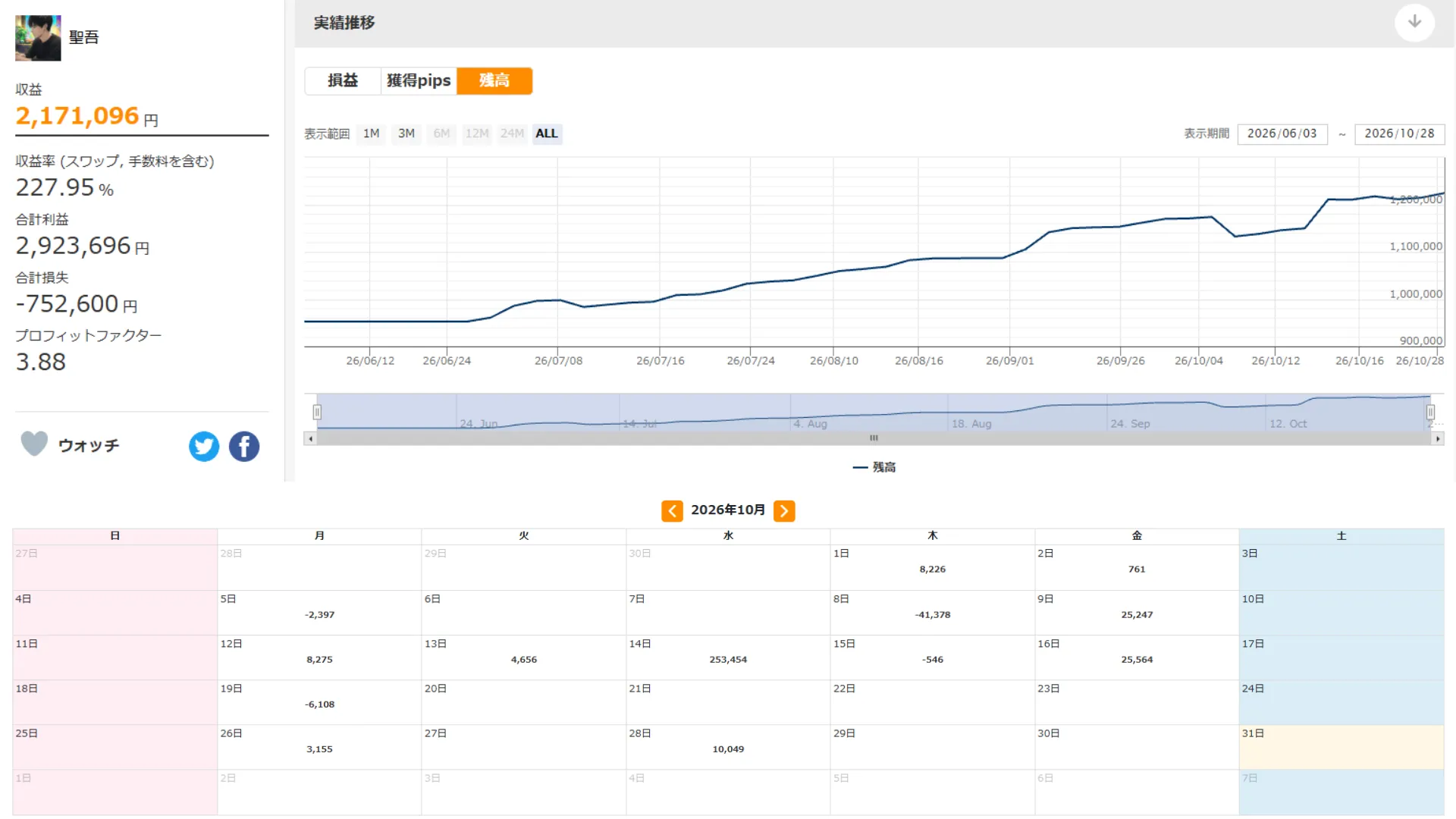
※ Real account results of the author using Gold Trade Navigator’s signals for trading (2026/06/03–2026/10/28). This is past performance and does not guarantee future profits.
MT5 exclusive / XAUUSD (Gold) M1 and M5 sign tool
【Only Three Things to Look At Each Time】A Gold-Only Sign Tool You Can Use Without Hesitation
An MT5-exclusive sign tool compatible with XAUUSD on the 1-minute and 5-minute charts. By looking only at the confirmed mark, the entry price and the color bands for stop loss and take profit, and the market state, you can use it with the default settings. It is a display tool that aids judgment, not automated trading, and it comes with manuals in Japanese and English.
- Look at only three things: the mark, entry price/stop loss/take profit, and “Attention”
- Display entry price, stop loss, and the three take-profit levels on the chart
- The “Market State” informs you of ease of trading and trading costs
- Notify you of signal confirmation with sound and messages (also supports email and smartphone)
- User-friendly display without jargon; works with default settings; available in Japanese/English
MT5-exclusive Indicator
29,800 yen (tax included)
※ This tool is a display tool to assist trading decisions and does not perform automated trading. It does not guarantee profits. Please make investment decisions and bear results at your own responsibility.