
【AUTO TP/SL】Target amount・pips|Position add also automatic bulk reset【MT5 discretionary tool】
When you enter, the TP/SL you have set by amount or pips will be automatically placed.
No matter how many times you add positions, the total profit target and loss target remain the same.
Not only during normal averaging down,
you can also use it for scalping to profit while limiting risk.Even in harsh ranging markets where you usually don’t touch things, it becomes a trading opportunity.
▼ First, please watch the video to see actual movements.(03:37)

Have you ever thought, “If only there were such a function”?
【Free version】Now available with 1 Click PRO.
We will introduce the highlight, 【AUTO TP/SL】 feature.
Before: For all positions with one button to target “that moment”
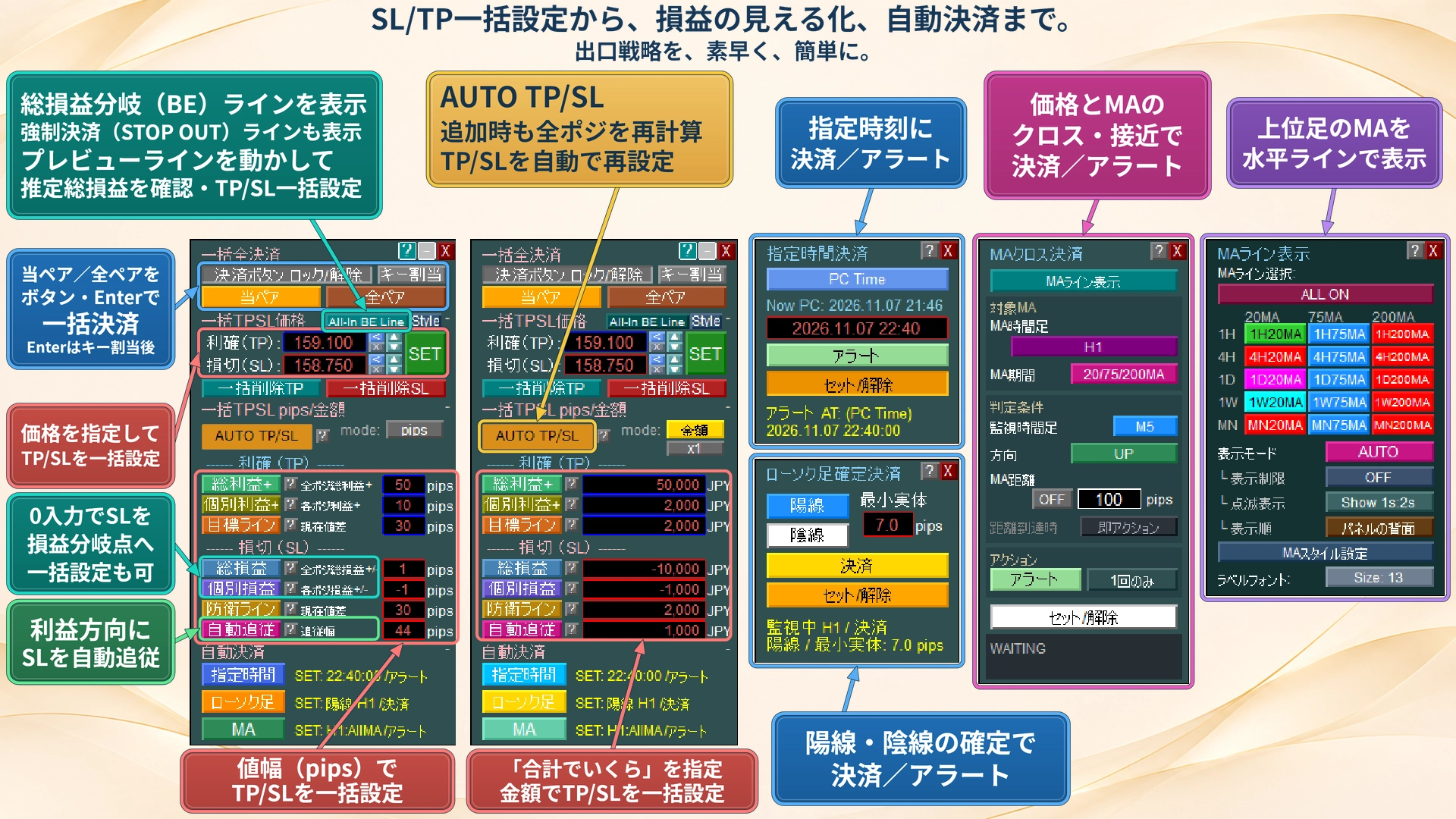
1 Click PRO could previously set all positions’ TP to reach a total of +10,000 yen by just pressing a button when you enter a total profit target of +. For the entire set of positions, you could set TP together.
However, this was the target for positions held at that moment.If you added positions, you had to press again.That was the case.
From now: AUTO TP/SL
Each time positions increase, the entire set is automatically recalculated and reset.
After pressing 【AUTO TP/SL】, just press the usual 【Total Profit +】. ThenTP/SL is automatically set every time a new position is added.
What’s important is not to assign only to the newly added positions, but to recalculate the whole, including existing positions.This is done for all positions, including those already held..
Example: Set TP as total profit + 30,000 yen, SL as total loss -10,000 yen
| Position | TP/SL settings |
|---|---|
| First | Once+30,000 yen / −10,000 yento that price |
| Add second | Together the two become+30,000 yen / −10,000 yento that price |
| Add third | Together the three become+30,000 yen / −10,000 yento that price |
No matter how many times you add, the total profit target and loss target remain the same.
You can also register per-position +1,000 yen (TP setting [individual profit +], SL setting [individual loss]) or by price range (pips).
Situations where it works well
■ Averaging down / split entries
No need to recalculate and re-enter after each addition. You can focus on entry decisions while maintaining the total profit target and loss target. It can also be used to increase buys or sells in the direction of profit.
■ Take profit by you, only stop-loss automated
If you register only the SL side, even if you add positions, it will readjust the SL to match the total loss target.
■ Break/indicator reverse stop entry
If you register before entering, you can wait even without a position. When the stop is filled, it automatically proceeds to set TP/SL. Reduces manual input after execution.
We’ve designed it with attention to detail
- SL moved manually to a favorable position will be kept unchanged without loosening.AUTO target can be narrowed by buy/sell or order source (manual orders, etc.).
- After full settlement, it will wait for the next position until you cancel it.
- You can check per-position settings in the AUTO TP/SL panel list. Unset SLs and pending settings are visible.
The AUTO TP/SL feature only works on hedging accounts (it can be used with buy-only or sell-only trades).Other features are available on netting accounts.Due to broker restrictions (stop levels), it may not always set at the target level. If restrictions are lifted, it will automatically re-set.
Settings in 3 steps
1 Enter amount (or pips)
Example: TP side 30,000; SL side −10,000.
2 Press 【AUTO TP/SL】
3 Press the usual 【Total Profit +】/【Total P/L】
When the button blinks, auto-setting is ON.
Preview Menu: know in advance “how much it will be” before entering
So far, by moving a line on the chart, you could see the estimated total profit/loss if closed at that price, and you could set TP/SL in one go with 【→TP】/【→SL】.
Now, with Preview Menu, you can perform a trial calculation before placing an order.Before-entry profit/loss estimate“If I enter 0.2 lots and close at this price, how much will it be?” It can be estimated for the total held amount as well.
- Profit/loss estimate before entry“If I enter 0.2 lots and close at this price, how much will it be.” It can be calculated for the total held as well.
- Decision-price from target profit“If I want +5,000 yen, where should I close?”
- Maximum lotCalculates the upper limit of lots based on acceptable loss amount and SL price.
Since this is a projection, actual orders will not be placed.
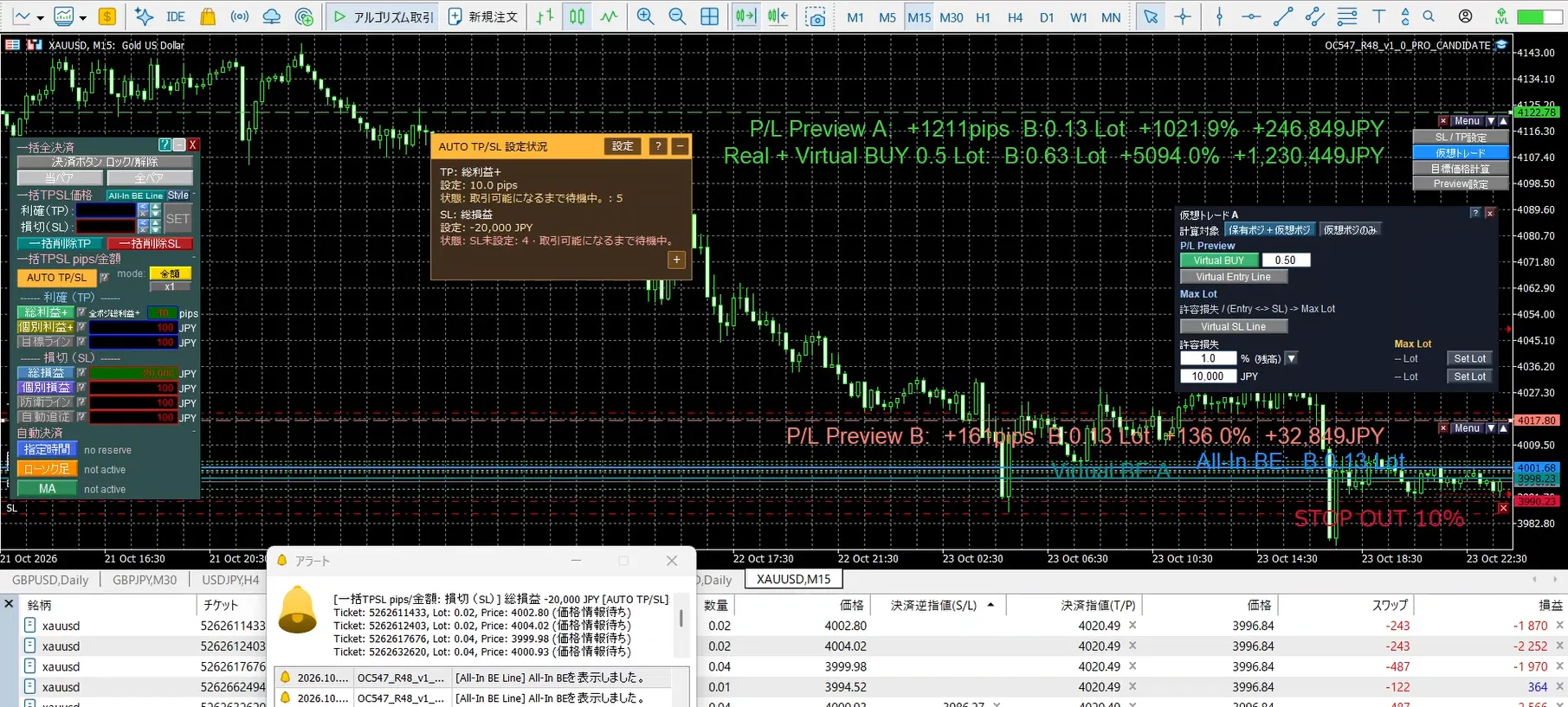
Also, confirm on the chart all at once
- Display account information (balance, margin maintenance rate, etc., choose from 28 items)
- Show scheduled economic indicators
- Auto chart timeframe switching (periodically showing 1-minute, 5-minute, 1-hour, etc.)
Free version, but usable on real accounts
Even with the free version,you can use it on a real account for 14 days(from purchase date).
No charges, and it automatically stops when the period ends.
Please try the actual execution and movement within real spreads on your own account, as opposed to a demo. Try it with FX or gold as well.
Currently, the features introduced here are not yet extended to paid versions (PRO・PLUS・BASIC, etc.).
We will gradually update these features to paid versions by 11/15.
First, please use the free version. Once updates are complete, we will indicate on the product page and in this article.
(Of course, you can upgrade later and use new features as soon as they are updated)
Questions or requests are welcome
If there is anything you don’t understand, questions about features, or observations from using it, feel free to send a message.
Sharing on the product page’s “Community” is also welcome. It’s a place for users and developers to exchange information.