
Horizon Quad Compass|“Not knowing which currencies are available” ends here, a monitoring dashboard of 4 indicators × 3-hour charts × up to 12 assets
Hello, this is kotoha.
When you’re looking at multiple currencies and multiple timeframes at the same time, doesn’t it become like this?
- You get tired just by switching charts one after another to check
- It takes time to grasp “which way is the overall trend now?” and “which currencies are aligned?”
- By the time you notice the currencies that were aligned, the move has already progressed
The more symbols you monitor, the more opportunities appear, but the verification work also increases proportionally. To shoulder that workload, I createdHorizon Quad Compass Trend Monitor Mt5.
Targeting up to 12 symbols, across three timeframes,MA / Stochastic / MACD / ADXA dashboard for MT5 that visually consolidates the directions of these four indicators. It finishes the step of narrowing down “which symbols to look at now” in one screen, so you can spend more time on actual decision-making.
▼ Product page here (GogoJungle)
https://www.gogojungle.co.jp/tools/indicators/76208
Screen images
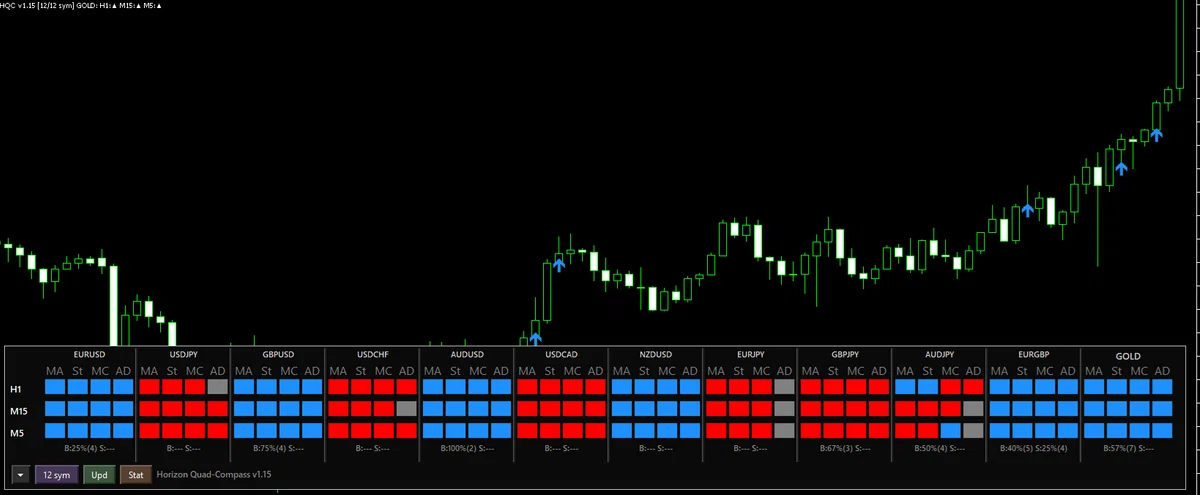
On the dashboard, directions for each symbol and each timeframe are shown as dots (blue: bullish bias / red: bearish bias / gray: neutral) in rows. You can quickly see which symbols are aligned and which timeframes are breaking without switching between multiple charts.
(Dashboard overall image)
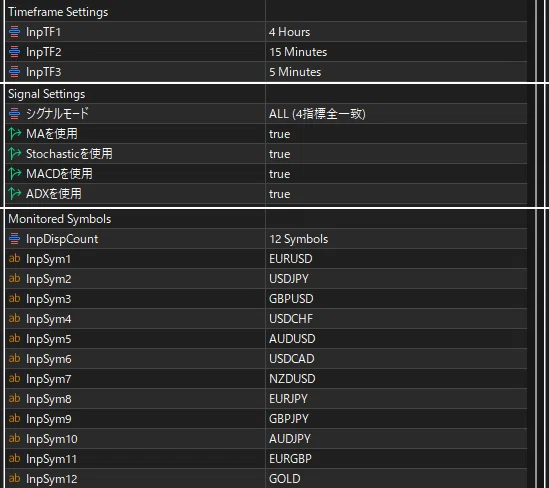
You can also change the timeframes, signal mode, and monitored symbols from the panel.
Main features
1) Choose signal strength by four-indicator agreement condition
Signal conditions can be chosen from the following.
- Single / Double / Triple / All(= how many indicators must agree to be considered “aligned”)
Setting loosely lets you notice earlier; setting strictly concentrates on moments when all conditions align. Also, MA / Stochastic / MACD / ADX canbe turned ON/OFFindividually, allowing you to adjust the “alignment conditions” to match your operating style.
2) Simultaneous monitoring on three timeframes (multi-timeframe)
Set TF1 / TF2 / TF3 as you like and review directional momentum together.
Default isH1 / M15 / M5(configurable). The flow of confirming direction on higher timeframes and watching changes on lower timeframes is consolidated into one screen.
(Example of monitoring three timeframes)
3) Up to 12 symbols monitored at once (multi-currency)
You can register up to 12 symbols to monitor, from EURUSD to GOLD.
Because symbol naming can vary by environment, please edit the list to match your display if needed.
4) Display count switchable to 3 / 6 / 9 / 12
Use the button at the bottom-left of the dashboard to switch the number of symbols displayed. This keeps the screen light depending on how many symbols you’re looking at that day, allowing you to switch between days when you want a broad view and days when you want to narrow down.
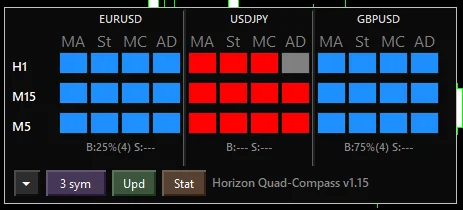
(Display count example 1)
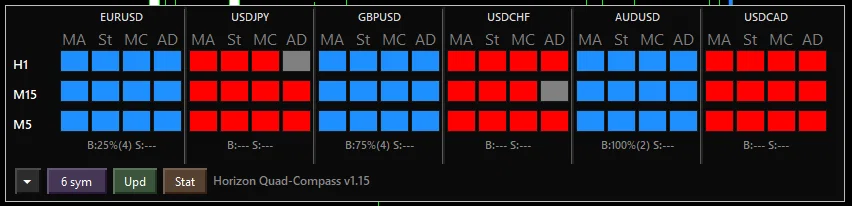
(Display count example 2)

(Display count example 3)

(Display count example 4)
5) Alerts support (reducing monitoring effort)
Supports popups / push notifications / email / sound.
Rather than staying glued to charts, this is designed so you notice when alignment occurs. Let the monitoring tool do the watching, and focus on your decisions.
6) Simple signal statistics (Stat)
Uses past data to show the win rate and count for Buy / Sell in a simple way.
- Lookback (references)
- HoldBars (assumed bars held)
- Statistical base TF (TF1 / TF2 / TF3)
can be adjusted, andRecalculation with the Stat buttonis also possible. Use the tendencies by symbol as a guide to help decide what to monitor (statistics are based on past data and do not guarantee future results).
Note that this tool also supports external indicator integration with Flat Manual Trader (ver1.32 and later), allowing Quad Compass for decisions and FMT for post-entry management to be split between roles.
Who it’s suited for / Who it’s not suited for
Who it’s suited for:
- People who want to monitor multiple symbols simultaneously
- People who want to confirm the directions of three timeframes together
- People who want to use MA / Stochastic / MACD / ADX to understand the environment
- People who want to receive alignment via arrows or notifications
Who it’s not suited for:
- People who focus on one symbol at a time (with few monitored symbols, this tool’s strengths are less applicable)
- People who want automated trading to be completed on its own (this tool is a monitoring/decision-support indicator)
Sales information
GogoJungle
Due to price revisions,9,800 JPY → 5,980 JPYis now on sale.
https://www.gogojungle.co.jp/tools/indicators/76208
MQL5 Market
- Price: 65 USD
Disclaimer
This product is not investment advice and does not guarantee profits. Display and results may vary depending on market conditions, spreads, order execution, server latency, and your environment (symbol names, decimals, tick specifications, etc.). The final buy/sell decision and profit or loss are the user’s responsibility. Please verify operation with a demo account or similar before use.
We will continue to update mainly MT5 tools, thank you for your continued support.