
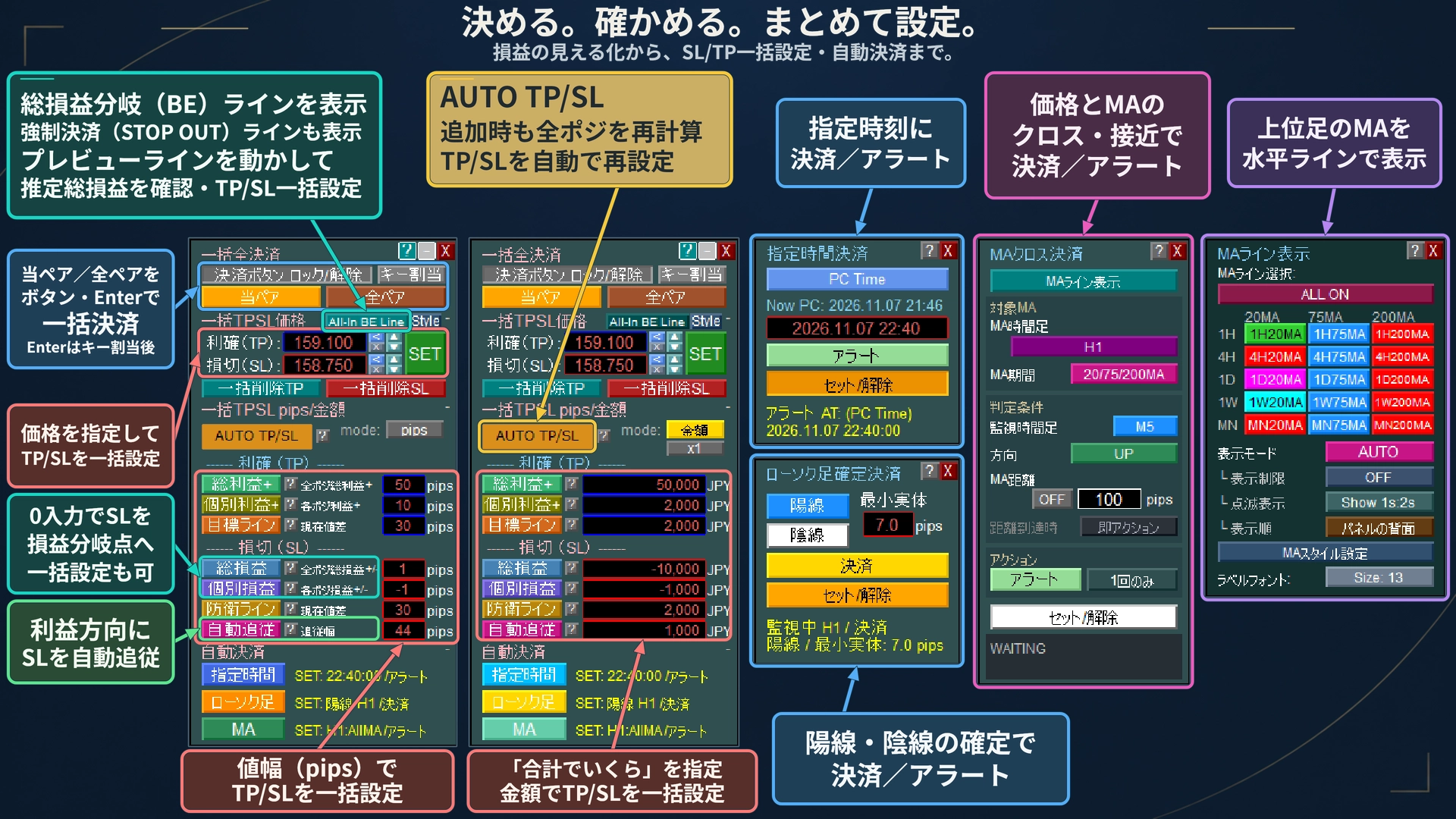
[MT5 Discretion Tool] Automatically Re-Set TP/SL In Bulk to Match Amount and Pips Target with Each Position Addition
Is there such a scene?
- A stop order placed before the indicator gets filled.
Even while quickly setting TP/SL, the price keeps moving. - With each add of another position via averaging down,
you re-calculate and re-enter TP/SL for all positions.
From the moment you enter, the TP/SL set by amount or pips is automatically applied.
No matter how many times you add positions, the total profit target and loss target stay the same.
Haven’t you wished such a feature existed?
With today’s update of the [Free Version] 1 Click PRO, that has become possible.
Introducing the highlight feature, [AUTO TP/SL].

Until now: With one button, for all positions at that moment
1 Click PRO could, by entering a value like “Total Profit + 10,000 yen” and pressing the button, set all positions’ TP to reach a total of +10,000 yen across all holdings.
However, this was a setting for the positions held at that moment. If you added positions, you had to press again.that moment’s holdingsto be recalculated.
From now on: AUTO TP/SL
Automatically recalculate and reset the entire position set every time a new position is added
After pressing [AUTO TP/SL], just press the usual [Total Profit +] to proceed. Theneach time a position is added, TP/SL is automatically set.
What’s important is not to attach it only to the newly added positions. Each time, all positions are recalculated together.not just for newly added positions.
Example: TP set to total +10,000 yen via Total Profit +, SL set to total −15,000 yen via Total P/L
① First entry
Set TP and SL to the price that makes the total +10,000 yen / −15,000 yen.
② Add second
So that combined they become +10,000 yen / −15,000 yen,recalculate TP/SL for all positions including the first.
③ Third, fourth…
No matter how many are added, it will be reset to the price that achieves the target across all positions.
You can also register per-position gains of +1,000 yen (TP set by [Individual Profit +], SL set by [Individual Loss]) or by price range (pips).
Where this works well
■ Indicator/Breakout Reverse-Indicator Entry
If registered before entry, you stay in a ready state even without a position. When the reverse order is filled, TP/SL is automatically set. It reduces the idle time when manually entering TP/SL.
■ Averaging down / Split Entry
No need to recalculate or re-enter at every addition. You can focus on entry decisions while keeping the total profit and loss targets intact.
We’ve thought through the details
- SL moved manually to a favorable position is kept without loosening.Maintained as is.
- Manually deleted SL can be re-set if possible. After partial settlements, remaining positions are recalculated.
- TP and SL can be registered and canceled separately. Even after all settlements, it will wait for the next position until canceled.
- You can check whether each position has been set in the AUTO TP/SL panel list.
AUTO TP/SL can be used with a “hedging account” (works with buy-only or sell-only trades). Due to broker restrictions (stop level) or other limitations, it may not be possible to set at the target level.
Setup in 3 steps
1 Enter amount (or pips)
Example: TP side 10,000, SL side −15,000.
2 Press [AUTO TP/SL]
3 Press the usual [Total Profit +] / [Total P/L], etc.
When the button flashes, auto-setting is ON.
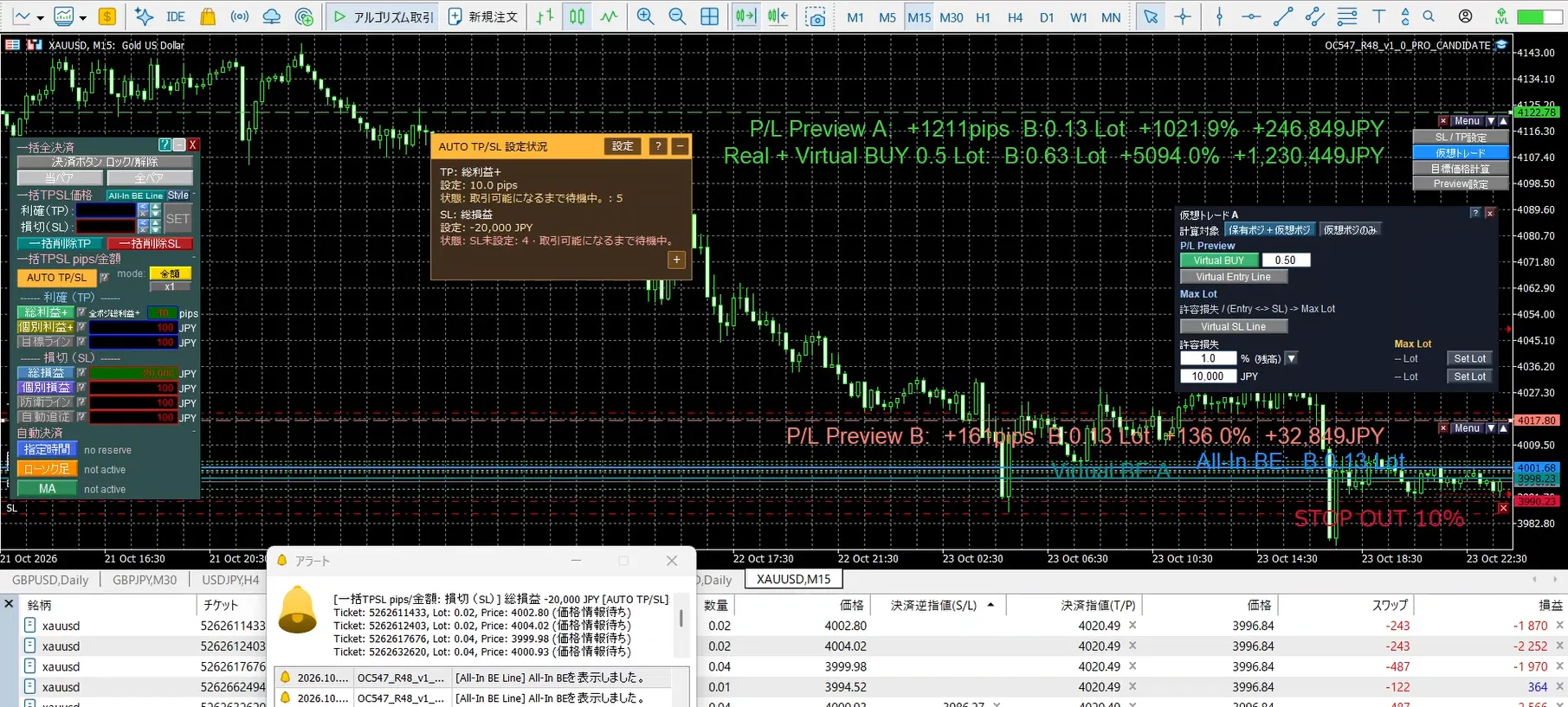
Preview Menu: know how it will be before entering
Until now, you could move a line on the chart to display the estimated total P/L if closed at that price, and you could set TP/SL in one go with [→TP] / [→SL].
Now, with Preview Menu, you can also perform a before-order estimation.
- Pre-entry profit/loss estimation“If I enter with 0.2 lots and close at this price, what will it be?”
- Decision price from target profit/loss“If I want +5,000 yen, where should I close?”
- Maximum lotCalculate the upper limit of lots based on acceptable loss and SL price
Since this is a projection, no actual order is placed.
Also, confirm on the chart all at once
- Account information display (balance, maintenance margin, etc., choose from 28 items)
- Display of economic indicator release schedules
- Auto chart timeframe switching (periodically showing 1-minute, 5-minute, 1-hour, etc.)
Although Free Version, usable on real accounts
Even the Free Versionfor 14 days on a real accountfrom the purchase date
No charge, and it automatically stops when the period ends.
Please try it with real orders and actual execution and spreads, not just in a demo. Try it with FX and gold as well.
Currently, paid versions (PRO・PLUS・BASIC, etc.) do not include the features introduced here.
Paid versions will be updated sequentially by 11/15.
Questions or requests, please feel free
If you have any unclear points, questions about features, or observations from using it, please feel free to send a message.
Sharing on the product page’s “Community” is also welcome. It’s a place where users and developers can exchange information.