
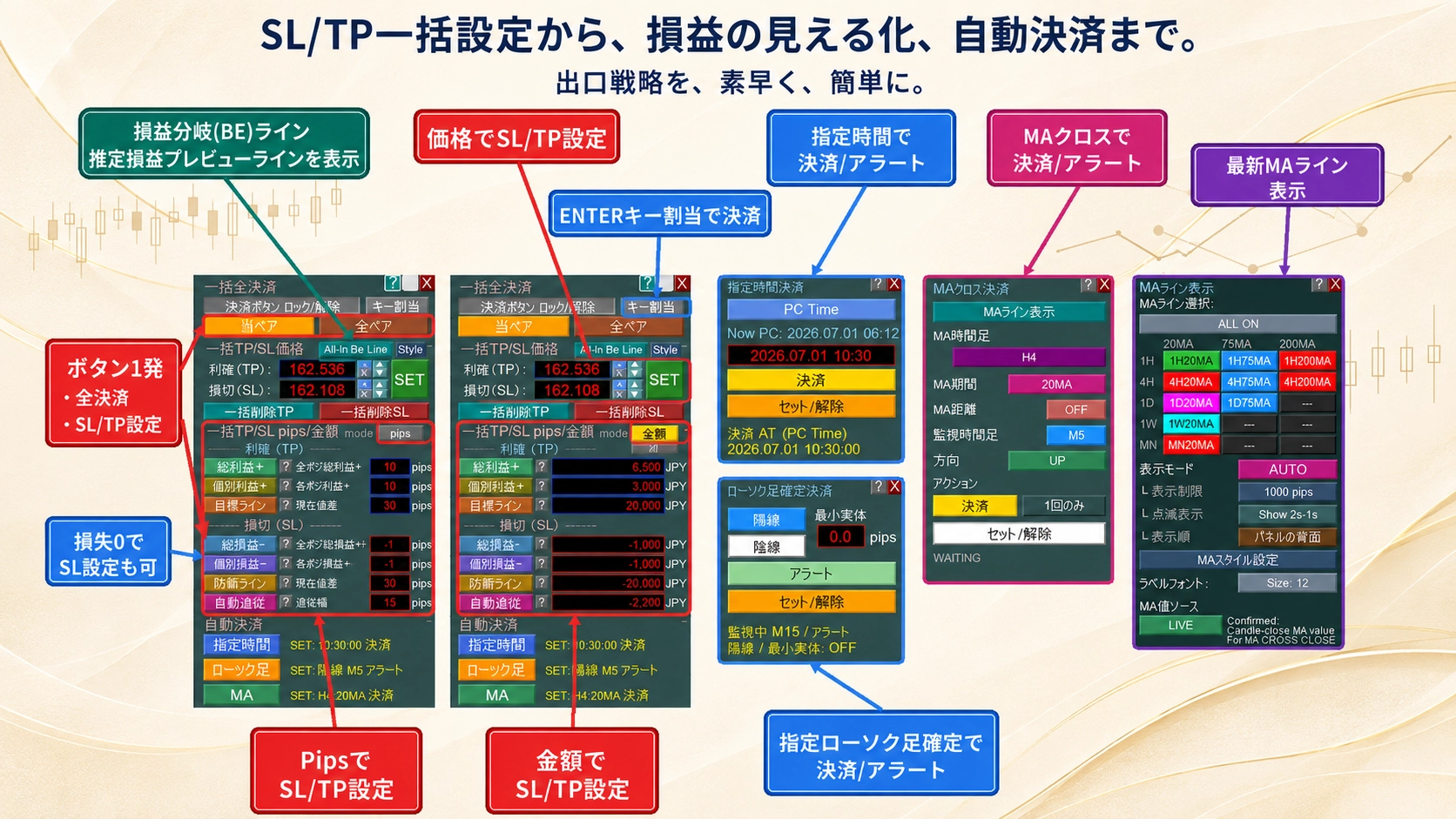
【MT5 Discretion Tool】AUTO TP/SL: Auto TP/SL bulk settings enabled continuously for each position addition
Table of Contents:What can be doneConcernsProduct comparison tableRecommended for these peopleOther features▶ See price & comparison
※ You can view from any section by clicking the table of contents.
Introducing two upcoming features still under development.
They are scheduled to be released in an upcoming version upgrade.
They are scheduled to be released in an upcoming version upgrade.
This series' BASIC/BASIC PLUS/PRO models will standardly include these features.
If shown in an image, it would look like this.
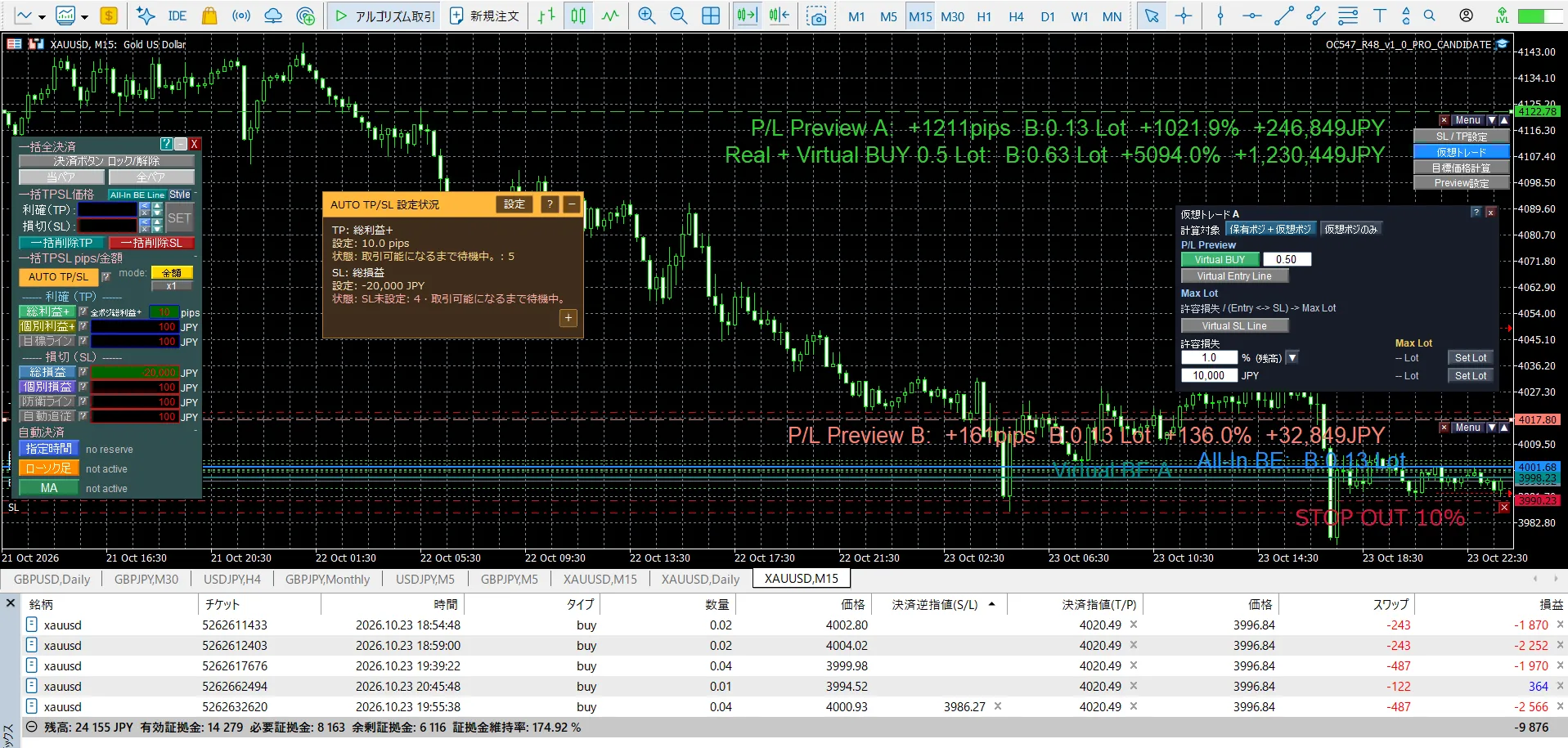
■ AUTO TP/SL
When you add a position, TP/SL can be set automaticallyso that it becomes possible (as shown on the left image).
When you add a position, TP/SL can be set automaticallyso that it becomes possible (as shown on the left image).
You will be able to standby even before entering the tradeand proceed (before entering).
TP/SL values will be recalculated automatically for all positions if there are additional positions, so that the target value is always reached, by adjusting TP/SL for all positions accordingly.
When entering during market moves or impulsive moves including indicators using stop orders,you can automatically set SL and TP right after entryto reduce risk and aim for quick profits.
Moreover, when repeatedly averaging down,you won't have to manually repeat troublesome SL/TP settingsanymore.
From the preview line (image on the right), until now you could only move the line to configure TP/SL in bulk on the chart, but now additional features will be added in a Preview Menu to access multiple new functions.Before entry, you will be able to understand the profit/loss after entry by moving the price line and calculating LOTs in advanceThis will allow you to quickly check what kind of profit or loss will occur if you enter at the planned LOT when the price comes down to this point.You can instantly confirm the potential profit or loss by moving the line.
[TP/SL settings]
Still set TP/SL in bulk on the chart by price line as before
[Virtual trading]
If you enter with something like 0.35 LOT as new or additional entry, you will be able to see estimated P/L on the preview line. You will also be able to calculate the MAX LOT that can be entered under specified conditions. This will allow you to grasp total P/L for new and additional entries.
[Target price calculation]
You can derive the target price rate from the target profit/loss.
Please note that the features introduced this time are not yet released. They are in the final stages of development and will be released in a version upgrade soon.
When released, the corresponding series will undergo price revisions.
For the Basic version, a price increase of around 4,000 yen is being considered.
For both FX and gold
Please try the free version extensively.
From the product comparison table, you can consider the best tool for you.
The BASIC model already includes all the essential features.
We hope you will compare with other products as well.
Since this is something I use daily, we will continue to update it.

※ If text is hard to read, please switch the video settings to 1080p for a clearer view.
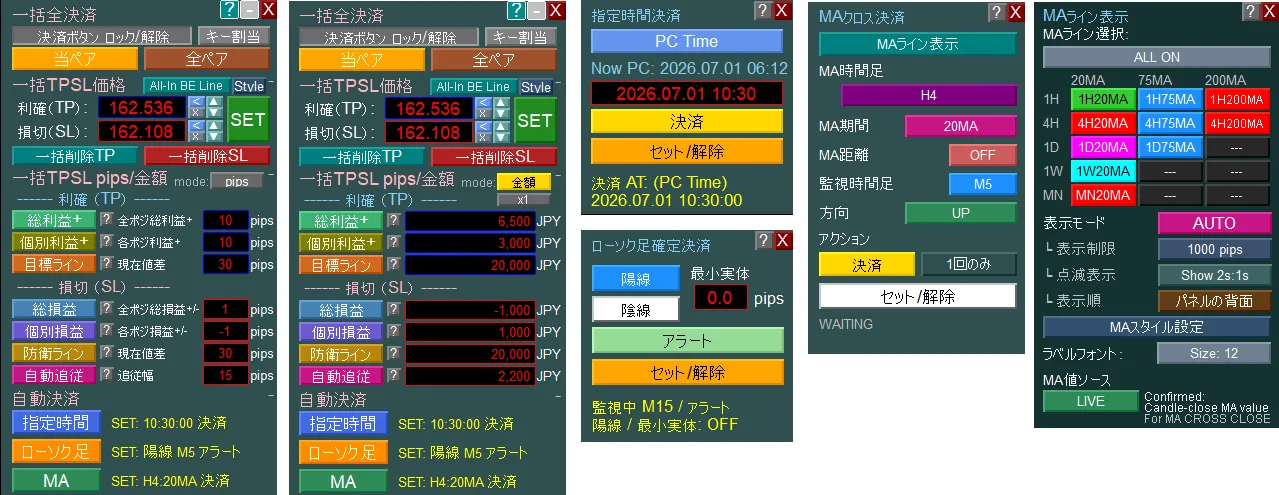
■ What you can do
Judgment is made by the trader, and the tool supports confirming necessary information, setting and executing orders. All features are designed to make it easier for discretionary traders to follow their own rules.
✓
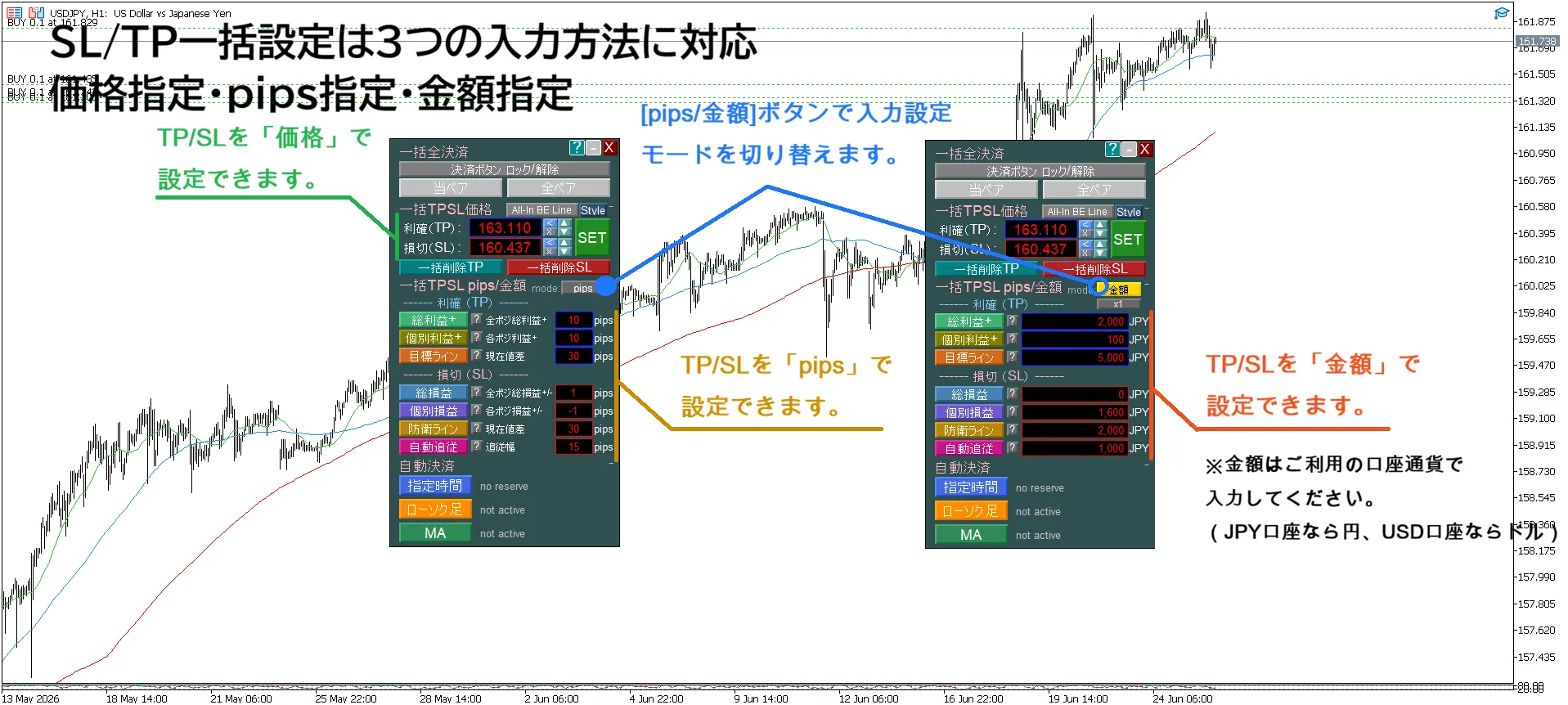
One-click bulk setting for all positions’ SL/TP
Supports amount, pips, and price-based specifications
In amount or pips mode, you can bulk set based on entry value or a chosen profit/loss amount
✓
Automatically set SL/TP to target profit/acceptable loss just by specifying the amount
✓
Show breakeven price including spreads, fees, and swaps (All-In BE line)
✓
Display the estimated profit/loss for multiple positions at arbitrary prices
✓
Drag the Profit/Loss Preview Line and set TP/SL in bulk on the chart without entering data
✓
Automatic settlement by time / candle / MA cross
✓
Display MA on 1H, 4H, daily, weekly, and monthly charts selectively without switching charts
✓
Enter key for immediate all-settlement
■ To reduce the feeling of “knew it but couldn’t do it”
In trading, regret comes not only from misreading the market.
“I decided to settle, but I waited a bit longer thinking it might move further.”
“I decided to cut losses, but I didn’t want to lock in the loss and postponed.”
“I planned to set SL, but postponing because setting for multiple positions seemed troublesome.”
“I thought I checked higher-timeframes, but I may have overlooked an important MA.”
“While sleeping or at work, I couldn’t act at the timing I had decided.”
This product is a tool to help you implement your own rules.
Bulk settings, P/L lines, automatic settlements, higher-timeframe MA display, and key settlements.
Appearing as different features at first glance, all share one goal:
“To reduce those moments when you knew what to do but couldn’t do it.”...
■ Do you have experiences like this?
【Bulk management】
・When you postponed setting TP/SL for multiple positions, price moved and you missed the timing
→“If only I had set it then,” regretting after a loss
→“If only I had set it then,” regretting after a loss
・Even after deciding target profit and acceptable loss, you don’t know the TP/SL setting price
・Want to retreat at break-even or slight profit, but don’t know the break-even price including costs
・Cannot immediately judge “If it comes to this price, overall profit/loss will be this much”
・Want to retreat at break-even or slight profit, but don’t know the break-even price including costs
・Cannot immediately judge “If it comes to this price, overall profit/loss will be this much”
【Settlement】
・Even with settlement rules decided, you can’t keep them due to emotions or circumstances
- At work, you couldn’t look at charts and settle before the news
- You decided “when the next candle reverses and closes, settle” but couldn’t decide
- You planned “settle when price breaks the 20 MA,” but kept watching
→ Indecision and carelessness that hinder your rules can erode profits and capital
- At work, you couldn’t look at charts and settle before the news
- You decided “when the next candle reverses and closes, settle” but couldn’t decide
- You planned “settle when price breaks the 20 MA,” but kept watching
→ Indecision and carelessness that hinder your rules can erode profits and capital
【Chart analysis】
・It’s tedious to switch charts many times to check higher-timeframe MAs
・You may forget the higher-timeframe MA you were watching and realize it only after a rebound
・You may forget the higher-timeframe MA you were watching and realize it only after a rebound
【Settlement operations】
・If you slightly move the mouse cursor during a scenario where a few pips move P/L, the settlement menu closes and you can’t focus on price movement
■ Product comparison table
| Product name | SL/TP | Key Settlement | P/L line | Auto settlement | MA Line Display | Price | ||||
|---|---|---|---|---|---|---|---|---|---|---|
| Button Bulk Settings | Line Drag Setting | Profit Breakeven BE | Estimated P/L | MA Cross | Candle | Time | ||||
| 1 Click PROThis product Bulk settings [Stop loss/Take profit] & Auto settlement [MTF MA cross・Specified time・Specified candle] MT5 | ✓ | ✓ | ✓ | ✓ | ✓ | ✓ | ✓ | ✓ | ✓ | 13,980 yen |
| 1 Click PLUS Bulk settings [Stop loss/Take profit] & MTF MA line display MT5 | ✓ | ✓ | ✓ | ✓ | ✓ | – | – | – | ✓ | 8,980 yen |
| 1 Click BASIC Bulk settings [Stop loss/Take profit] MT5 | ✓ | ✓ | ✓ | ✓ | ✓ | – | – | – | – | 7,480 yen |
| 1 Click AUTO Auto settlement [MTF MA cross・Specified time・Specified candle confirmation] MT5 | – | – | – | – | – | ✓ | ✓ | ✓ | ✓ | 6,980 yen |
| 1 Click MTF MA Auto settlement [MA cross] & MA line display MT5 | – | – | – | – | – | ✓ | – | – | ✓ | 3,980 yen |
| 1 Click CANDLE Auto settlement [Specified candle confirmation] MT5 | – | – | – | – | – | – | ✓ | – | – | 1,680 yen |
| 1 Click TIME Auto settlement [Specified time] MT5 | – | – | – | – | – | – | – | ✓ | – | 1,680 yen |
| 1 Click MTF MA line display MT5 | – | – | – | – | – | – | – | – | ✓ | 1,880 yen |
※ Click on a product name to go to its page.
■ Recommended for these traders
①
Traders holding multiple positions
to manage
to manage
②
Discretionary entries
+ rule-based exits
+ rule-based exits
③
Emphasis on higher-timeframe analysis
for those who value it
for those who value it
【Traders who hold multiple positions】
(averaging down・pyramiding・hedging・split entries etc.)
When you have multiple positions, there are more concerns than with a single position.
・Cannot bulk change SL/TP
・Don’t know the price to retreat at break-even or slight profit
・Even after deciding target profit and acceptable loss, you don’t know TP/SL setting price
・When prices move to any level, you don’t know overall profit/loss
・Don’t know the overall break-even point for multiple positions
What this EA can do:
✓Bulk setting of SL/TP for multiple positions with one button (amount, pips, and price specifications supported)
✓Auto-setting of SL/TP by entering amount of entry price, or target P/L(If you retreat at entry price, enter 0 yen or 0 pips)
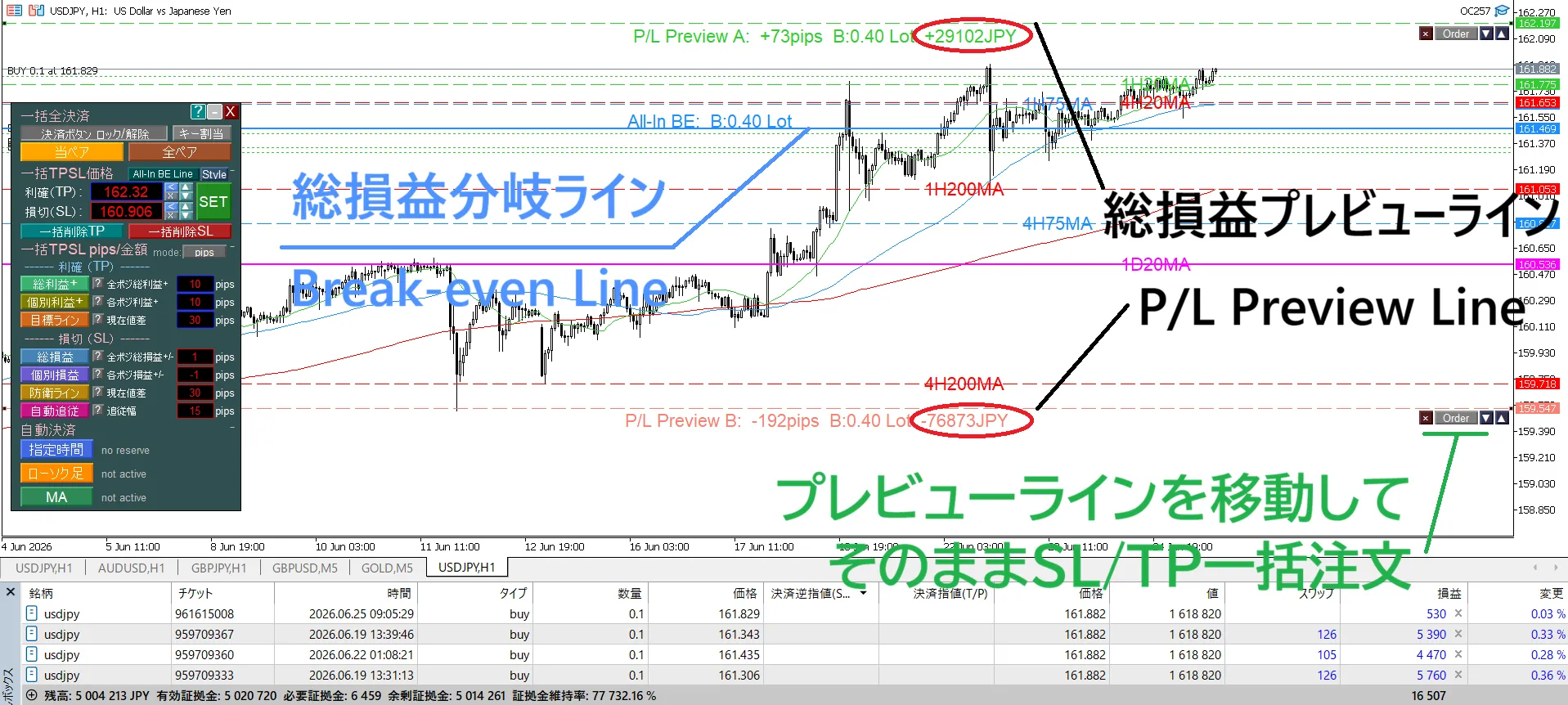
✓Display the break-even price for multiple positions (All-In BE line)
✓Display estimated P/L for multiple positions at arbitrary prices
✓Drag the profit preview line and set TP/SL in bulk on the chart
✓Enter key for immediate settlement (focus remains on the chart)
Bulk setting is not just about speeding up work. It reduces omissions and input errors and makes it easier to execute the decided risk management.
All-In BE line and P/L preview line are not just for display. You can drag the line to see the estimated total P/L and set the TP/SL for all positions at the price you want, directly from the chart.
Enter key settlement is not just to speed settlements. It is designed to help you focus on the price action you should be watching rather than your cursor.
All-In BE line and P/L preview line are not just for display. You can drag the line to see the estimated total P/L and set the TP/SL for all positions at the price you want, directly from the chart.
Enter key settlement is not just to speed settlements. It is designed to help you focus on the price action you should be watching rather than your cursor.
※ If text is hard to read, please switch the top-right ⚙ settings to 1080p for a clearer view.

※ If text is hard to read, please switch the top-right video settings to 1080p for a clearer view.
【Discretionary Entry + Rule-Based Settlement】【Higher-timeframe analysis emphasis】
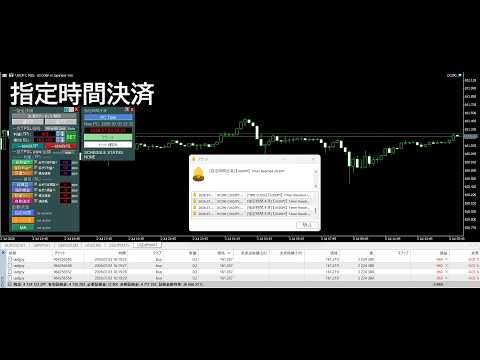
Entry can be discretionary, but settlements should be conducted according to rules without influence from emotions or life circumstances.
✓Automatic settlement at a specified time (before indicators, before sleep, etc.)
✓Automatic settlement when a candle of the specified time frame closes
✓Automatic settlement when an MA cross is confirmed or when approaching a specified distance
✓Can freely combine specified time (TIME), candle confirmation (CANDLE), and MA cross (MA CROSS)
✓All of these are available not only for settlement but also for alert notifications only
We support implementing pre-decided settlement rules without being swayed by emotions or life circumstances.
※ If text is hard to read, please switch the video settings from the video’s settings to 1080p for a clearer view.

※ If text is hard to read, please switch the video settings from the video’s settings to 1080p for a clearer view.

Switching charts to check higher-timeframe MA repeatedly is tedious. If you forget, you may move with the market without noticing the higher-timeframe MA, or you may end up judging while overlooking the MA lines.✓
Display MA prices of 1H, 4H, daily, weekly, and monthly on the current chart with horizontal lines
✓AUTO mode to display only when price approaches
✓Blinking display is also possible to improve visibility of Fibonacci lines and trendlines
Higher-timeframe MA display is not intended to change your analysis method. It allows you to confirm higher-timeframe MA on the current chart without switching charts.

※ If text is hard to read, please switch the video settings to 1080p for a clearer view.
The English version of the video is also available below ⇩ Please review the screen and features.

■ Other features
With daily use in mind, features are designed not only for functionality but also for readability, ease of setup, and recoverability.
✓
EA in-chart display・ Built-in guides・ Alerts Multilingual (9 languages): English, Japanese, Russian, Chinese, Korean, Portuguese, Spanish, Indonesian, Thai
✓
Built-in user guide (34 pages; also available as a text export)
✓
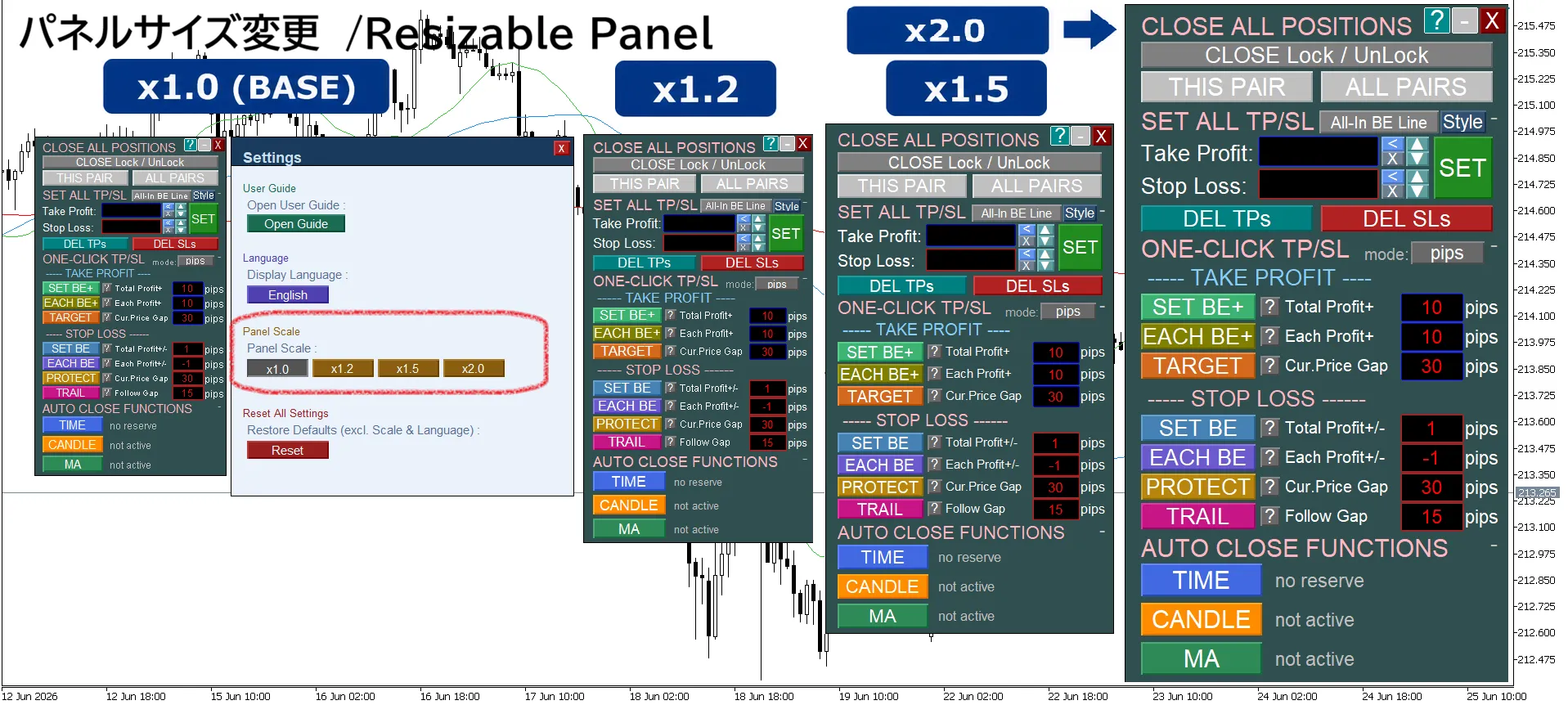
Panel size adjustment (1.0× to 2.0×)
✓
Compact display by folding unnecessary panel items
✓
Save settings for panels and lines and automatically restore after restart
✓
freely adjust line color, style, thickness, label font size, and label position (settings are saved)

※ If text is hard to read, please switch the video settings to 1080p for a clearer view.

※ If text is hard to read, please switch the video settings to 1080p for a clearer view.

※ If text is hard to read, please switch the video settings to 1080p for a clearer view.
■ In conclusion
This product is not an EA that makes trading decisions on your behalf. It is designed to help you implement what you decide and reduce the regret of “knew it but couldn’t do it.”
This product and its series did not originate from a single idea.
I translated the inconveniences I experienced in actual trading and the requests from long-time users of XAUUSD into this product, shaping and improving it step by step until completion.
That is why every feature has a reason for its necessity.
Practicality over flashiness.
More than the number of features, something truly useful for daily trading.
We will continue to listen to users and strive to improve into a tool that is easier to use and reliable to keep using.
This product and its series did not originate from a single idea.
I translated the inconveniences I experienced in actual trading and the requests from long-time users of XAUUSD into this product, shaping and improving it step by step until completion.
That is why every feature has a reason for its necessity.
Practicality over flashiness.
More than the number of features, something truly useful for daily trading.
We will continue to listen to users and strive to improve into a tool that is easier to use and reliable to keep using.
If you have any questions or requests, please feel free to send a message.
Whether it’s about features, usage, feature requests, or even price discussions, we’re happy to hear from you.