

300 sold KGS finally turns into EA. Sale starts next week [Exclusive for KGS Indicator purchasers]
KURAMA GOLD SIGNAL PRO (くらまゴールドシグナルプロ) has reached 300 units sold. Thank you to everyone who has used it.
And here is the next development.
We plan to launch next week an EA that connects KGS signals to automatic orders, called “KGS AUTO STUDIO.” For sale on Gold-Japan (GogoJungle), KGS indicators (KURAMA GOLD SIGNAL PRO) are available exclusively to purchasers.
Find the signal, open the order screen, and input the lot size and take-profit/stop-loss. This is what we have developed and tested for those who want to delegate that task.
What I want to convey this time is not just automation. It’s also the ability to adjust “which signals to use” and “under what conditions to pass.”
From signal viewing to automatic orders.
Until now, KGS was an indicator that checked gold signals and reference prices for take-profit/stop-loss and then allowed you to place orders manually.
In the EA version, you receive new signals that meet the configured conditions and, after confirming the price and trading terms at order time, connect to automatic trading.
This EA is for those who want to reduce manual labor like, “I noticed it and it moved,” or “I had trouble entering orders.”
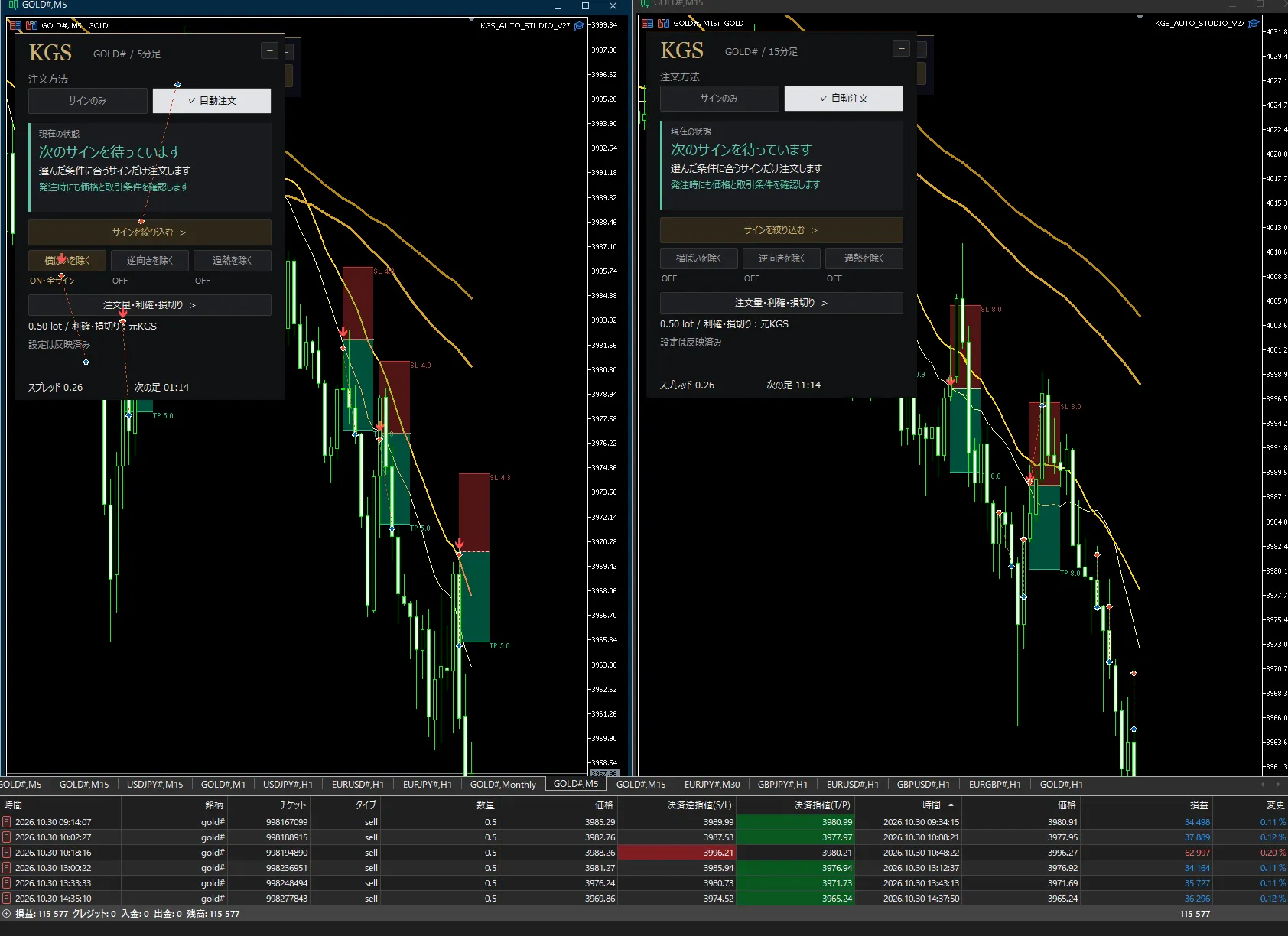
Above is the MT5 demo running screen under development. Left is the 5-minute chart, right is the 15-minute chart. Each has its own panel to check settings and operational state separately. The history shown in the screen is from some demo trades and does not represent the overall performance of operations or real account profits.
First “signals only.” Once familiar, “automatic orders.”
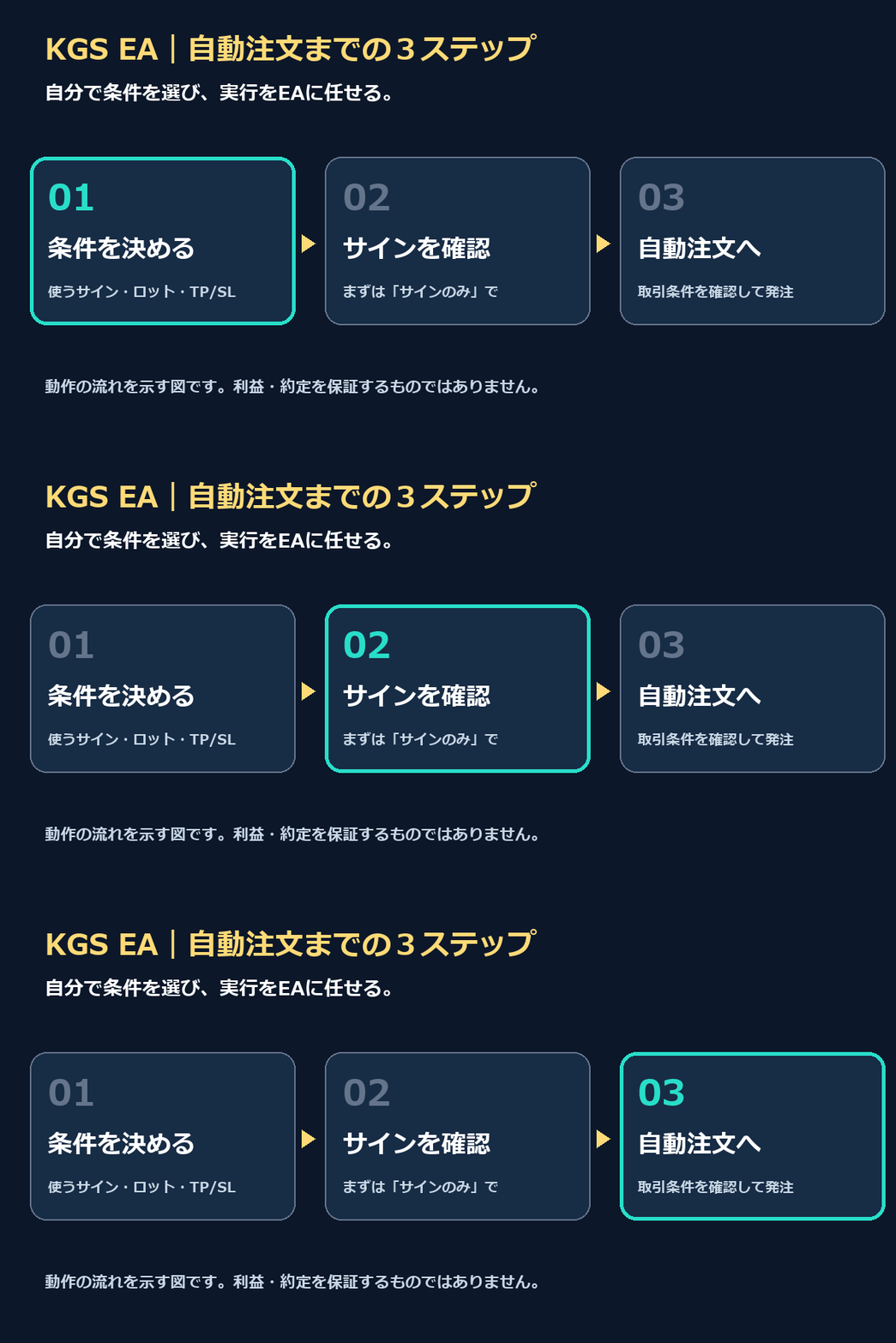
You don’t need to start with automated trading from the beginning. The panel can switch between “signals only” and “automatic orders.”
With signals only, you observe arrows and baseline TP/SL and make your own judgment. With automatic orders, the EA places orders according to the reflected conditions.
First confirm the display and settings, then move to automatic orders when you’re satisfied. The same screen allows you to take these steps progressively.
The panel also shows the current state. You can check on the screen whether it is waiting for the next signal or stopped for reasons such as trading permission.
Pre-set scenarios you want to avoid.
You can either use KGS signals as-is or filter with additional conditions.
- Exclude flat markets: skip when the selected MA moves little.
- Exclude reverse direction: skip signals that go against the chosen MA direction.
- Exclude overheating: filter signals by configured RSI conditions, etc.
Conditions can be turned ON/OFF. It’s possible to apply them to all signals at once or to configure them separately by signal type.
The big feature of the EA is that you can encode, in settings, the idea of “I won’t enter in this scenario,” instead of doing it manually each time.
However, adding more conditions does not guarantee higher win rate or profits. Excluding flat markets is not a universal feature that recognizes every range market. Please first test with a demo to see what to leave in and what to pass.
Lot size, take-profit, and stop-loss. Define your own operating conditions.
You can change order volume, take-profit, and stop-loss settings from the panel. In addition to using KGS-based take-profit/stop-loss references, there are settings to specify fixed spreads, etc., on the order side.
You can set a maximum holding amount, daily loss limit, spreads, and time-of-day constraints. This lets you tailor the risk you are willing to take according to your funds and trading hours.
Before automating, decide what conditions will move and where to stop. I hope you will treat this preparation seriously even in the EA version.
The configured loss limits and TP/SL do not guarantee you will always stop at that price, because price gaps or slippage can occur.
Five-minute and fifteen-minute charts, each with its own use.
The development version introduced here targets the gold 5-minute and 15-minute charts on Windows MT5. The current verification environment is XMT○○ GOLD#.
Keep the 5-minute and 15-minute charts on separate charts, with separate settings and states. You can operate while checking conditions on the time frame you want to use.
Because KGS logic is built-in, this EA version does not require installing the original indicator on a separate chart.
For MT4 versions or other company environments, please refer to the official release information at launch. When running, you will need a PC or VPS with network connectivity to MT5.
Final verifications are underway ahead of next week’s release.
Currently, in addition to the demo run, we are confirming setting reflections, signal filtering, and order/settlement operations.
The release is planned for next week. On GogoJungle, it will be sold exclusively to KGS indicator purchasers. The price, official release date, and purchase procedures will be announced again at release. The schedule may change depending on final verification results.
This EA is a separately sold product exclusive to KGS indicator purchasers. Those who have already purchased the KGS indicator will be able to purchase the EA as an add-on. The indicator purchase does not automatically include the EA.
If you are already using KGS and want to automate up to the order stage, or if you want to use it with your own conditions while narrowing signals, please be sure to check this EA version.
To take KGS, purchased 300 copies, into the next use case. At release, we will clearly explain how to operate and how to purchase.
For those who do not yet have the KGS indicator
The GoGoJungle edition EA is targeted at KGS indicator purchasers. If you do not have it yet, please check the contents of Kurama Gold Signal Pro from the product card below. This is the main indicator product page. The EA is sold separately, and purchase information will be provided at release.
 Existing Indicator Version: KURAMA GOLD SIGNAL PRO
Check signals, TP/SL display and usage →
Note: Automatic ordering does not guarantee profits. Losses can occur. The listed screens and specifications are from the development version and may change in the final release.