Upgrade app
TRADING APP GUIDE
Not only the “results” of buy/sell,
but also the contents behind them should be looked at.
What are the features of the smartphone app “Completely Visible Trade”
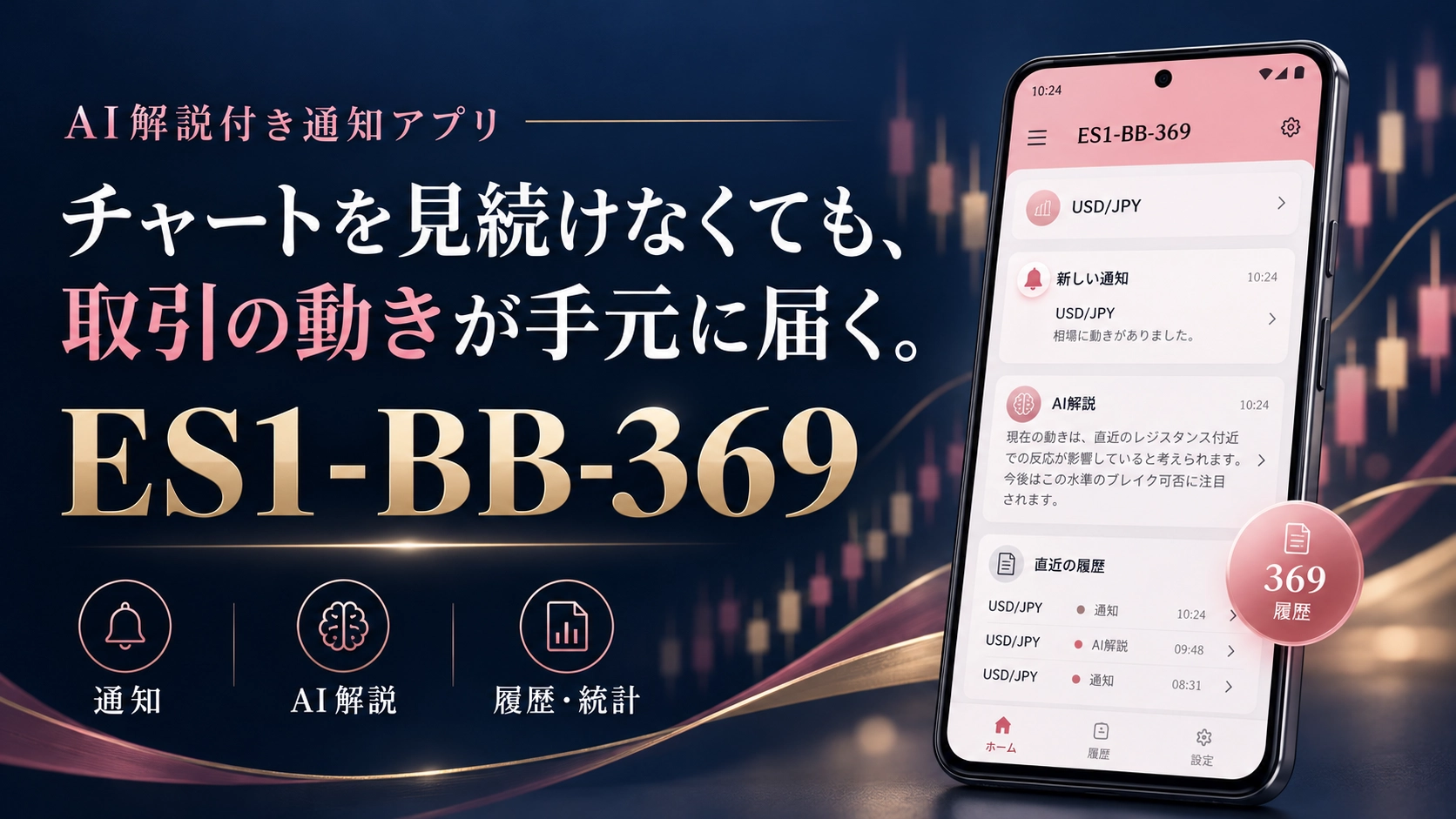
Know the trades, review in history, read the background with AI commentary. ES1-BB-369 is an Android app that lets you check the broker’s trades from various angles. It also has a feature to obtain PC tools, and its use isn’t limited to buy/sell notifications.

When viewing trade information, are you only interested in profit or loss figures? “When, which asset, and in which direction did you trade?” “What market conditions were there?” Some people would like to know the flow of the trade as well.
As introduced on GogoJungle“Completely Visible Trade”is an app for performing such checks on a smartphone. The app name isES1-BB-369. It receives the publisher’s entries and settlements, and can be checked together with AI commentary, trade history, and statistics.
Even after notifications arrive, there are things you can confirm
In trade information, you can confirm fill time, currency pair, BUY/SELL, lot size, price, and more. New entries or settlements are announced by notification sounds and a notification panel, so you can notice trades moving without constantly opening the chart or the app itself.
What to pay attention to next isAI commentarywhich explains the background of entries and settlements based on price movements at execution and technical data. It can serve as a clue to read back situations that are hard to understand just from the numbers in the history.
The traded information that is delivered is said to be based on a method using the BB moving-average divergence. Compare notifications with your own chart and use it as a reference for price levels and movements.
Open history while using your usual trading app
When you are looking at other charts or a browser on your smartphone, switching apps can be cumbersome. ES1-BB-369 supports the circular “369 History” button floating on the screen.“369 history” round button.
Tapping the round button opens the history panel of the received trades. Its position can be moved, and it can be hidden when not needed. There is also a button to open the main screen, so you can choose between a lightweight history check and a detailed view of information.
It is not a system that assigns another counterpart’s app, but rather can be checked alongside a familiar chart, which is a notable feature that makes it easy to imagine use cases.
See position status and post-trade results
On the main screen you can confirm the publisher’s number of positions, direction, lot size, current price and entry price, unrealized P/L, today’s realized P/L, and maintenance margin, etc. It’s designed to track not only the start of trading but also the ongoing held state.
The trading history shows the last six executions and AI commentary, scrollable within the frame. In addition, for the most recent up to 70 settlements received, it aggregates profit factor, total P/L, total profit, total loss, and win rate. An accumulated P/L graph is placed under the history.
What is displayed and aggregated here are the data from the broker’s account information and the trades that could be received. It does not automatically reflect the user’s own account results.
MORE THAN NOTIFICATIONS
An entry point to PC tools from an app that shows notifications,
as well
On the product page, the indicator generation feature is introduced as a major feature. In the app, you select a tool suited to your purpose, and then obtain a ZIP containing the executable, license file, and related PDFs.
In the “Indicator Generation” screen, you can confirm a simple description by popping up from the“Product Overview”button within each product. Since you can verify its用途 before obtaining it, it’s easy to choose tools you’re seeing for the first time.
The main tools introduced are four types:
BB Moving Average Divergence Indicator
Displays how far the price is from the BB central line as a percentage of the band width. Uses central line as 0%, upper/lower bands as ±100% as a rough guide, and lets you verify the divergence trend with BB on the chart. In addition to the visual impression, it’s a tool for measuring the price position numerically. Compatible with MT4/MT5.
Fibo Lot Auto-Calculation Tool 369
Sets SL, Entry, and TP with a dedicated Fibonacci and assists in lot calculation according to settings such as potential loss amount and loss rate. After verifying the calculated values, you can place a market order from a button. Compatible with MT4/MT5. The dedicated Fibonacci should be placed only once per chart to avoid misoperation.
My Friend [Scalping Version, AI at Your Side]
A MT5-only tool that checks market direction, level of expectancy, arrows, AI commentary, etc., to support the user’s own decisions. The app-provided version does not perform automatic ordering. Contains a lot of AI information, and generation/download may take time.
SIGNAL CRAFT 369 [AI-Powered MT5 Version]
Recognizes BUY/SELL signals from external indicators and assists in automating entry/settlement according to configured conditions. MT5-only tool. AI judgment scores and commentary on signal direction are also available. The signal indicators used must be provided separately, and you configure them to match their specifications.
The four kinds have different roles. If you’re checking price position, use BB divergence; if you’re helping with quantity calculation, use Fibo; for AI support in discretionary judgment, use My Friend; for automating external signals, use SIGNAL CRAFT. Choose based on your needs for clarity.
Generated files to be used on PC MT4/MT5
Tools can be generated in the smartphone app, but the generated tools are used on PC MT4/MT5. Send the ZIP to your PC, extract it and install. For products that support both MT4 and MT5, you can obtain .ex4 and .ex5 together.
The ZIP includes the executable, plus a dedicated license file to check the expiration and related PDFs. Do not copy only the executable; you must also place the expiration file according to the included PDFs.
Tool expiration is linked to the app’s usage period. If you renew the expiration, regenerate the ZIP from the updated app and overwrite the new expiration file, then re-import to the chart. The PC-side expiration file is not updated automatically.
What kinds of use cases is it suited for
Completely Visible Trade is designed for people who want not only to be notified of trades but also to review backgrounds and history. It allows you to check the trade flow on the go with a smartphone and use analysis/operating assistance tools that suit your目的 on a PC, connecting these scenarios.
The app screens, notifications, and AI commentary support Japanese, English, Vietnamese, Thai, Chinese (Simplified), and Korean. It is for Android and is not available on iPhone. For continued reception, you also need to check device settings such as notification permissions and battery restrictions.
Note that the smartphone app itself is for receiving and displaying information and does not automatically place orders to your account. The AI commentary and broker performance information do not guarantee future profits or identical results for you.
Know the trades’ contents and expand how you use the tools
The hallmark of Completely Visible Trade is that trade notifications, AI explanations, histories and statistics, and PC tools acquisition are connected in one app. Not only receive information, but you can review trades, compare with your own charts, and select the necessary tools. This makes it an app worth checking for those considering such uses.
On the referenced GogoJungle product page, as of October 26, 2026, it is listed as free. For usage period, distribution conditions, and update methods, please check the product page and the guidance at the time of acquisition.
Check the Completely Visible Trade product page →