

Even though I drew a horizontal line, I realized it had disappeared when I wasn’t looking — a method to have someone watch while you’re not looking at the chart
Before going out in the morning, I drew a horizontal line on the chart.
After opening the chart a while later,the line had long since been crossed, and it had moved.
Have you ever experienced this?
I have many times.
A horizontal line is not useful just by drawing it.
It depends on whether you can see the moment when price hits the line.
But you can’t stay in front of the chart all day while working or doing chores.
Watches should be left to the computer
So I set it up so that“If it hits the line, notify my smartphone”.
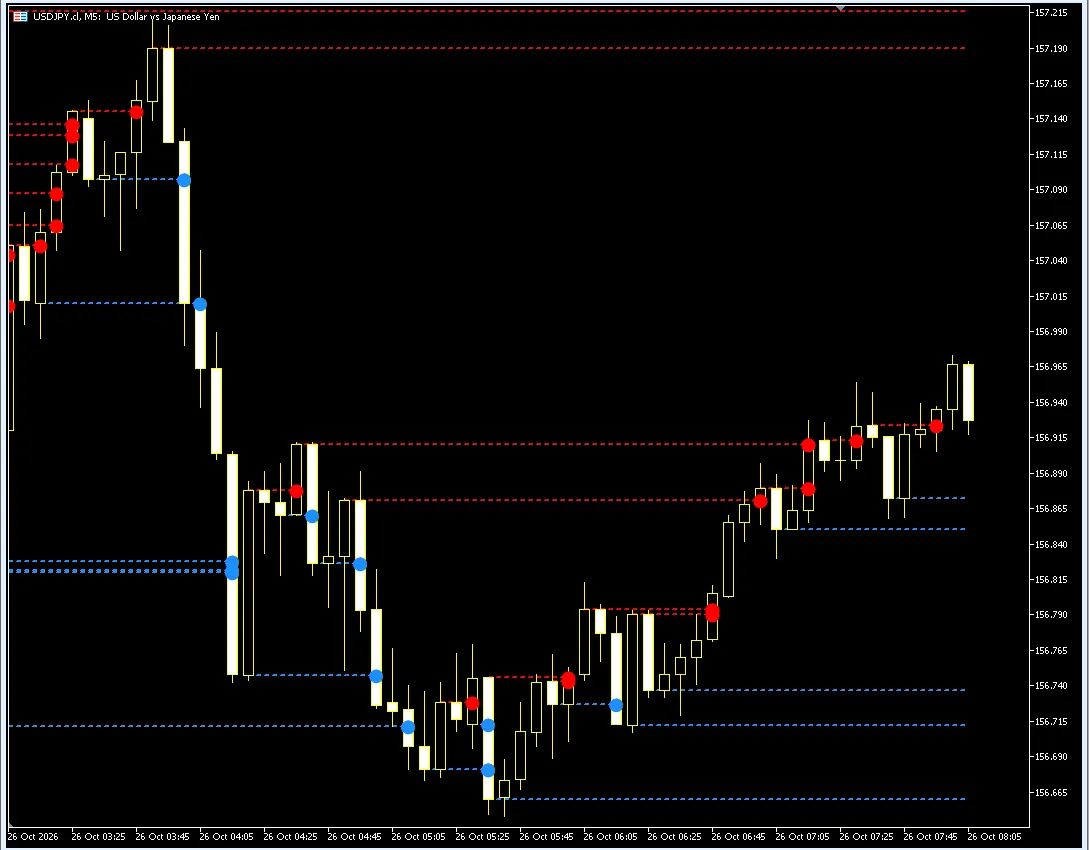
What I am using is the MT5 indicator released on October 22“Leave It to Horizontal Line Pro” (a product I sell).
- Automatically draw horizontal lines in red for highs and blue for lows.
- When the candle that hits the line is confirmed, put a● on that candle
- At the same time, notify both MT5 screen and smartphone
Which candles get the ● is selectable in the “line drawing method” settings. In this article, we explain with candles that crossed the line on their bodies – “body → body.” .
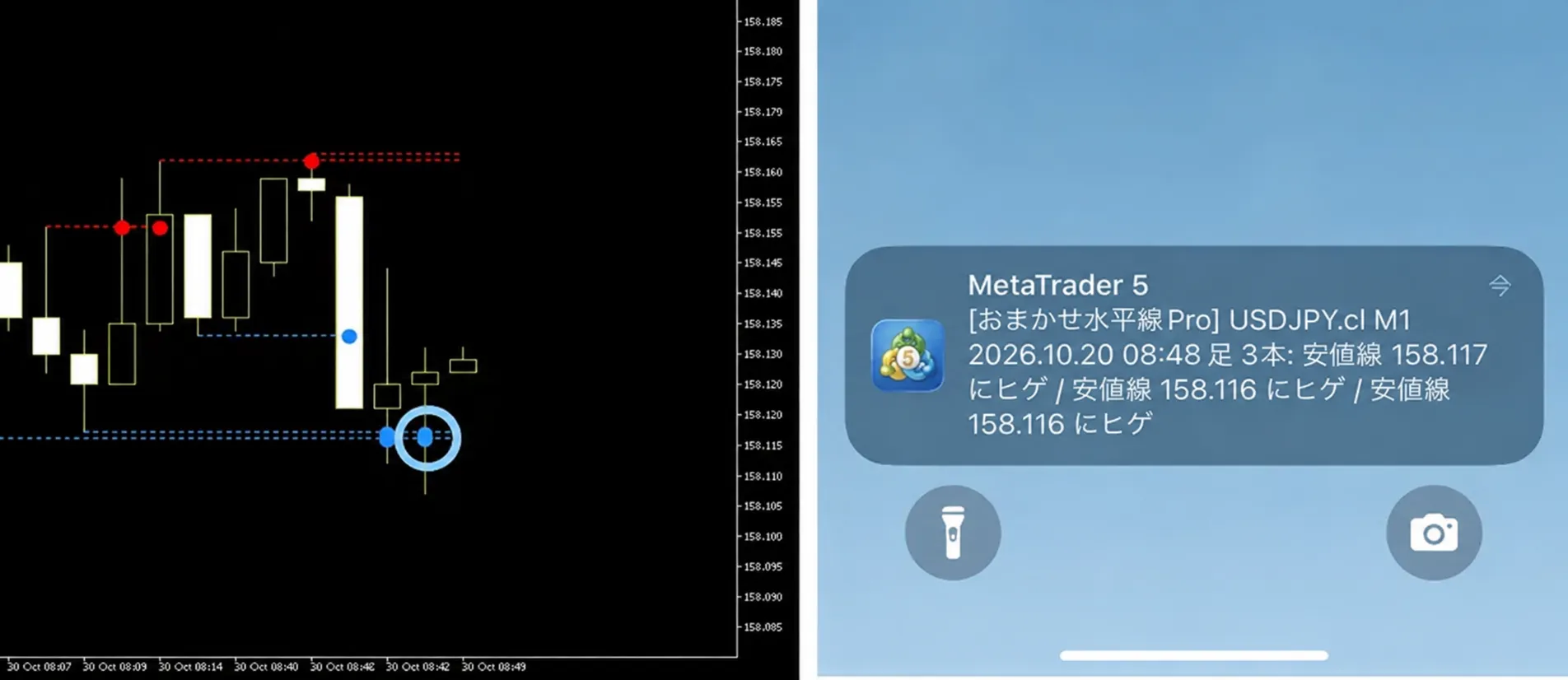
The notification includes the currency pair, timeframe, and which line it hit (high or low).
Since you only need to open the chart when you receive it,you’re less likely to miss important moments even if you don’t watch all the time.
▶ View Leave It to Horizontal Line Pro (launch sale 2,980 yen until 11/1)
However, if you enter right after a notification arrives,you may be stopped out, which can happen. I was like that at first.
Notifications are a cue to look, but when you enter or not is a separate decision.
From here, I will introduce the settings that deliver notifications to your smartphone and two things to look at before entering when a notification arrives.
Settings to deliver notifications to your smartphone
MT5 notifications come from MT5 on your computer to the MT5 app on your smartphone. You set this up once at the start.
- In the app settings,check yourMetaQuotes ID (8 alphanumeric characters)
- In MT5 on your computer, open “Tools → Options → Notifications”
- Check “Enable push notifications” and enter the MetaQuotes ID
- Press “Test” to confirm it reaches your smartphone
- In the indicator settings, set the “how to notify”to “Screen and Smartphone”.
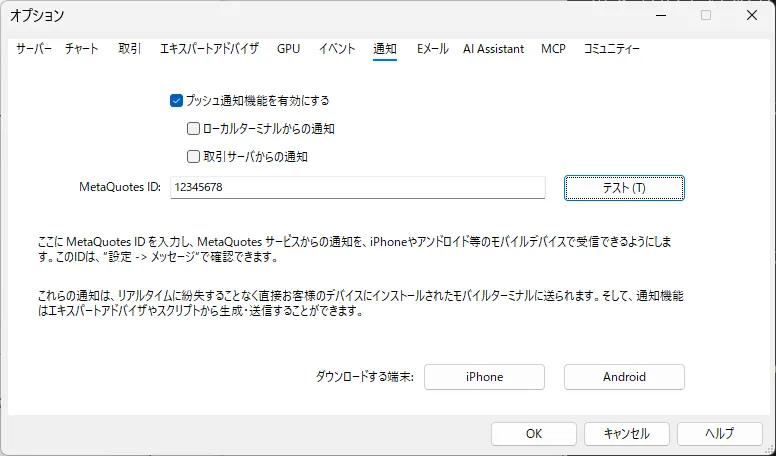
※ To receive notifications, you must keep the MT5 with the indicator running and connected to the Internet. If you use it while away from home, keep the computer on or use a VPS (a rentable computer).
Difference from MT5’s standard alerts
MT5 also has a price alert feature.
However,you must set the price you want to be notified for one by one, and it rings the moment the price reaches it, so even a wick touching mid-candle will trigger. .
Leave It to Horizontal Line Pro automatically adds lines and watches as new highs/lows form,and notifies after the candle closes,and if you set the line drawing to “body → body,” you can be notified only when the body breaks through.
Two things to look at first when a notification arrives
The notification is a notice that it hit the line.It is not a signal to go up or down.
When a notification arrives, I look at the following two things.
① Is this a time when price tends to move a lot?
Even with the same ●, times with little price movement tend to have less follow-through. I mainly enter when watching during the European and US sessions (evening to night in Japan).
② Is there another line further ahead?
Even if you break the line, if there’s a high/low on the one-hour chart a short distance ahead, you’re more likely to stop there.
Pro can also overlay one-hour and four-hour lines on a five-minute chart.
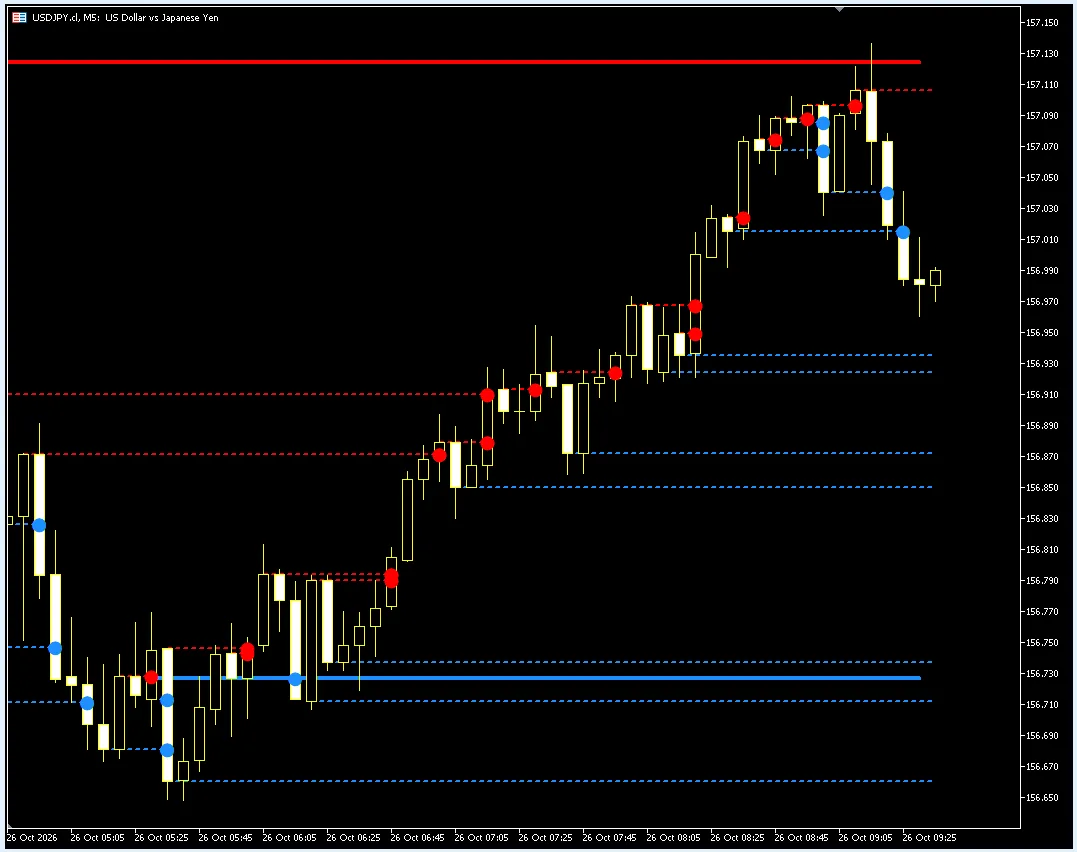
※If you set the line drawing to “Wicks → Bodies,” notifications will be about testing the wicks and returning, which is useful for waiting for a breakout at the upper or lower range.
My method: enter in the direction of the ●, keep losses small, let profits run
- Entry:Enter in the direction of the● when price is moving a lot (red ● for buy, blue ● for sell)
- Stop loss:Decide before entering,keep it small.
- Take profit:Do not decide in advance;hold until the opposite color ● appears (if stopped out before, that ends the trade)
With this setup, small losses may occur frequently, and the number of wins is not large.
Instead, I try to hold through moments when the price moves sharply to maximize gains.
※This is a description of my approach and does not guarantee profit. Set your stop loss and holding time in consultation with your capital.
Recommended settings for beginners
| Item | Recommendation | Reason |
|---|---|---|
| Line drawing method | Body → Body | Draw the line at the end of the candle body; a ● appears on candles that break through the body. If only the wick touches, no ● appears, so you can stay calm (I use this on a 5-minute chart) |
| Notification method | Screen and smartphone | You receive it even when away |
| Too many lines | Make the peaks and troughs 2–3 | Only the large peaks/troughs have lines drawn |
| Want to see the one-hour line as well | Put another chart in the same chart and set the time frame to “1 hour” | Changing line color, thickness, and marker shape/size makes it easier to distinguish |
Summary:Once you draw the line, leave monitoring to notifications. When a notification arrives, check two things: “is this a time when price moves well?” and “is there a line ahead?” before deciding.
▶ View Leave It to Horizontal Line Pro (launch sale 2,980 yen until 11/1)
Related (all within GogoJungle. Products and articles I have published)
・【Free PDF】How to draw horizontal lines, no more confusion | 5 basic rules (for FX beginners)
・【Examples】Scenes where the wick only breaks through and returns vs. breaking through by the body | 3 points to identify horizontal line breaks
※Leave It to Horizontal Line Pro is an MT5-only indicator. It does not place orders. The marks and notifications simply indicate that the line was hit and do not advise on buying or selling. Past chart examples do not guarantee future results.