
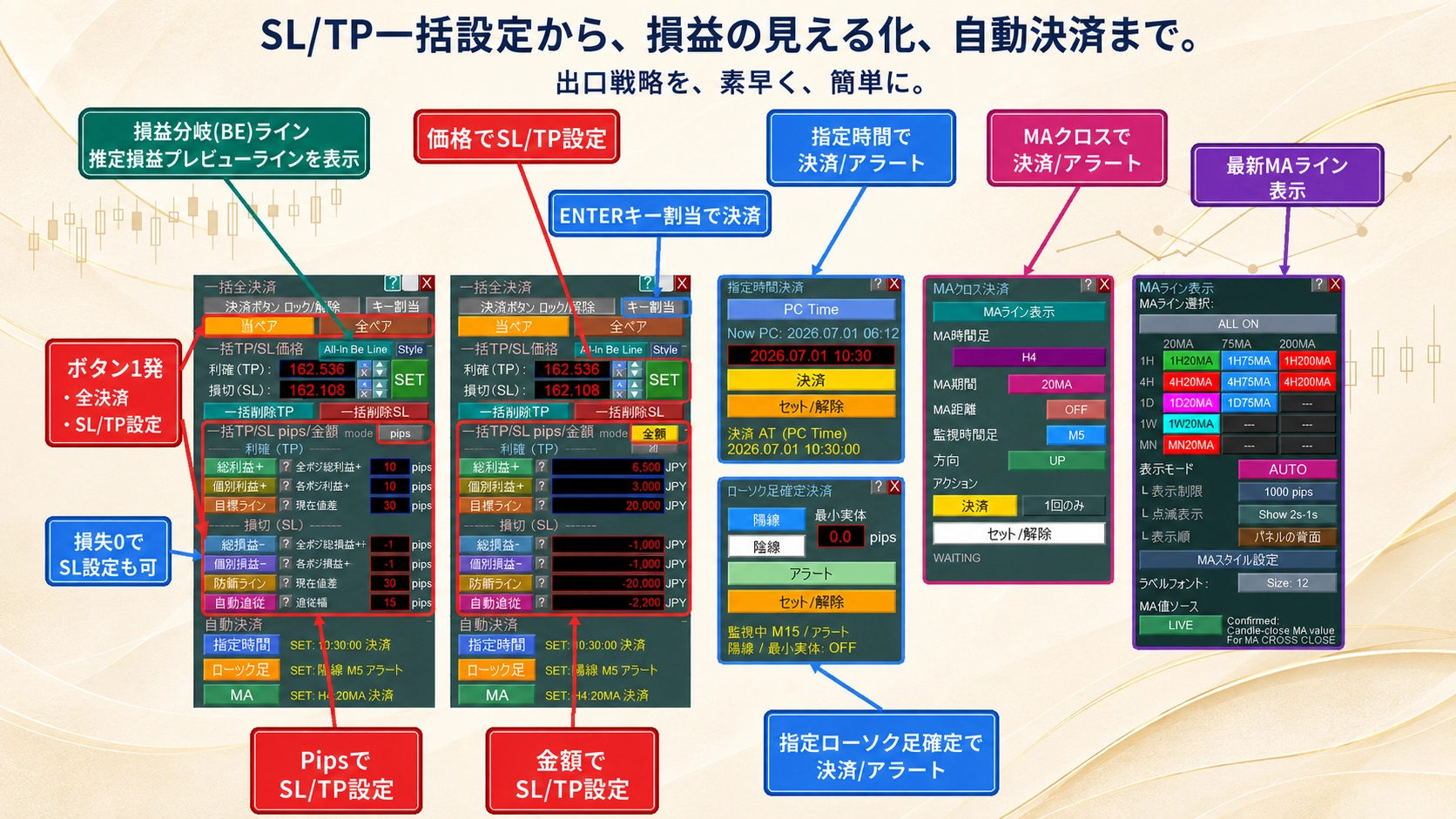
[MT5 Discretion Tool] 8 selectable products: introduction of upcoming features
Table of Contents:What you can doConcernsProduct Comparison TableRecommended for such peopleOther Features▶ View Price & Comparison Table
※ You can start viewing from any section by clicking the table of contents.
We will introduce two new features currently in development.
These features are planned to be standard on the BASIC/BASIC PLUS/PRO models in this series.
If shown with images, it will look like this.
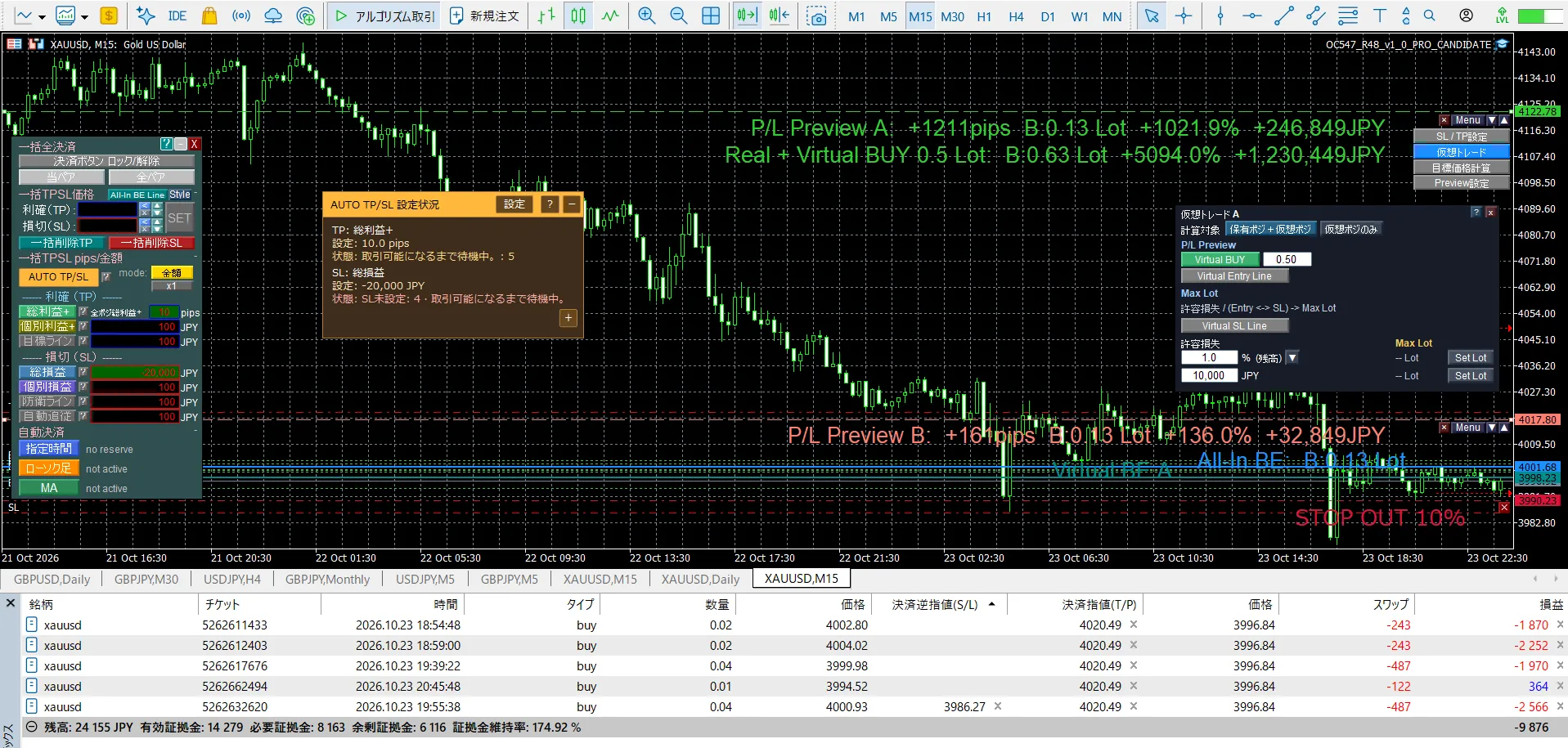
■ AUTO TP/SL
When you add a position, TP/SL can be automatically setto become like this (left side image).
When you add a position, TP/SL can be automatically setto become like this (left side image).
You will be able to standby before enteringas you can.
TP/SL values will be automatically recalculated for all positions if there are additional positions, based on the target value in specified pips/amounts, keeping all positions aligned to the target value.
When entering against unexpected moves such as early market trends or gaps caused by indicators,you can automatically set SL and TP right after entryto reduce risk and aim for quick profits.
Furthermore, when averaging down, you no longer need to manually repeat tedious SL/TP settingsfor multiple positions— it’s convenient.
From the Preview Line (right side of the chart), you could always move the line to viewTP/SL settings in bulk on the chart, but now additional features will be added in a Preview Menu to use multiple new features.Before entering, you can understand potential profit/loss and calculate LOT in advanceThis will allow you to quickly confirm, by moving the line, how much profit or loss will occur for the planned LOT before entry.
[TP/SL Settings]
Bulk TP/SL setting on the chart as before using the line price
[Virtual Trade]
On the preview line, you will be able to simulate P/L for new or added entries with a hypothetical LOT, such as 0.35 LOT. You will also be able to calculate the MAX LOT under specified conditions. This will allow you to estimate profit/loss for planned LOTs before new or added entries.
[Target Price Calculation]
Derive the target price level from the target profit/loss.
Please note that the features introduced this time are still in testing and not released yet. We are in the final development stage and will need a little more time.
When released, the corresponding series will undergo a price revision.
If you are on the Basic version, we are considering an approximate price increase of 3,500 yen.
FX or gold
Please try the free version extensively.
From the product comparison table, you can consider the best tool for you.
The BASIC model already includes all the necessary features.
We hope you will compare it with other products as well.
I use it every day myself, so we will continue to update it.

※ If text is hard to read, you can set the video to 1080p in the settings for a clearer view.
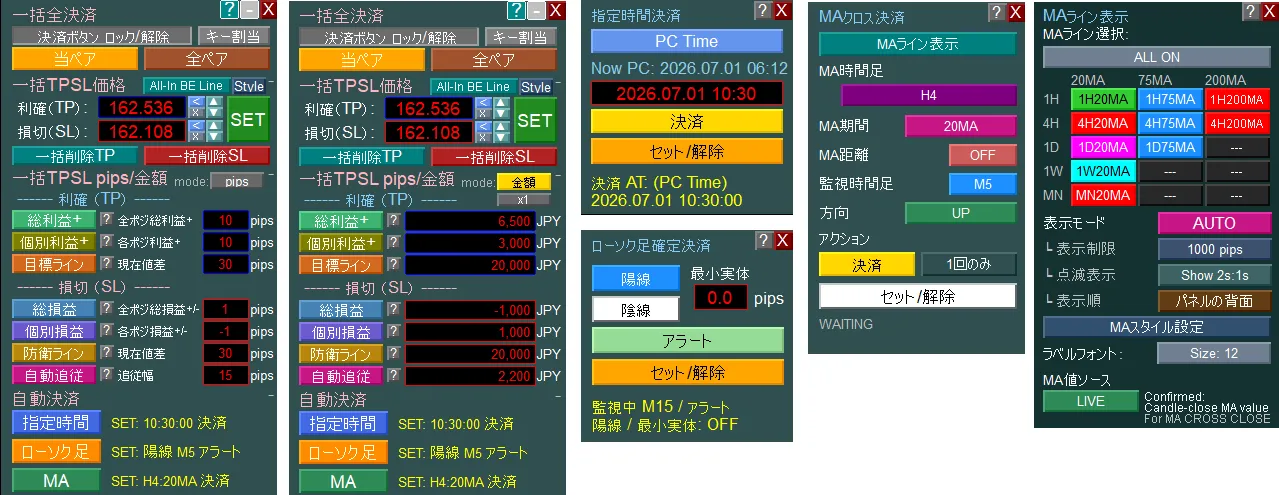
■ What you can do
Judgment is up to the trader, and this supports confirming the necessary information and setting and settlement from there. All functions are designed to make it easier for discretionary traders to implement their rules.
✓
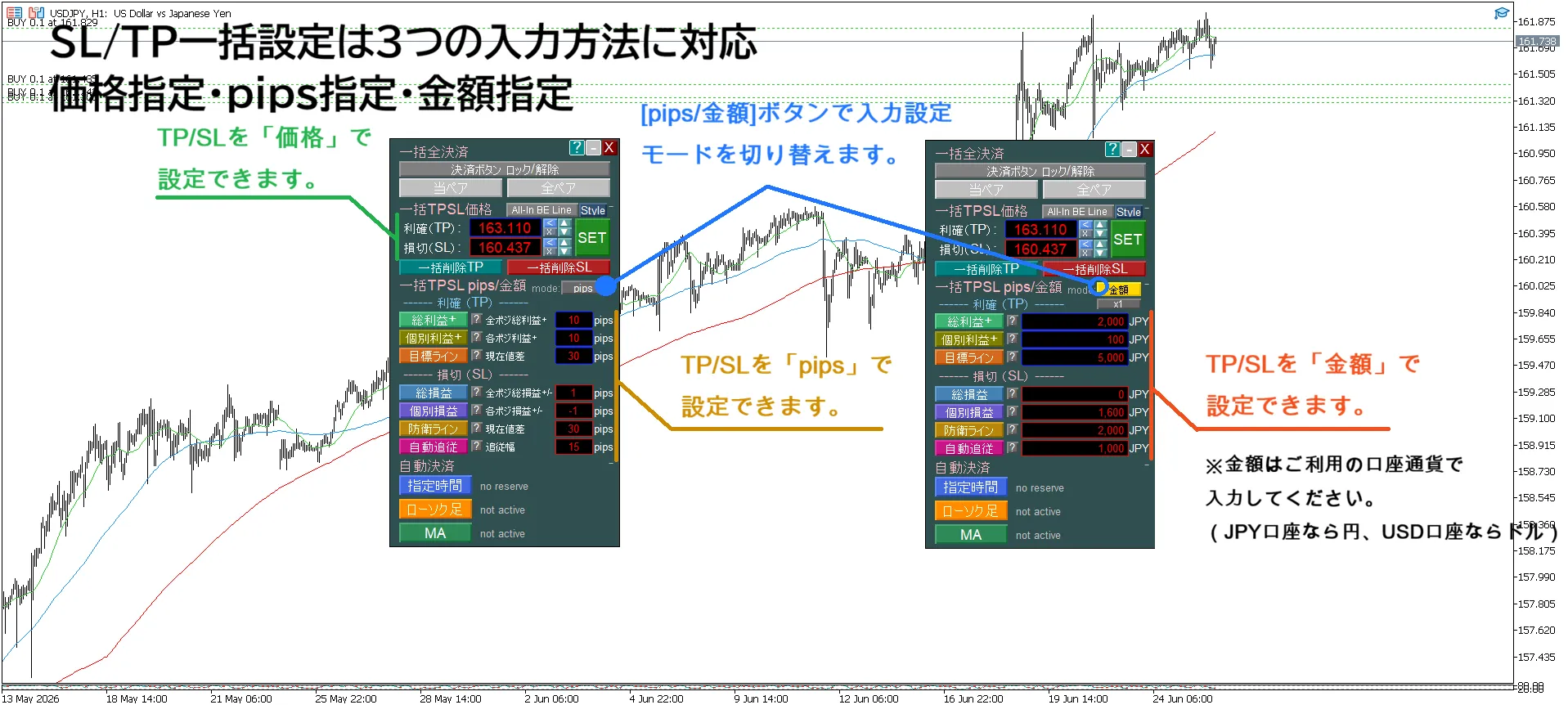
One-click bulk setting of SL/TP for all positions
Supports amount, pips, and price specification
In amount or pips mode, you can set in a fixed price or a desired profit/loss amount with bulk settings
→ Quickly set SL/TP in a method that suits you without hesitation
✓
Automatically set SL/TP by specifying target profit and acceptable loss
✓
Display the price where profit/loss becomes zero (All-In BE line)
✓
Show estimated P/L for multiple positions at arbitrary prices
✓
Drag the profit/loss preview line and set TP/SL in bulk on the chart with a click
✓
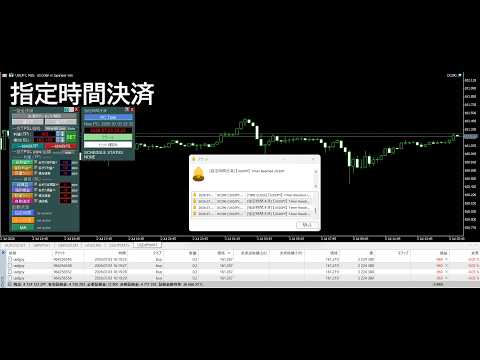
Auto-settle by time / candle / MA cross
✓
Display MA for 1H/4H/Daily/Weekly/Monthly selectively without chart switching
✓
Enter key for immediate full settlement
■ To reduce the “I knew it but couldn’t do it”
Profits in trading are not only about misreading the market; regretting after missing a decision also hurts.
“I decided to settle, but I stayed in hoping it would go a bit more.”
“I decided to cut losses, but I didn’t want to realize the loss, so I postponed.”
“I planned to set SL, but setting for multiple positions was tedious and I postponed.”
“I thought I checked higher timeframe, but I missed an important MA.”
“While sleeping or at work, I couldn’t respond at the planned timing.”
This product is a tool to help you implement the rules you set for yourself.
Bulk settings, profit/loss lines, auto settlements, higher timeframe MA display, and quick settlements.
They may seem like different features, but they all share a common goal:
“Reducing the gap between knowing and doing.”to the extent possible.
■ Have you ever experienced this?
【Bulk Management】
・Postponing TP/SL settings for multiple positions caused you to miss the price movement
→“If only I had set it then,” and you later regret the losses.
→“If only I had set it then,” and you later regret the losses.
・Even after deciding target profit and acceptable loss, you don’t know the setting price for TP/SL
・Want to exit at breakeven or minor profit but don’t know the break-even price including fees
・“At this price, what would the overall result be?” you cannot decide immediately
・Want to exit at breakeven or minor profit but don’t know the break-even price including fees
・“At this price, what would the overall result be?” you cannot decide immediately
【Settlement】
・Even with set settlement rules, emotions or circumstances prevent you from following them
- Couldn’t settle before a news release because you were at work and couldn’t monitor the chart
- Planned to cut losses when the next candle confirms a reversal, but couldn’t decide
- Planned to settle when the 20 MA is breached, but watched and hesitated
→ Dithering and carelessness that undermine your rules can erode profits and capital
- Couldn’t settle before a news release because you were at work and couldn’t monitor the chart
- Planned to cut losses when the next candle confirms a reversal, but couldn’t decide
- Planned to settle when the 20 MA is breached, but watched and hesitated
→ Dithering and carelessness that undermine your rules can erode profits and capital
【Chart Analysis】
・It’s tedious to switch charts repeatedly to confirm higher timeframe MA
・You may forget the higher timeframe MA you were watching and realize it only after a bounce
・You may forget the higher timeframe MA you were watching and realize it only after a bounce
【Settlement Operation】
・If you move the mouse cursor slightly during a moment when profits can swing by a few pips, the settlement menu closes and you can’t focus on price movement
■ Product Comparison Table
| Product Name | SL/TP | Key Settlement | Profit/Loss Line | Auto Settlement | MA Line Display | Price | ||||
|---|---|---|---|---|---|---|---|---|---|---|
| Button Bulk Settings | Line Drag Settings | Profit Break-even BE | Estimated Profit/Loss | MA Cross | Candle | Time | ||||
| 1 Click PROThis product Bulk Settings [Stop Loss/Take Profit] & Auto Settlement [MTF MA Cross, Specified Time, Specified Candle] MT5 | ✓ | ✓ | ✓ | ✓ | ✓ | ✓ | ✓ | ✓ | ✓ | 13,980円 |
| 1 Click PLUS Bulk Settings [Stop Loss/Take Profit] & MTF MA Line Display MT5 | ✓ | ✓ | ✓ | ✓ | ✓ | – | – | – | ✓ | 8,980円 |
| 1 Click BASIC Bulk Settings [Stop Loss/Take Profit] MT5 | ✓ | ✓ | ✓ | ✓ | ✓ | – | – | – | – | 7,480円 |
| 1 Click AUTO Auto Settlement [MTF MA Cross, Specified Time, Specified Candle Confirmed] MT5 | – | – | – | – | – | ✓ | ✓ | ✓ | ✓ | 6,980円 |
| 1 Click MTF MA Auto Settlement [MA Cross] & MA Line Display MT5 | – | – | – | – | – | ✓ | – | – | ✓ | 3,980円 |
| 1 Click CANDLE Auto Settlement [Specified Candle Confirmed] MT5 | – | – | – | – | – | – | ✓ | – | – | 1,680円 |
| 1 Click TIME Auto Settlement [Specified Time] MT5 | – | – | – | – | – | – | – | ✓ | – | 1,680円 |
| 1 Click MTF MA Display MT5 | – | – | – | – | – | – | – | – | ✓ | 1,880円 |
※ Clicking the product name will link to each product page.
■ Recommended for which traders
①
Traders who hold multiple positions
will benefit from this
will benefit from this
②
Discretionary entries
+ rule-based settlements
+ rule-based settlements
③
Higher timeframe analysis
emphasis
emphasis
【Traders who hold multiple positions】
(averaging down, pyramiding, hedging, split entries, etc.)
When you have multiple positions, new problems arise that aren’t present with a single position.
・Cannot bulk change SL/TP for multiple positions
・Do not know the price to exit at break-even
・Even if you decide target profit and acceptable loss, you don’t know the TP/SL setting price
・When price moves to an arbitrary level, you don’t know total profit/loss
・Don’t know the overall breakeven point for all positions
What this EA can do:
✓Bulk setting of SL/TP for all positions with a single button (amount, pips, price) coordinated
✓Automatically set SL/TP by inputting basic exit prices, fixed loss/profit values, or pips(If exiting at break-even, enter 0 yen or 0 pips)
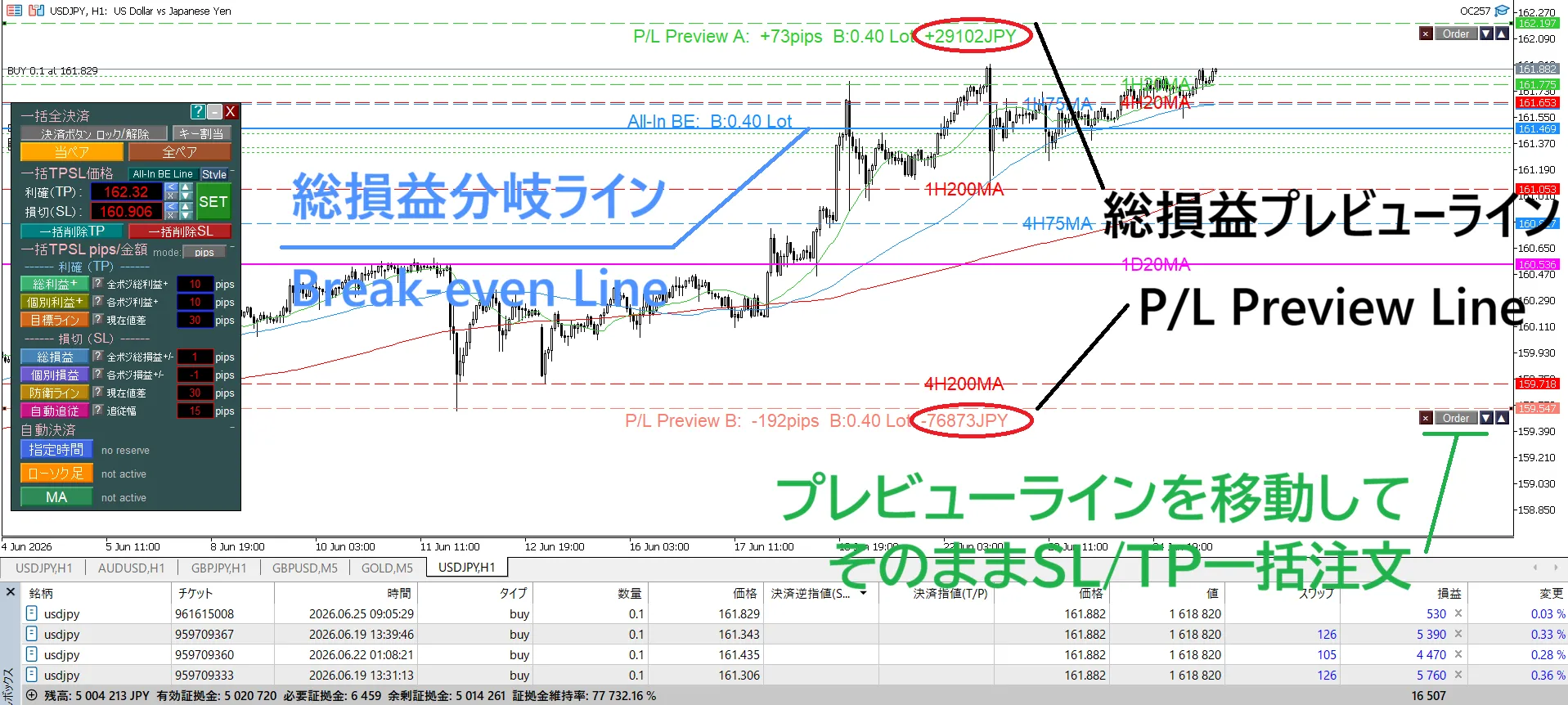
✓Display the exit price for bulk exit of multiple positions (All-In BE line)
✓Show estimated profit/loss for multiple positions at an arbitrary price
✓Drag the profit preview line and set TP/SL in bulk on the chart
✓Enter key for immediate settlement (focus remains on the chart)
・Bulk setting is not just to speed up work. It reduces omissions and input errors and makes it easier to implement the decided risk management.
・All-In BE line and profit preview line aren’t only for display. By dragging the lines and seeing the estimated total P/L, you can decide the exact price to settle and apply it as a bulk TP/SL for all positions, completing checks, viewing, and setting all in the chart.
・Enter key settlement is not to speed up settlements alone. It’s designed to minimize the tendency to focus on the chart, so you can focus on the price movement you should watch.
・All-In BE line and profit preview line aren’t only for display. By dragging the lines and seeing the estimated total P/L, you can decide the exact price to settle and apply it as a bulk TP/SL for all positions, completing checks, viewing, and setting all in the chart.
・Enter key settlement is not to speed up settlements alone. It’s designed to minimize the tendency to focus on the chart, so you can focus on the price movement you should watch.
※ If text is hard to read, set the video to 1080p from the gear icon in the top-right corner for a clearer view.

※ If text is hard to read, set the video to 1080p from the gear icon in the top-right corner for a clearer view.
【Discretionary Entry + Rule-Based Settlement】【Upper Timeframe Analysis Emphasis】
Entries can be discretionary, but settlements should be performed by rules without being swayed by emotions or life circumstances.
✓Auto settlement at a specified time (before indicators release, before sleep, etc.)
✓Auto settlement when the candlestick of a specified time frame closes
✓Auto settlement when MA cross is confirmed or a specified distance is reached
✓Can freely combine specified time (TIME), candle confirmation (CANDLE), MA cross (MA CROSS)
✓All of these can be used not only for settlement but also as alert notifications only
We support executing pre-determined settlement rules without being swayed by emotions or life circumstances.
※ If text is hard to read, set to 1080p via the video’s settings for a clearer view.

※ If text is hard to read, set to 1080p via the video’s settings for a clearer view.

Switching charts to confirm higher timeframe MA every time is tedious. If you forget updates, you may miss higher timeframe MA and move based on outdated MA lines.・
✓Display 1H/4H/Daily/Weekly/Monthly MA prices on the current chart with horizontal lines
✓AUTO mode to show only when price is near
✓Blinking display is possible to maintain visibility of Fibonacci lines and trendlines, reducing misses
Upper timeframe MA display is not to change your analysis method. It allows you to view higher timeframe MAs on the current chart without switching charts.

※ If text is hard to read, set to 1080p via the video’s gear icon for a clearer view.
We also have an English version of the video ⇩
Please review the operation screen and features.

■ Other Features
Assuming you will use this daily, we consider not only features but readability, ease of setup, and resilience in restoration as well.
✓
Language support inside the EA display, built-in guide, and alerts (9 languages): English, Japanese, Russian, Chinese, Korean, Portuguese, Spanish, Indonesian, Thai
✓
Built-in user guide (34 pages; also supports exporting to a text file)
✓
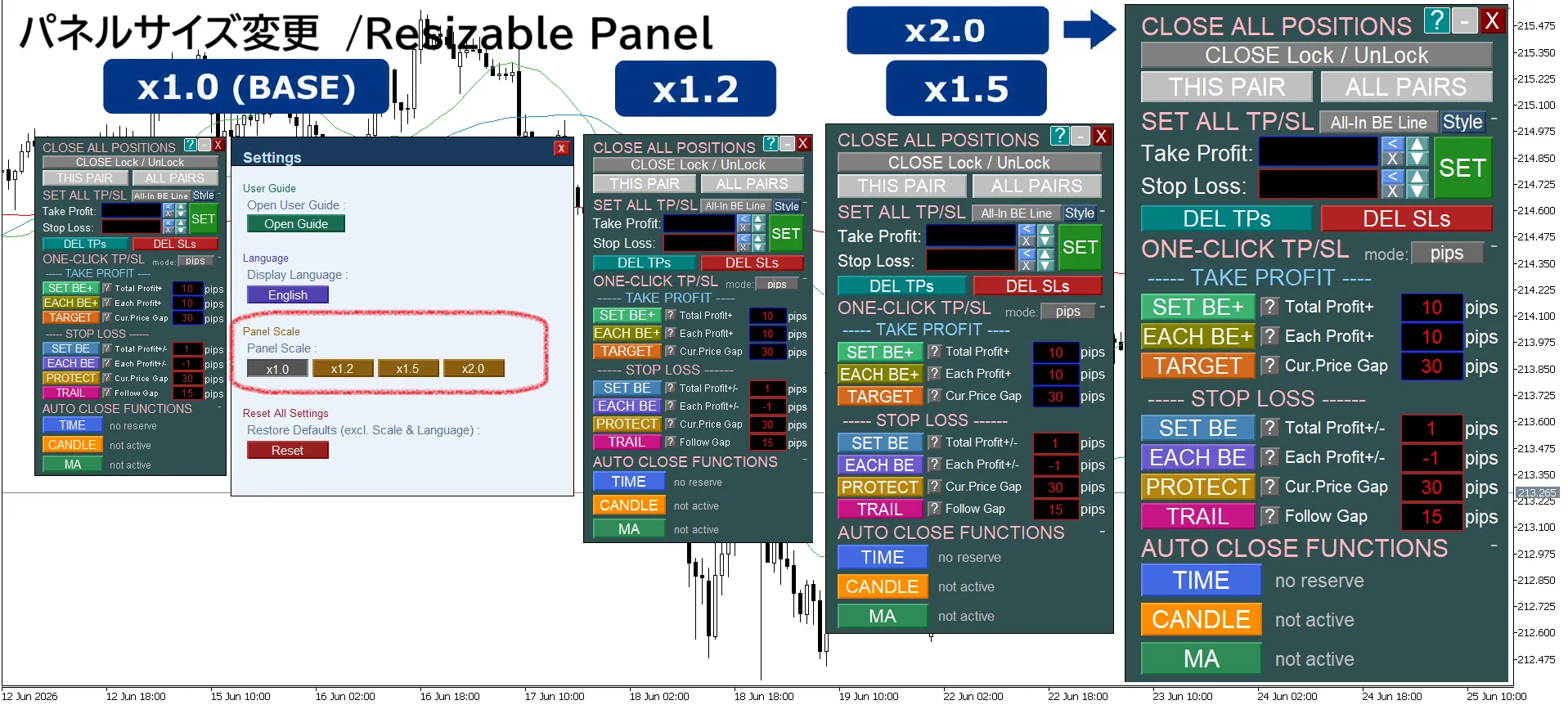
Panel resizing support (1.0x to 2.0x)
✓
Compact display by collapsing unnecessary panel items
✓
Save various settings for panels and lines and restore automatically after restart
✓
freely customize line color, line type, thickness, label font size, and label position (settings are saved)

※ If text is hard to read, set to 1080p via the video’s gear icon for a clearer view.

※ If text is hard to read, set to 1080p via the video’s gear icon for a clearer view.

※ If text is hard to read, set to 1080p via the video’s gear icon for a clearer view.
■ Finally
This product is not an Expert Advisor that makes decisions on your behalf. It is built to help you execute what you decide and to reduce the regret of “I knew it but couldn’t do it.”
This product and series were not created solely from my own ideas.
I shaped this from the inconveniences I felt in actual trading and from requests from users who have traded XAUUSD for years, refining and improving it into what it is today.
That is why every function has a reason for being.
Practicality over flashiness.
More about what truly helps in daily trading than the sheer number of features.
From now on as well, we will continue to value user feedback and improve it to be a tool that is easier to use and reliable for ongoing use.
This product and series were not created solely from my own ideas.
I shaped this from the inconveniences I felt in actual trading and from requests from users who have traded XAUUSD for years, refining and improving it into what it is today.
That is why every function has a reason for being.
Practicality over flashiness.
More about what truly helps in daily trading than the sheer number of features.
From now on as well, we will continue to value user feedback and improve it to be a tool that is easier to use and reliable for ongoing use.
If you have any questions or requests, please feel free to send us a message.
Whether about features, usage, requests for feature additions, or even corrections and pricing discussions, we welcome your inquiries.