
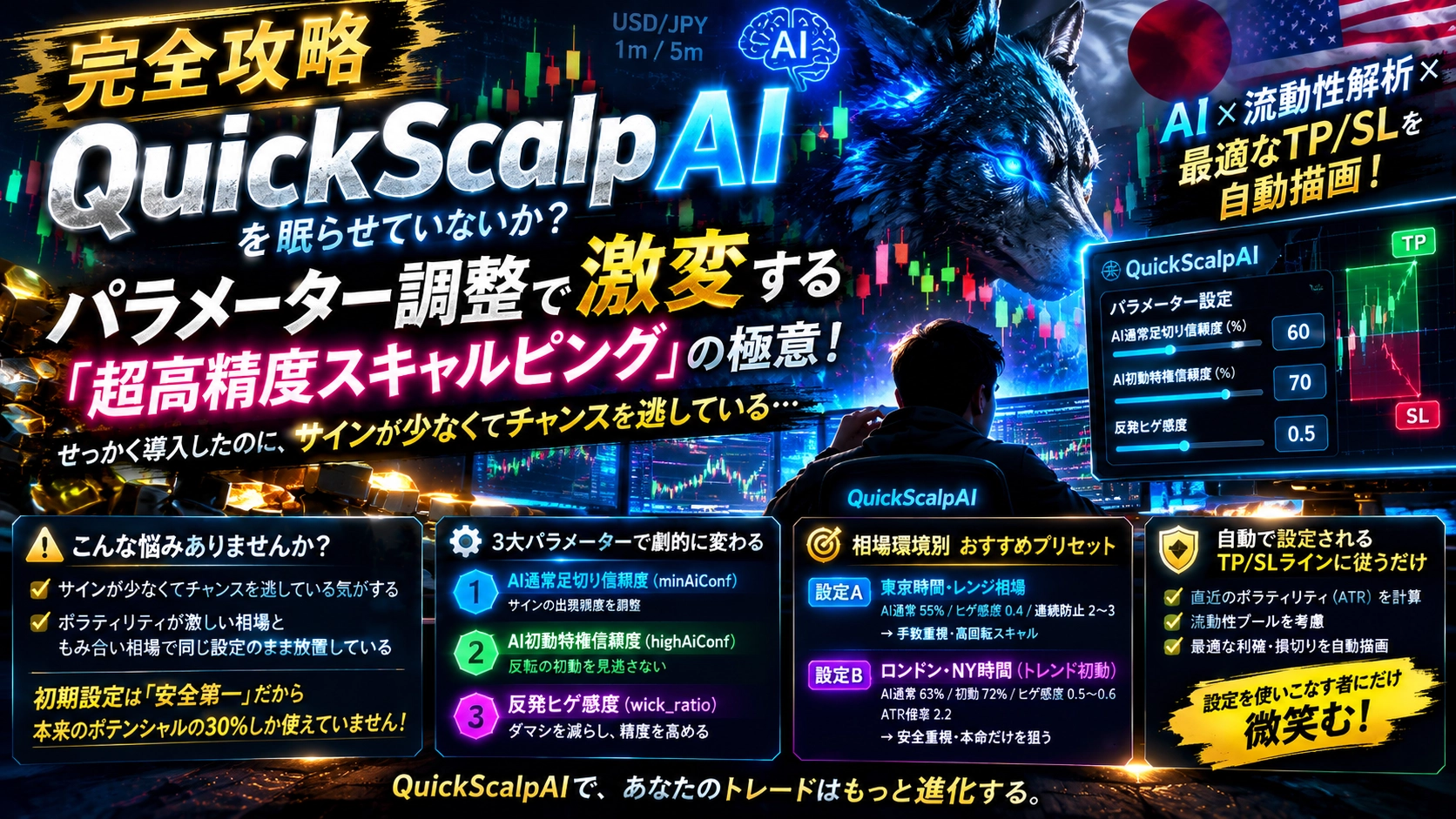
[Complete攻略] Are you keeping QuickScalpAI awake? The copy of the secrets of ultra-high-precision scalping that dramatically changes with parameter tuning
“Even though we’ve introduced it, I feel like we’re missing chances because there are too few signals.”
“Because of the volatile market and the ranging market, we’ve left it as is with the same settings.”
“If you’re using QuickScalpAI with the default initial settings,
you’re only experiencing about 30% of the potential hidden in this indicator.
QuickScalpAI is a scalping-only indicator designed to survive ultra-short-term noisy markets, with a nearby AI + algorithmic liquidity detection
engineered feature.
This time, we’ll disclose the parameter-tuning techniques that many users overlook to adapt to market conditions. Just by understanding this, signal frequency and win rate will dramatically change.
1. Why QuickScalpAI is wasteful to keep at “default values”?
If you don’t adjust them, you’re leaving value on the table.
QuickScalpAI’s initial settings are a safety-first (defensive) configuration to absolutely avoid big losses. Because the Danger guard for rapid fluctuations and the blocking features for ranging/band walks work powerfully, it intentionally narrows signals in wild markets.
However, markets also have “gentle ranging” periodsand“times when a clear trend emerges during London and New York hours.” The biggest strength of this tool is that by changing the values in one or two places in the parameters, you can reflect these different environments.
2. The “Three big parameters” that dramatically alter behavior
Open the settings page (gear icon) and pay attention to the following three items.
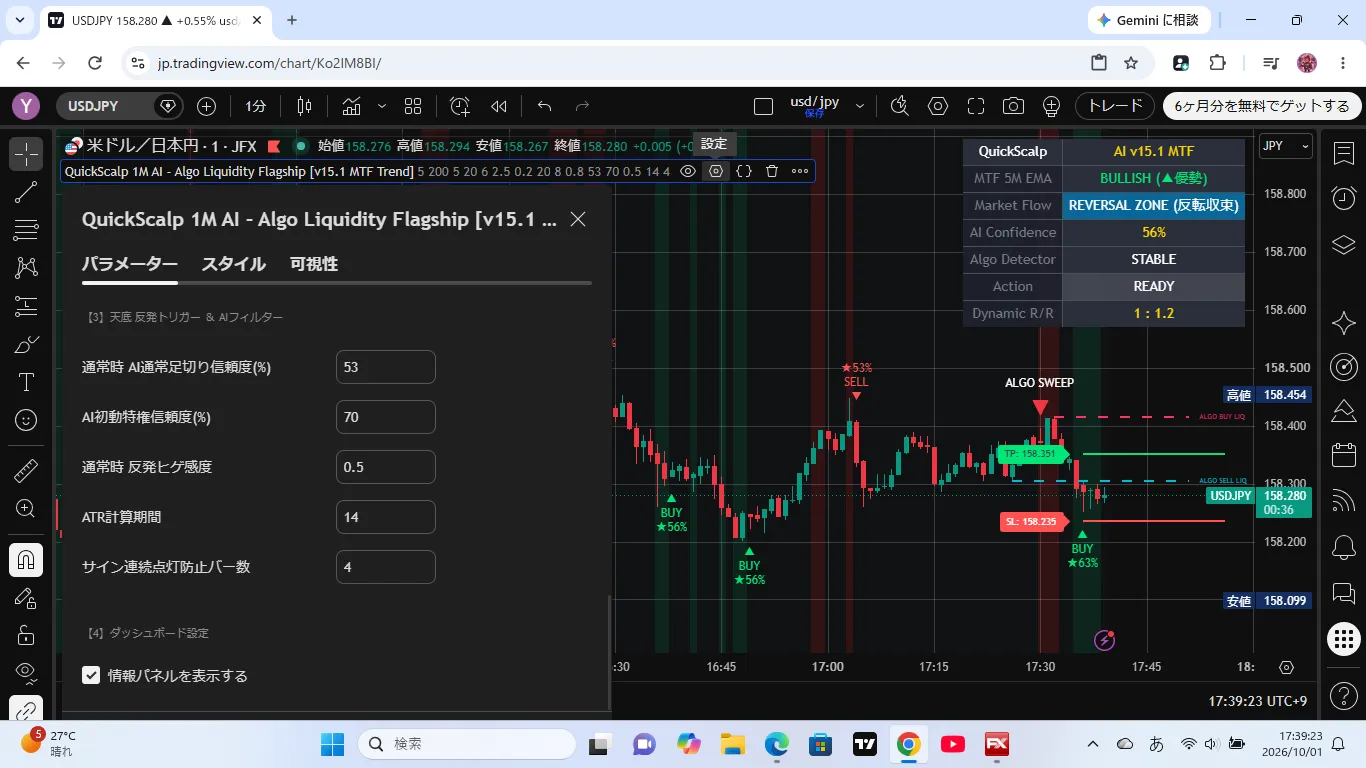
【3】 Bottom Rebound Trigger & AI Filter
・AI Normal Foot Cutoff Confidence (%) [default: 60]
・AI Initial Movement Privilege Confidence (%) [default: 70]
・Rebound Wick Sensitivity [default: 0.5]
① AI Normal Foot Cutoff Confidence (minAiConf)
This is the cutoff line for the confidence score that AI calculates from past similar patterns (neighborhood search).
Lowering this to “55%”:the signal appearance frequency increases by about 1.5–2x. Aimed at short-term scalpers who want more opportunities without missing trades.
Raising this to “65%”:eliminates unnecessary trades and selects only the “true signals.”
② AI Initial Movement Privilege Confidence (highAiConf)
Immediately after a band walk (rapid one-directional trend), signals are ordinarily blocked to prevent being swept along. However, only when the AI score exceeds this threshold is entry allowed as a strong reversal initial move.
If you want to pinpoint the peak and trough of a trend reversal, set this to “68–70%” to reliably capture dramatic initial signals.
③ Rebound Wick Sensitivity (wick_ratio)
This is the判定 ratio for the length of the wicks relative to the body of the candle.
Set to “0.4”:Even small wicks are considered reversals and signals light up quickly.
Set to “0.6”:Only when long pin bars (clear rejection) appear will signals be produced, greatly improving false signal resistance.
3. Market environment-based: Recommended preset settings
Try the following settings as-is, tailored to your trading hours and market state.
【Setting A】 Tokyo hours – ranging market (high turnover scalping)
A style that chops the range in Asia hours by taking profits from the highs and lows with a back-and-forth approach.
AI Normal Foot Cutoff Confidence:55%
Rebound Wick Sensitivity:0.4
Consecutive signal light-up prevention bars:2–3
Effect:Significantly increases signal frequency. Allows capturing small rebounds from overheated zones (areas where the background turns red/green) and compounding profits.
【Setting B】 London & NY hours – trend initial moves, safety-first
A style that safely rides the wave while avoiding abrupt breaks or stop-hunting caused by Western participants.
AI Normal Foot Cutoff Confidence:63%
AI Initial Movement Privilege Confidence:72%
Rebound Wick Sensitivity:0.5–0.6
Rapid change assessment ATR multiplier (dangerMul):2.2
Effect:Institutional investors’ “stop-hunting (ALGO SWEEP)” and sudden spikes are blocked by safety guards, revealing only truly advantageous turning points.
4. Following the automatically drawn “TP/SL lines” only
does not break the risk-reward balance
The biggest reason scalpers lose capital is “small profits, big losses (gradual gains, big loss strategy).”
QuickScalpAI, at the moment signals light up,automatically calculates the nearest volatility (ATR) and liquidity pool (order-book accumulation) and directly draws the optimal take-profit (TP) and stop-loss (SL) lines on the chart.
Stop-loss (SL) is automatically placed beyond the most recent high/low to leave room (noise reduction)
Take-profit (TP) is automatically set in front of central mean reversion + algorithmic liquidity
Even if you change settings to increase the number of trades, you simply close them mechanically along the drawn lines,which preserves a risk-reward ratio around 1:1.5.This mechanism is built in.
In conclusion: The tool is for those who master the settings
alonesmiles
There is no holy grail that lets you win by simply following signals. However,an indicator that can adjust sensitivity to market conditions at willand you can control its parameters as intended will dramatically change how you read charts.
If you have QuickScalpAI, start with a demo account and gently adjust the “AI Foot Cutoff Confidence.” A “golden setting” that perfectly fits your trading style will definitely be found.
If you found this helpful at all, please consider following—your support motivates updates!
▼ Free trial versions are available here (GogoJungle)

‘TrendPulse Pro’ Free Trial:https://www.gogojungle.co.jp/tools/indicators/86532?via=users
‘TrendPulse Pro AI’ Free Trial:https://www.gogojungle.co.jp/tools/indicators/86529?via=users
‘QuickScalp AI’ Free Trial:https://www.gogojungle.co.jp/tools/indicators/86523?via=users