

Name.com VPS Unauthorized Access | Unauthorized FX account trades disclosed, 5 items you should check now
This isn’t a story that can be settled simply by saying “the VPS stopped and the EA isn’t running.”
Name.com Desktop Cloud had unauthorized access disclosed, and FX PrimeFinest separately announced that some accounts experienced unauthorized login and trades. If you are using these services, don’t just wait for recovery notices; please check your trading accounts themselves.
However,FX PrimFinest’s announcement does not identify Name.com as the source of the leaked authentication information.Because this is serious, we will organize the confirmed facts and the parts that still require investigation without mixing them up.
※Based on publicly available information confirmed on October 22, 2026. The timing of each company’s announcements is noted in the text.
01|What Name.com and the FX company公布ed
Name.com side:In the announcement at 4:00 on October 21, it explained that unauthorized programs may have been installed on some user servers and that stored information could have been viewed. It guides stopping the service sequentially for all plans from 4:00 onward on the same day.
The servers potentially affected amount to 26,739. This is not the number of victims, nor the number of accounts where unauthorized trades were confirmed.Also, “sequential stopping” does not imply that all servers stopped at the same time.
FX PrimFinest side:In the October 21 announcement, it confirmed unauthorized access and trades using ID and password combinations that may have leaked from other services. It states that access restrictions and additional checks are being applied to affected or suspected accounts.
Official confirmation of unauthorized trades is not something to be taken lightly. On the other hand, what happened to each individual account, and where the information came from, requires investigation of access logs and order histories.
Name.com’s 4:00 a.m. October 21 announcement noted that there was no confirmation of information misuse.Based solely on that time’s explanation, we cannot deny later unauthorized trades.
02|“Stopping the VPS doesn’t necessarily mean your accounts are safe”
A VPS is an environment for running MT4/MT5 and EAs. A broker’s trading account has a different role and different authentication.
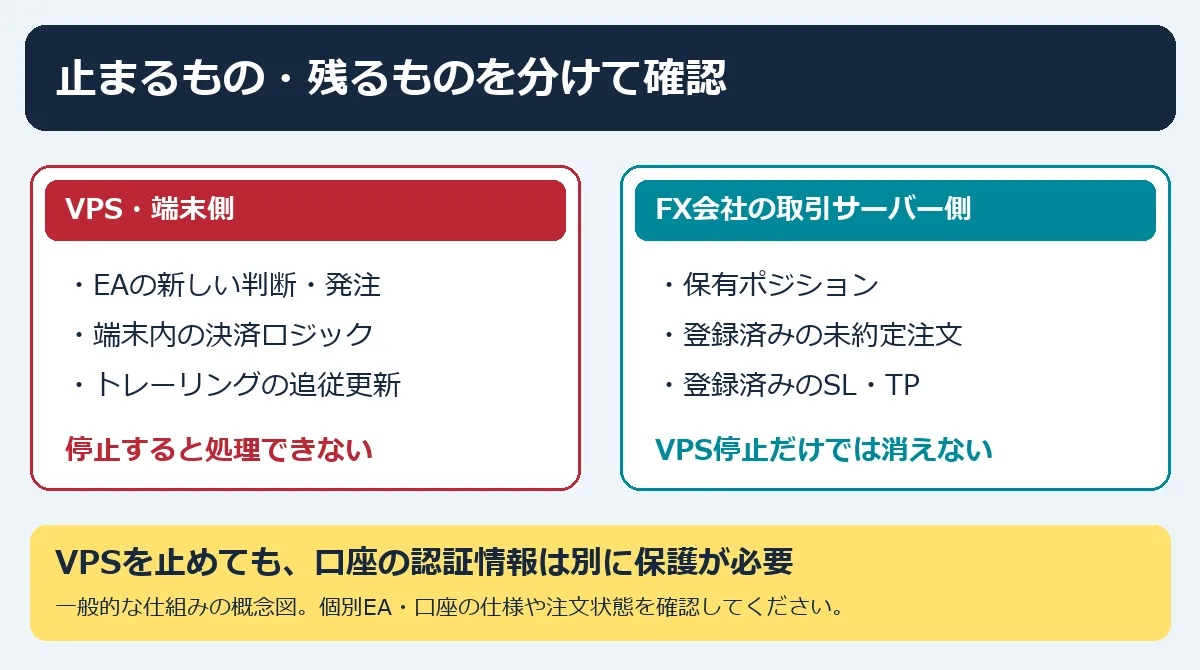
Even if the VPS stops, it does not automatically invalidate the trading account’s password. Even if you have already eliminated open positions, that alone does not prevent new unauthorized orders.
Both “checking positions” and “protecting access to the account” are necessary.This is the point we most want you to notice this time.
03|Five items to check right now
① Check not only the balance but also orders and history
From a trusted separate device and a legitimate app, verify held positions, unfilled orders, SL/TP, recent trading history, and deposit/withdrawal history. Look for unfamiliar instruments or quantities, or consecutive orders you don’t recognize. Do not judge solely by balance changes.
② Review authentication information by each destination
VPS connection, FX company member pages, and MT4/MT5 trading passwords may be stored separately. Name.com guides changing the authentication information stored and reused inside the VPS. FX PrimFinest requires changes on both the My Page and MT4/MT5 sides.
Make changes from a trusted device on a legitimate screen, not in an environment suspected of unauthorized access. For two-factor authentication, confirm the methods and scope supported by each service.
③ Report suspicious trades with records to the FX company
Save order numbers, symbols, quantities, execution/settlement times, and trading histories, and report them to official support. Confirm any trading restrictions and how existing orders will be handled. Take time to preserve history, but don’t delay emergency contact or account protection.
④ Separate VPS stop from stop-loss mechanism
EAs on the stopped device cannot continue making new judgments or sending orders. However, positions you already hold are not automatically closed just because the VPS stopped. Check registered unfilled orders as well.
⑤ Avoid dual operation on restart or migration
If you move EA to another PC or VPS, do not run both in parallel after the original environment is restored. Depending on the EA’s specifications, duplicate orders or conflicts in order changes can occur. Reconcile current orders, settings, and startup state before resuming.
04|Recovery plans and compensation: read only the settled parts
The maintenance notices we checked show,as of October 21, 19:41, the restart timing was undeterminedand you should not determine your environment’s recovery based on the initial timing or other users’ connection reports.
As for compensation, the issue of not being able to use the service is separate from losses from trades. FX PrimFinest says it is discussing future measures and will report to affected users individually. Neither full compensation nor no compensation can be concluded here.
Keep records of inquiry dates, case numbers, and responses. Be cautious about solicitations such as “install recovery tools” or “send authentication codes for compensation.” Do not share passwords or authentication codes with third parties.
05|Auto-trading cannot be confirmed automatically either
I don’t think using EAs is inherently bad. However, even if they usually operate well, I would avoid leaving all account-state checking to a single VPS.
Being able to check accounts from another device. Knowing what remains if a VPS stops. Knowing where to contact during abnormal situations.These three things should be prepared regardless of method or profitability.
This time, it’s not only about “when will it be fixed” but also about checking whether there are any unintended orders in your own account. This does not advocate buying or selling or closing all positions uniformly. Please compare each company’s guidance with your actual orders and history and respond accordingly.
06|Materials reviewed
Name.com: Apology and Notice Regarding Unauthorized Access by a Third Party (as of October 21, 4:00)
Name.com: Emergency System Maintenance (October 21 update)
FX PrimFinest: Notice Regarding Unauthorized Login and Unauthorized Trades (October 21)
MetaQuotes: MT4 Order Types / Trailing Stop, MT5 Basic Principles
※This article is for general information整理. It does not determine individual intrusion paths, damages, compensation judgments, or security guarantees.
07|Information about learning about the market
In addition to protecting your account, I have prepared a complete package that compiles my MA method, indicators,教材, and personal guidance for those who want to learn methods and chart interpretation.This is not a product that handles the countermeasures or the recovery of this unauthorized access.If you’re interested in learning content, please check the product page.
 【To a Fully Qualifed Trader】GOLD×USD/JPY Indicator +教材 + Personal Guidance