
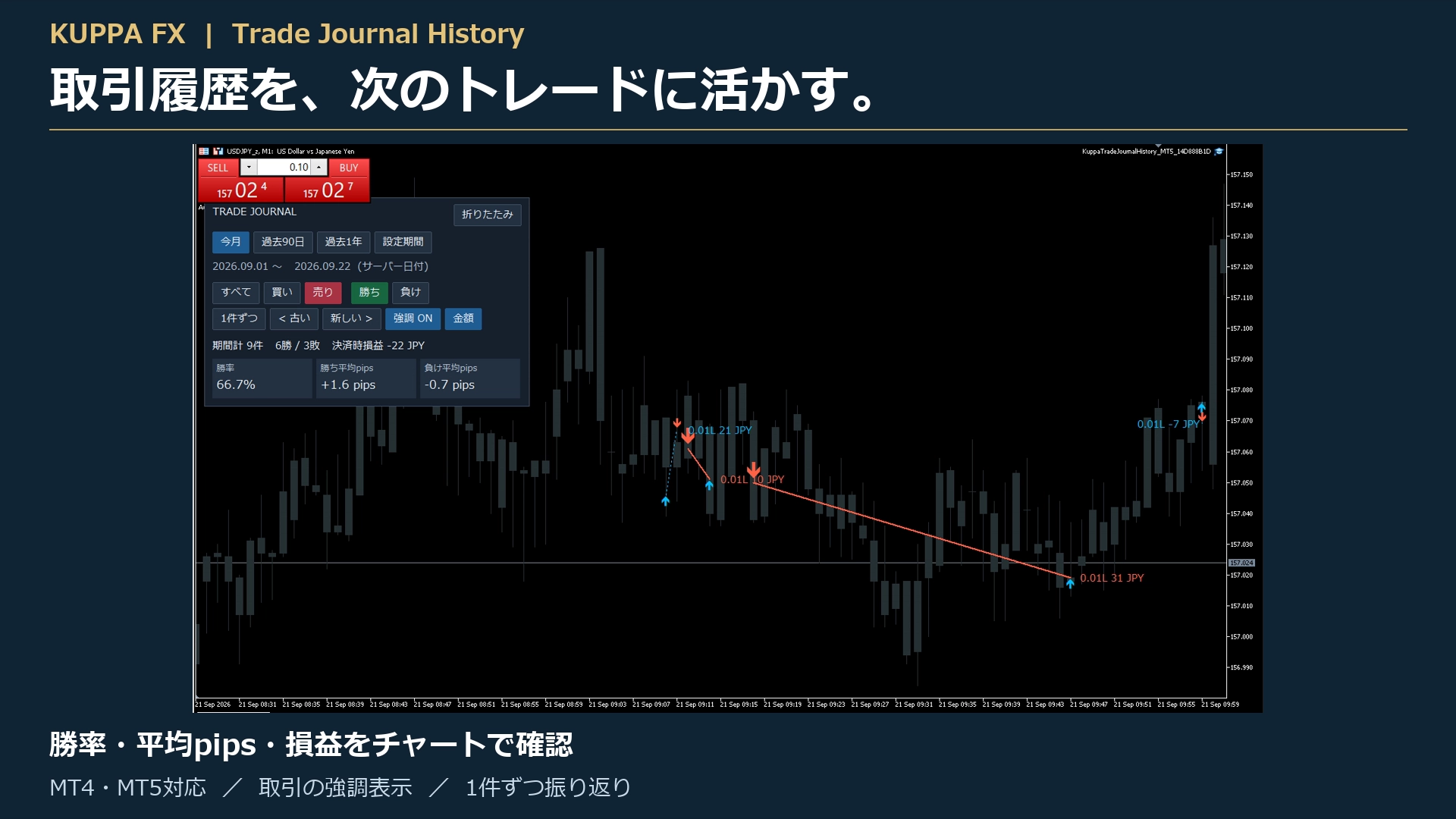
Review MT4 and MT5 trading history on a chart | Introduction to KuppaTradeJournalHistory
After the trade is over, are you finishing your reflection by only looking at the profit and loss?
If you also check “where you entered” and “how prices moved after settlement,” it becomes easier to organize the next points you want to review.
Hello, this is KUPPA-FX.
This time, we will introduce the tool that reviews MT4/MT5 trade history on a chart, “KuppaTradeJournalHistory.”
■ Display from entry to settlement on the chart
Trade history is displayed with arrows and lines.
You can confirm the flow of trades, which may be hard to grasp just from the numbers in the history list, together with price movements at that time.
■ Choose a period and check performance
You can reflect on periods such as “This month,” “Last 90 days,” “Last year,” or a customized period.
The panel displays the number of trades, win/loss counts, realized profit/loss, win rate, average pips won, and average pips lost.
Not only the win rate, but also the price range of winning and losing trades can be checked together.
■ Focus on buys/sells, wins/losses
You can select trades of interest with the “Buy,” “Sell,” “Win,” and “Lose” buttons.
If you turn on emphasis, the candlesticks darken, making the trade arrows and lines easier to see.
Note: The panel’s aggregated values are for the target instrument’s trades within the period. They do not change based on which trades you highlight.
■ Review one by one to leave insights
You can review trades sequentially with the “One by one” and “Old/New” buttons.
For example, while looking at trades, try noting the following three points.
・Was I able to enter at the planned price?
・Could I settle according to the rules I had set?
・What should I continue next time, and what should I review?
You can use it not only for results but also to reflect on the decision-making process.
■ When you want a wider chart view, collapse the panel
The operation panel can be collapsed with a button.
If needed, press “Expand” to display it again.
■ About the product
Product name: KuppaTradeJournalHistory
Compatibility: MT4/MT5 (bundled together)
Sales price: 3,980 yen (tax included)
This tool is for displaying and analyzing trade history and does not execute automated trading. A guide explaining the installation steps is also included.
MT4 and MT5 authentication accounts share the same account.
If you switch to a different account number, remove this tool from the currently used chart and reset your account information on the purchaser’s My Page.
If you continue to use it with the same account, a reset is not required each time. It does not support simultaneous use with different accounts.
Detailed screens and introduction videos can be viewed on this product page.
※ The results shown on the screen are examples. This tool does not guarantee profits or future performance.https://www.gogojungle.co.jp/tools/indicators/86732