

Announcement by voice before the USD/JPY midpoint. How to use my "FX Voice Reminder"
"Watch the spread before the fix"
This is the 9:49 notification I use when I trade USD/JPY (Dollar/Yen) in the short term.
Register the time and sentence in the "FX Voice Reminder," and have it read aloud what you want to check before the fix.
FX Voice Reminder product page
From a day of trading to the current settings
In the past, there was a period when I traded all day. Recently I focus on times with large moves, but to start trading at any time, I register one day in the reminder.
What underpins those settings is my past experience. I include what I want to be reminded of: notice before the fix, milestones in the overseas markets, and a cue for meals or ending trading.
Before the fix, I separate attention for the move and the spread. In addition to notifications that inform the milestone times, I also register reminders a little beforehand to prompt caution.
The 14 reminders I have registered
The times are in Japan Standard Time. The spoken sentences are posted as registered.
| Time | Text to read aloud |
|---|---|
| 08:00 | Check today’s key indicators and order book |
| 09:30 | Watch for the start of the fix moves |
| 09:49 | Watch the spread before the fix |
| 09:54 | Watch the fix spread |
| 09:55 | It’s the fix |
| 11:00 | If volatility is low, lunch |
| 15:58 | Be aware of price movement before the London open |
| 16:00 | London market opens |
| 18:00 | If there’s no volatility, dinner |
| 22:28 | Be aware of price movement before the New York open |
| 22:30 | New York market opens |
| 23:20 | Watch the movement before the RON fix |
| 23:58 | It's before the RON fix |
| 翌00:00 | RON fix time; if there is no volatility, please close your trades |
| 【Actual registered screen】 |
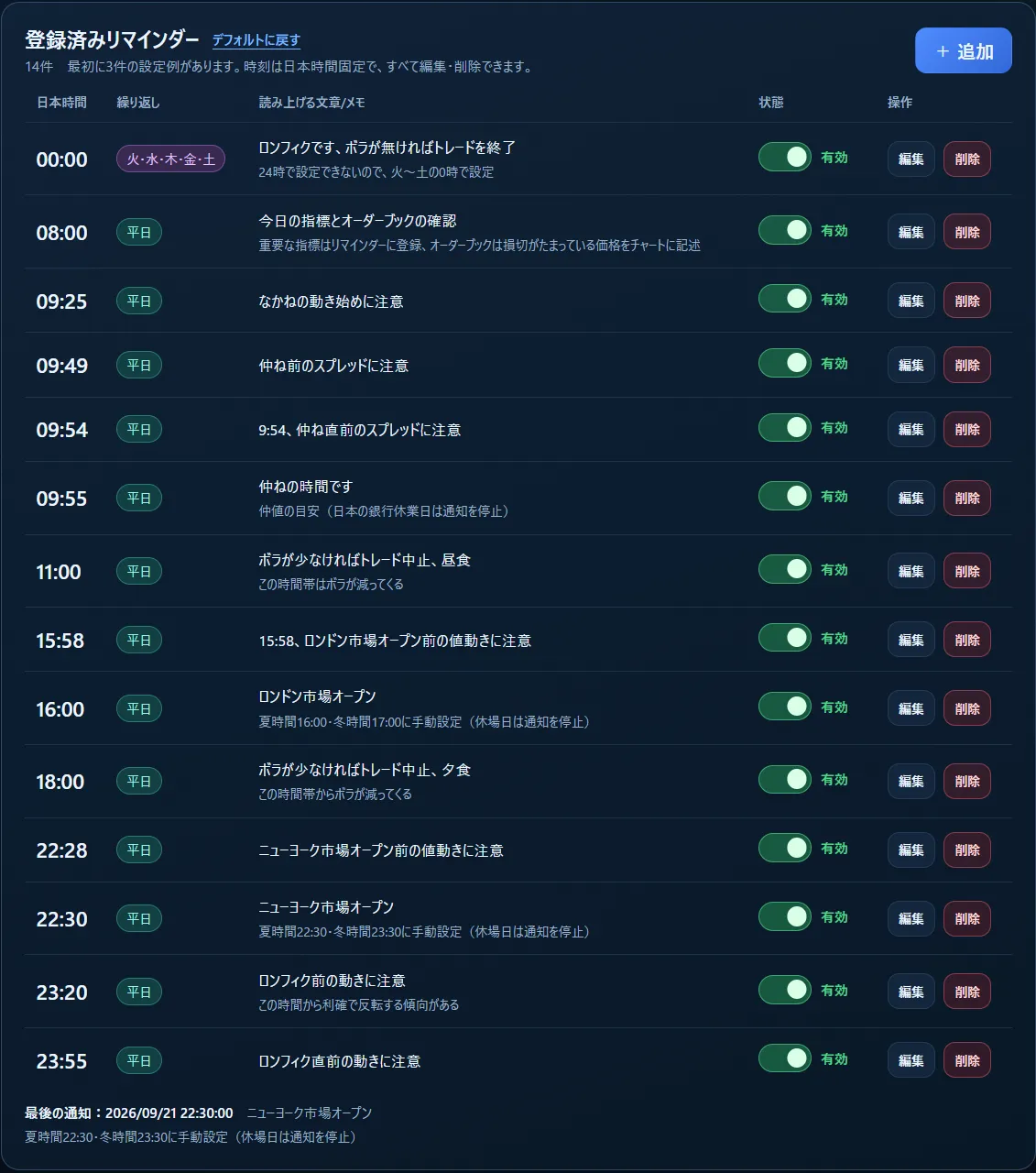
This is my notification setup and not a market-wide year-round timetable. For overseas markets, check daylight saving time and adjust manually.
On days with major economic releases, I add those schedules myself. I register the time confirmed and the sentence I want to read aloud.
Start with one reminder of what you want to check
You do not have to enter the same 14 items as I did. You can freely set the time and sentences for your own checks, breaks, etc.
To use it: open the HTML file in a browser, register the time, sentence, and repetition. Activate the schedule and press "Start voice notifications." Repetition can be "once, daily, weekdays, or by day of week."
No integration with MT4 or MT5 is required.
Product page
For those who want to be reminded aloud of what to check at the needed times.You can check the screen, detailed features, and pricing on the product page.
FX Voice Reminder product page