

Fibo ロット automatic calculation tool 369
Fibo Lot Auto-Calculation Tool 369
By simply drawing the Fibonacci,
Make lot calculation aligned with the SL width even simpler.
Do you decide “how many lots” by feel every time you trade?
When trying to manage funds in FX or GOLD, one unavoidable thing is lot calculation.
For example, with the same 1 Lot, the loss amount at SL arrival changes greatly depending on whether the distance to SL is 20 pips or 50 pips.
Therefore, originally you shouldadjust the lot size every time according to the SL width.However, opening the calculator and calculating each entry is surprisingly bothersome.
What is the Fibo Lot Auto-Calculation Tool 369?
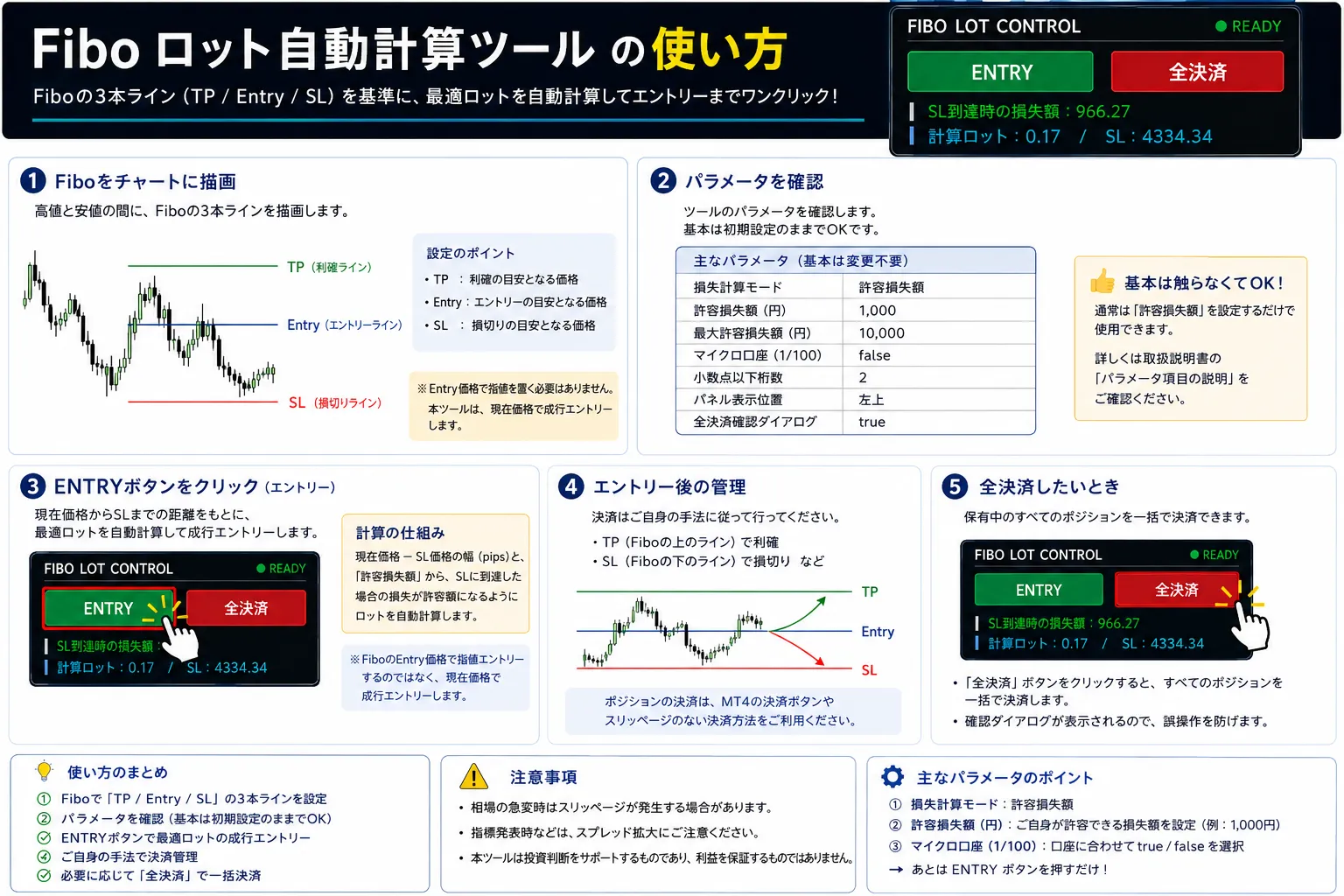
From the Fibonacci Retracement installed on the chart,read three lines: Entry / TP / SLand automatically calculate the lot based on the distance from the current price to SL.
This is not an EA that automates trading logic.It is a tool to “support lot calculation and order placement according to your own SL.”Therefore,
Three-step usage
Place the Fibo
Set three lines on the Fibonacci Retracement forSL / Entry / TP.
Check the Lot
From the current price to the SL distance and the configured loss conditioncalculated Lotis displayed.
Click Entry
Enter at the current price with a market order,and set TP & SL simultaneously.
There are 3 Lot Calculation Methods
Fixed Lot
Use when you want to place the same Lot every time.
Loss Amount
From the desire to cap the loss at SL reach to about ○○ yen,amount-basedLot calculation is performed.
Allowed Loss Ratio
Based on the balance or usable margin,○%is used to automatically calculate the Lot.
Risk-Reward can also be adjusted on the Fibo side
The basic RR 1:1 isSL=0 / Entry=1 / TP=2.
By keeping SL and Entry fixed and increasing the TP value, you can adjust the reward.
| RR | SL | Entry | TP |
|---|---|---|---|
| 1 : 1 | 0 | 1 | 2 |
| 1 : 2 | 0 | 1 | 3 |
| 1 : 3 | 0 | 1 | 4 |
| 1 : 4 | 0 | 1 | 5 |
BUY / SELL are determined by Fibo direction
BUY
TP line isabove, SL line isbelow.
SELL
TP line isbelow, SL line isabove.
Works on MT4 and MT5
The Fibo Lot Auto-Calculation Tool 369 isavailable for both MT4 and MT5as a set.
All-close button also available
Pressing “Close All” shows a confirmation screen; when confirmed, all open positions in the account are closed in bulk.
Particularly convenient for whom
✓ It’s bothersome to calculate the Lot for each entry
✓ The SL width changes each time
✓ You want to decide Lot based on loss amount
✓ You want to set risk by percentage of balance
✓ You decide SL/TP with Fibo
✓ You want to use MT4 and MT5 with the same approach
Set the SL.
Let the Lot calculation handle it.
Make the fund-management “calculation tasks” simpler.
Important
If there are two or more Fibonacci Retracements on the chart, the tool may recognize an unintended Fibo and malfunction. When using, ensure there isonly oneFib retracement on the same chart.
Summary
Fibo Lot Auto-Calculation Tool 369 is not a tool that tells you where to win.
Instead,it simplifies the funding-management portion of deciding which Lot to enter with your own SLfor executing trades.
Keep your own trading judgments, and let the tool handle Lot calculation. It is suitable for those who want to use it that way.
Fibo Lot Auto-Calculation Tool 369
Just draw the fib.
Automatically calculate the Lot according to the SL width.
This tool assists with Lot calculation and order placement and does not guarantee profits. Actual gains and losses depend on spread, slippage, execution price, market volatility, broker trading conditions, etc. Please test on a demo account or similar first.