
About Mochipoyo Alert MT5 version
MochiPoyo Alert MT4+MT5 Version
Thank you for waiting!
We have added an MT5 version indicator to the previously MT4-only "MochiPoyo Alert."
For those who have already purchased "MochiPoyo Alert MT4 Version" on GoGoJyan,you can use the MT5 version at no additional charge.
There is no need to repurchase MochiPoyo Alert to use MT5.
If your MT4 account is authenticated, you must reset the web authentication once and authenticate with your MT5 account, then enable DLL permissions for the signs to display correctly. In other words, if you are using alerts on MT4, they cannot be used on MT5, so you will use one or the other. (You can use MT4 again by resetting as needed.)
Below are steps and precautions, but basicallyQuestions about the MT5 version are difficult to address individually at the moment, so please first check all of the items below, the included manual, and the FAQ. For basic MT5 indicator installation procedures and settings, please refer to Gogojan's "Usage Guide" and other resources.
By re-downloading the product file you have purchased, you can use the MT5 version.
In this article,
The process to use MT5
How to install the indicator into MT5
Differences from the MT4 version
Precautions during use
We will explain together.
① For those who have already purchased MochiPoyo Alert
Even if you previously purchased the MochiPoyo Alert MT4 version from Gogojan,you can use the MT5 version for free.
There is no need to repurchase.
First, please log in to Gogojan.
Flow to download
1. Log in to Gogojan
Log in with the account that purchased MochiPoyo Alert.
2. Open "Downloads" on My Page
3. Select "MochiPoyo Alert" from purchased items
4. Download the latest version from "Product Files"
The previously downloaded file does not include the MT5 version,so please re-download the latest product file.
5. Unzip the downloaded ZIP file
MT5 indicators are basically in the **.ex5 format**.
Be careful not to confuse with MT4's ".ex4".
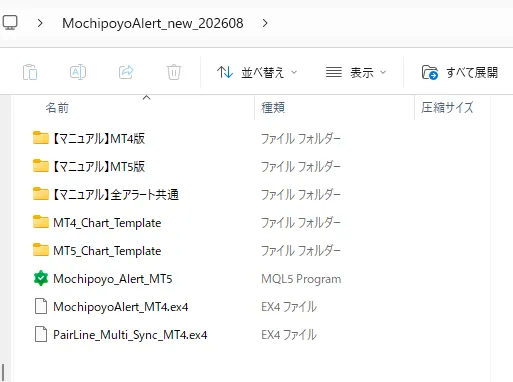
② How to install MochiPoyo Alert into MT5
From here, install the downloaded MT5 version into MetaTrader5.
STEP1: Start MT5
Launch the MT5 you normally use.
※ Start MetaTrader5 (MT5), not MT4.
STEP2: "Open Data Folder"
From the MT5 top menu,
“File” → “Open Data Folder”
click.
STEP3: Open the "MQL5" folder
Open the MQL5 folder shown in the directory.
MQL5
Next, open the Indicators folder.
In other words,
MQL5 → Indicators
is the order.
STEP4: Put the MT5 version indicators into place
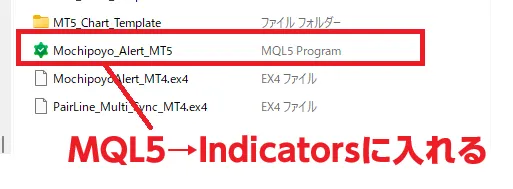
Place the downloaded MochiPoyo Alert MT5 version indicator files into
MQL5 → Indicators
and also place other sub-indicators MT5 version and templates in their respective folders.
Open the MT5_Chart_Templates folder.
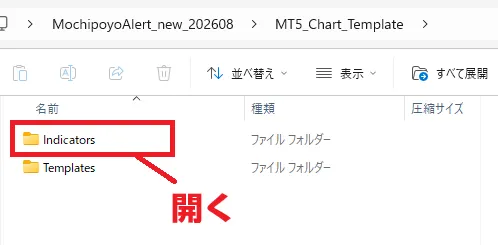
There are Indicators and Templates folders, so first open the Indicators folder.
※ Currently, Mochipoyo_Line_G is not included in the MT5 version.
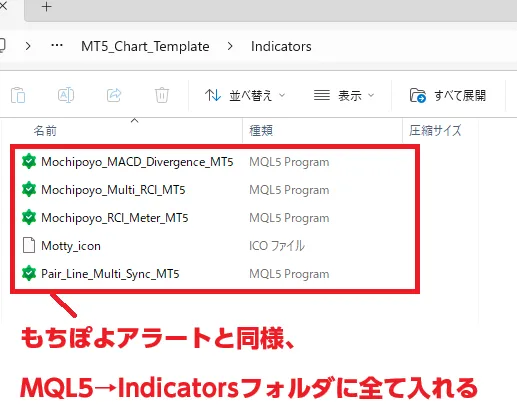
Open the Templates folder under Indicators.
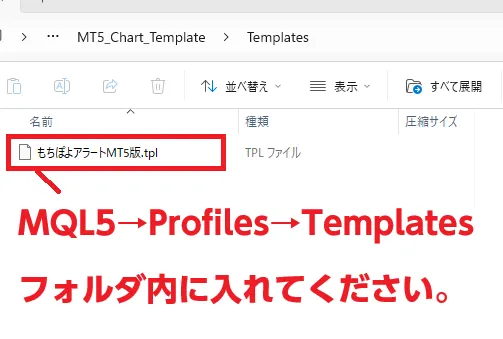
When you finish placing files, close the folders.
STEP5: Restart MT5
After adding indicators, it is reliable to close MT5 and restart it once.
Alternatively, you may see them appear by refreshing from the Navigator in MT5.
STEP6: Display on the chart
After opening a chart, right-click on the chart,
Standard Chart → Load Standard Chart Template → MochiPoyo Alert MT5 Version Template
and apply it to the chart.
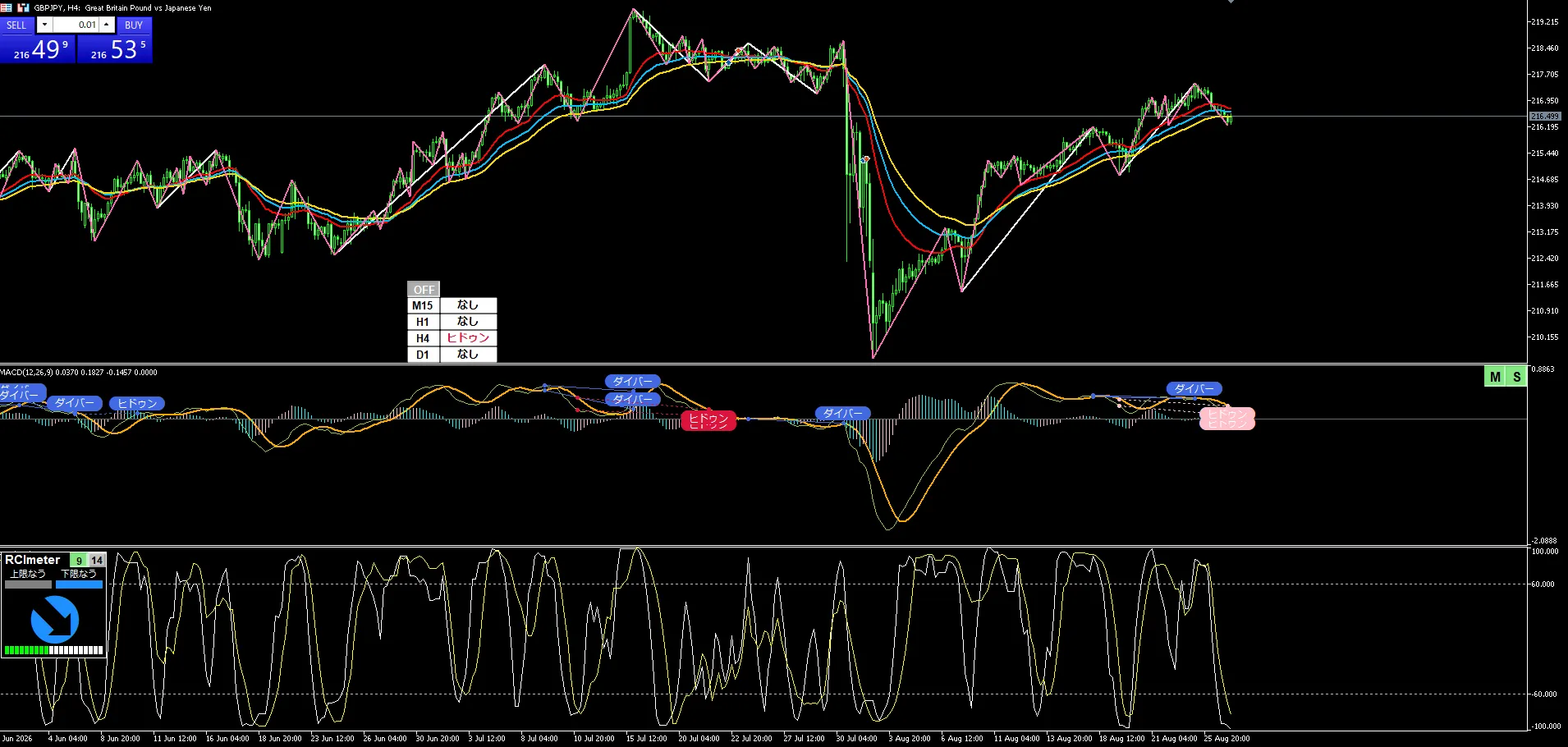
※ Depending on the environment, some indicators may not display even after applying the template. If that happens, please manually add the indicators from the Navigator to the chart.
Then, open the indicators list from the Navigator on the left of MT5,
MochiPoyo Alert
and drag and drop onto the chart where you want to use it.
If authentication and loading proceed normally, you can use it on MT5.
③ For those using MT4 version, you can keep using it as is
We added the MT5 version this time,but that does not mean MT4 version stops working.
If you are currently using MT4 without issues, you can continue to use the MT4 version as is.
For example,
If you are currently using MT4
→ Continue to use MT4 version
If you want to migrate to MT5
→ Use MT5 version
If you are using both MT4 and MT5
→ Use the corresponding version for each
This is how it works.
④ Please be careful not to confuse MT4 and MT5 versions
MT4 and MT5 have similar names but are separate platforms.
MT4
MQL4 → Indicators
Install MT4 version here.
Main indicator files are
.ex4
files.
MT5
MQL5 → Indicators
Install MT5 version here.
Main indicator files are
.ex5
files.
Placing MT4 files into MT5 or MT5 files into MT4 will not work properly.
This is especially easy to confuse, so please be careful.
⑤ You need a Forex company/account that can use MT5
To use MochiPoyo Alert MT5 version, of course you needa Forex company/account that supports MT5.
If your current Forex company only supports MT4, you cannot use the MT5 version.
MT4 accounts
MT5 accounts
may be provided separately.
If you want to use MT5 version, please check whether your broker supports MT5.
⑥ Sign positions may not be exactly the same between MT4 and MT5
This is an important caution as well.
Even if MT4 and MT5 use the same logic,
the Forex company you use
rates provided
spreads
candlestick formation
server time
historical price data
etc.,the signs' display position and timing may differ slightly between MT4 and MT5.
This can occur not only between MT4 and MT5 but also when comparing charts from different brokers.
Even if you see only one sign position differs when placing MT4 and MT5 side by side, it does not necessarily indicate an issue with the indicator.
⑦ Do not change the indicator file names
Some Gogojan products use web authentication for the indicators.
The downloaded file names may contain information necessary for authentication,so do not rename the indicator files; use them as they are.
If you change the name to make it easier to understand, authentication may fail.
⑧ Use the latest version, not a previously downloaded file
With MT5 version now added, even if you previously downloaded MochiPoyo Alert, when using MT5 pleasere-download the latest GoGoJyan product file.
Even if you kept an older ZIP file on your PC, it does not include the MT5 version.
GoGoJyan Purchased Items → MochiPoyo Alert → Product Files
then download again.
⑨ For those only wanting MT5 version
This time the existing MochiPoyo Alert MT4 version includes the MT5 version.
Therefore,we will offer the MT5 version free of charge to those who already purchased MT4 version.
On the other hand,
“I don't use MT4, only MT5 version”
is planned to be sold separately as MT5-only version.
If you have already purchased MT4 version, you do not need to repurchase the MT5 standalone version, so please note.
⑩ Please first test in a demo or small trading environment
When you first install MT5 version, do not immediately use it for real trading;
Check if it displays on the chart correctly
Check if signs display properly
Check that all parameters are set as intended
Check that changing timeframes works correctly
This is recommended before use.
Especially when migrating from MT4 to MT5,settings and files used in MT4 may not work the same in MT5.
Treat MT4 and MT5 as separate platforms.
Summary
With this update, MochiPoyo Alert can be used on both MT4 and MT5.For those who already purchased MT4 version,
you can use the MT5 version at no additional charge.
Existing purchasers
Log in to Gogojan
↓
My Page → Downloads
↓
MochiPoyo Alert
↓
Re-download product file
↓
Install MT5 version into MQL5 → Indicators
This is the flow.
Now those who were using MT5 can also use MochiPoyo Alert even if they previously could not use it.
If you are using MT4, there is no need to forcibly switch to MT5; please choose MT4 or MT5 version according to your trading environment.
We will continue to improve and update MochiPoyo Alert to make it even easier to use.