EA that can place demo and real orders and settlements on a real account
Unique"Order Settlement Panel"
Of course you can trade on a demo account in a demo account,
you can demo trade on a real account.
With one click, it changes to the real order settlement screen.
<You can watch the operation on YouTube>
https://youtu.be/C8AWgDA_cNY
Even if you place a demo order on a real chart, a line appears on the chart.
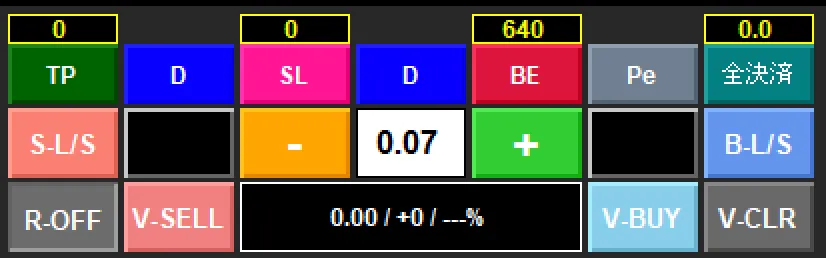
P&L is also displayed inside the EA panel (center lower section)
A percentage of account funds is also displayed (center lower section)
Order reservations, TP, SL are also displayed as lines on the chart (draggable)
In other words, everything that can be done in real trading can be done here.
<Demo Trade Panel>
↑
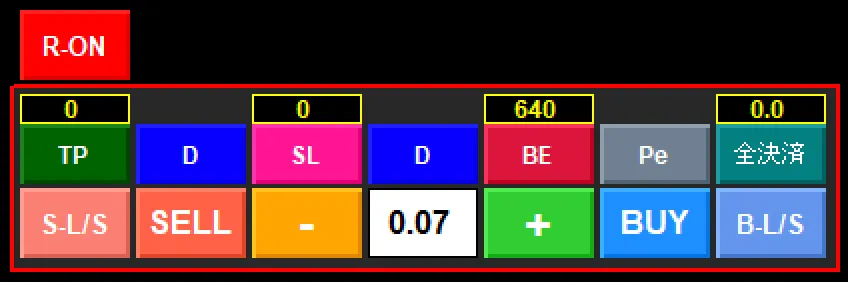
Pressing the R-OFF button becomes the real order panel
<Real Order Panel>
There are many buttons and it may seem difficult to operate, but it has only the necessary features.
Moreover, thispanel can be moved anywhere you like.
To return it to its original position, just click the black part at the top of the panel!
In the top-right box, for example, if you enter "5.0" then when the funds reach 5% unrealized loss, it will settle
In the top-left above the TP button, entering "10,000" and pressing the TP button will settle when unrealized profit reaches ¥10,000. Similarly, above the SL button, entering "-5,000" and pressing the SL button will settle when unrealized loss reaches -¥5,000. The box above the BE button supports pips! Depending on how you use it, it’s extremely convenient—pressing BE button with "0" settles at break-even, and "100" settles at 100 pips.
The drawback is that once you start using this, you can’t revert to other settlement methods.