
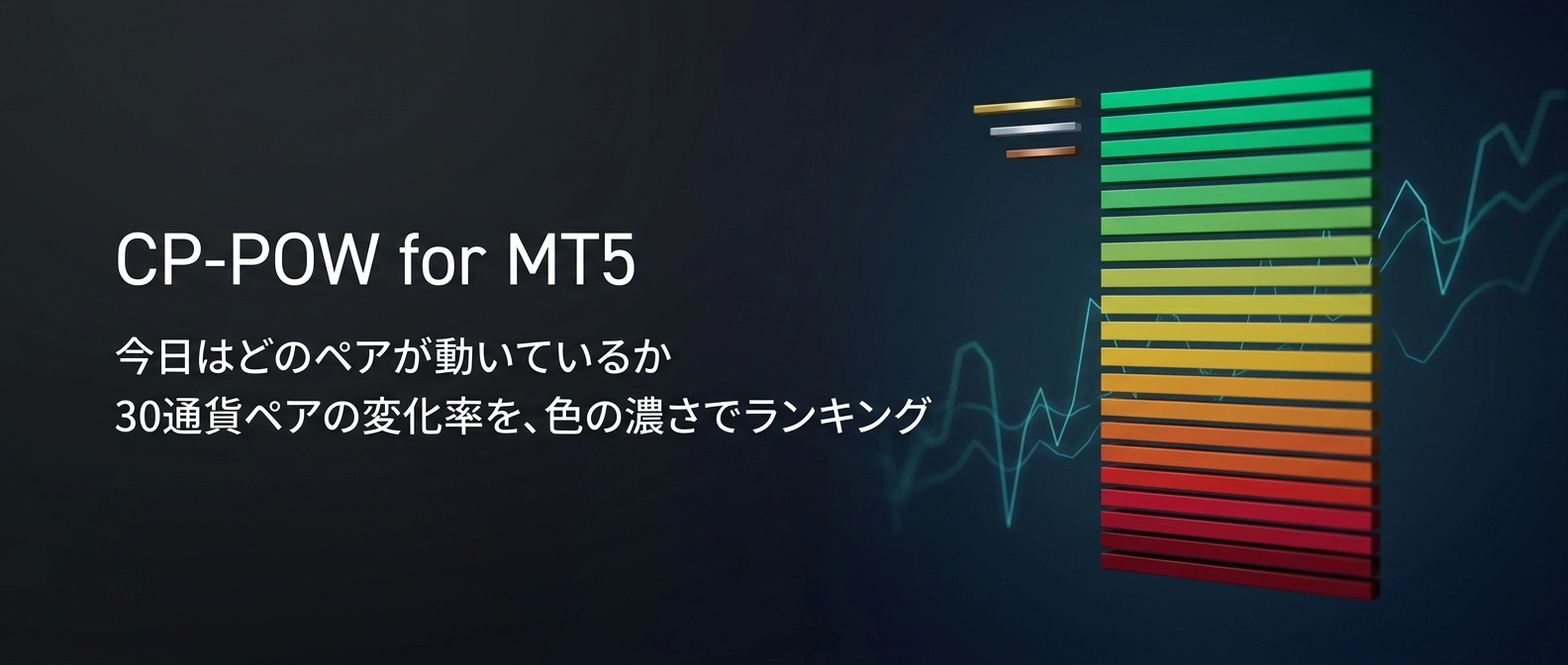
In MT5, eliminate the time to find "which pairs are moving today" and the MT5 version of the rate-of-change ranking "CP-POW" has appeared
"CP-POW, can't be used on MT5 either?"
We have received inquiries like this regarding the indicator "CP-POW" released for MT4. This time, we have released an MT5 version.
However, this is not just a simple port.We rebuilt the display mechanism from scratch.In this article, for MT5 users, we introduce what CP-POW is as a tool and what has changed in the MT5 version.
Aren't you using your time like this?
・Today, which pair is moving, by switching currency pairs one after another
・By the time you find it, the initial move is over, and you wrestle with whether to jump in or skip
・Even when you line up the percentage changes, you can't grasp which is "moving the most"
・You can only sense whether the overall market is biased toward buying or selling
Trading performance is largely determined before the method itself by"which pair to choose"No matter how much you monitor a stagnant pair, you won't capture price movement. CP-POW is an indicator that displays a list to finish this "pair selection" in the first 10 seconds.
What CP-POW is
In a word,"a monitoring tool that displays up to 30 currency pairs by change rate in descending order on one screen".
The rate of change is calculated from the current OHLC's opening price to the current price. Looking at daily charts shows today’s movement; looking at hourly charts shows the momentum of the last hour, directly in the ranking.
You don’t need to open charts one by one; just by looking at the screen at a glance, you can see the ranking of "which pairs are moving now." All 30 monitoring pairs can be freely swapped.
What changed in the MT5 version: color communicates before reading numbers
In the MT4 version, the rate of change was colored in two colors: green for positive and red for negative. You could tell the direction, but you had to compare numbers to see how much movement there was.
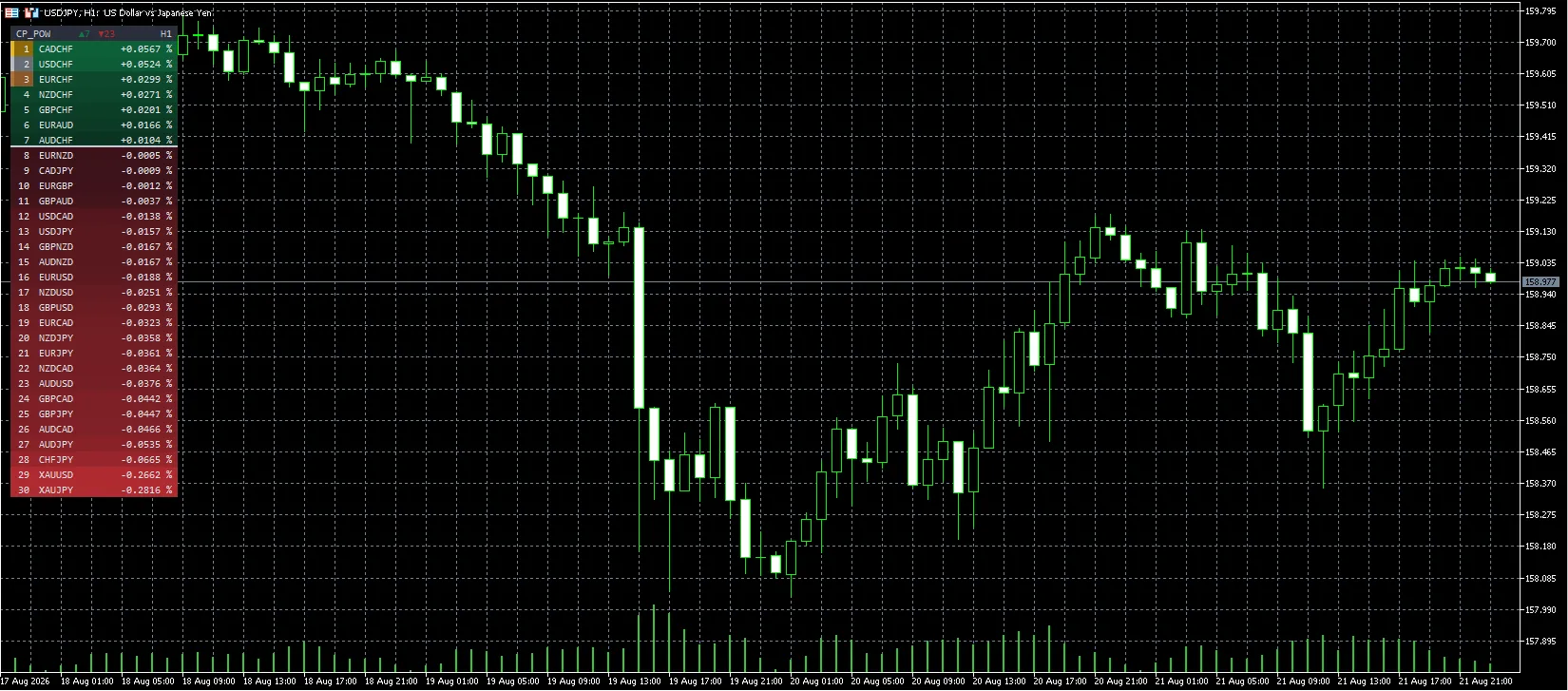
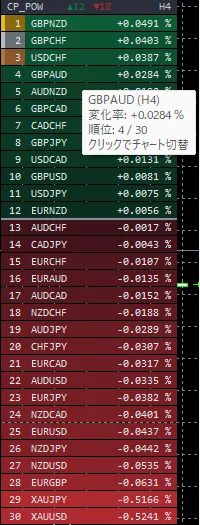
In the MT5 version,the magnitude of the change is represented by the intensity of the row color.Pairs with large moves appear in darker colors, while those with small moves are lighter/dimmer.
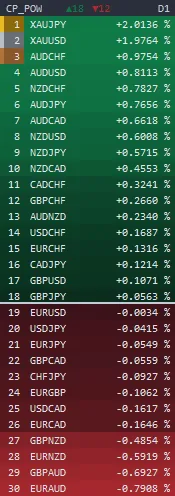
The image above is an example of a daily chart. The top XAUJPY and XAUUSD are in vivid green, mid-tier pairs are in dark green, and lower-tier EURAUD and GBPAUD are in dark red. By just "seeing" the list rather than "reading" it, you can identify the day's lead players and which currencies are being sold, at a glance.
There is one additional tweak in the color standard.
If you simply used the maximum value in the list as the standard, when very volatile instruments like gold (XAUUSD, XAUJPY) are mixed in,only those two would become very dark, and the relative intensity of other currency pairs would be blotted out.In fact, this phenomenon occurred during development.
Therefore, in the CP-POW MT5 version, the absolute value of all pairs’ changes is based on themedian. This prevents outliers from skewing the display, so even with gold included, the intensity differences among currency pairs are properly shown.
Overall market slope can be understood without counting
The panel header displays "▲18 ▼12" to indicatethe number of pairs rising and the number of pairs falling.
Additionally, there is a horizontal divider between the rising and falling groups. Above the line is rising, below is falling.
When biased like 18 to 12, the market is leaning in one direction, and when close to 15 to 15, the market is mixed across currencies. On days when dollar buying is dominant, dollar-blessed currencies tend to cluster on the lower side, showing the market sentiment directly in the ranking.
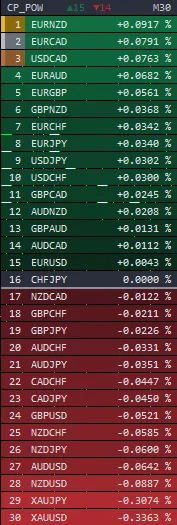
If you switch timeframes, rankings shift. If the same pair remains high across multiple timeframes, the direction is aligned across those timeframes.
Click a line of interest to switch the chart
In the MT5 version,clicking a row in the ranking switches to that pair’s chart.Since you don’t need to search again from the quotes, the path from discovery to analysis remains seamless.
If you hover the cursor, it shows the symbol being referenced, the change rate, current ranking, and the ranking change since the last update.
Reduced setup effort
The symbol suffixes (.raw / m / .pro, etc.) are automatically read from the chart’s symbol name.No need to modify settings for each broker.The panel’s display position automatically lowers based on the symbol name, OHLC display, and the presence of one-click trading on the chart. If displays overlap, you can fine-tune with "adjust height."

You can also fix the time frame for aggregation.Keep the chart at M5 while showing the change rates for H4 or D1 on the panel, allowing you to execute on a short term while keeping an eye on the momentum of higher timeframes.
Tips for use
Tip 1: Check the intensity first thing in the morning
Right after the market opens, look at the panel and note which pairs show strong color. The more the heavy rows cluster at the top and bottom ends, the more directional the day’s trend. If the whole panel is dark, there’s no need to force moves.
Tip 2: See where the same currencies cluster
| Panel state | What you can read |
|---|---|
| Top has JPY crosses clustering | Yen is being sold |
| Bottom has dollar index crosses clustering | Dollar is being bought |
| The same currencies appear both in top and bottom | That currency itself has no clear direction |
You can read not only the change rates of individual pairs but also which currencies are being bought and which are being sold.
Tip 3: See whether top pairs persist across timeframes
Do the top pairs on M15 remain top on H1 or H4? Check by switching timeframes. Pairs that align across multiple timeframes are more likely to reflect a real trend rather than a short-term rebound.
Operating environment
| Platform | MetaTrader 5 |
| Supported timeframes | All timeframes |
| Supported symbols | Currency pairs and instruments offered by your broker (default 28 currency pairs plus XAUUSD and XAUJPY) |
| Alerts | Not included (it's a panel-type display) |
| DLLs / external files | Not used |
Thank you for reading up to here.
“Looking for moving pairs and switching dozens of charts” — this time can be spent on evaluating entries. I hope CP-POW MT5 version will contribute even a little to making your trading more efficient.
※This product is an indicator to assist market analysis and does not recommend buying or selling. It does not display buy/sell signals. The displayed rate of change is calculated based on price data provided by your broker, so values may differ by broker. Please make investment decisions at your own risk.
If you have questions, please feel free to use GogoJungle's inquiry form.
Well then, happy trading.