

Gold Canon Episode 2|The Essence of Semi-Automatic EAs—How to Change "Visualization" into "Execution"
How to use Gold Semi-Auto EA: Sign linkage, RUN button, and the mindset for operating at confirmed bars【Gold Canon】
This is Gold Canon Part 2.
In Part 1, we talked about the sign indicator—“when it confirms” and “what it is drawing.”
This time, we continue that story.How to turn the visualized rules into action.
The hardest part of discretionary trading in gold is not only the lack of prediction power.
There are times when you can’t entrust execution during times you can’t monitor, even if there are rules.
An auto that can place orders is scary. There is anxiety about being unable to stop it.
Gold Canon Semi-Auto EA is a component that fills that “gap.”
What semi-automatic means (differences from fully automatic)
Since terms are vague, we’ll start with the lab’s definition.
Fully automatic EA… Once a human turns it ON, in principle the entries and exits continue by the machine
Discretion only… Judgments and operations are all done by humans
Semi-automatic (Gold Canon)… The decision logic is shared with the signal, while execution permission (RUN) is held by humans
Gold Canon Semi Linked is,
Able to place orders, add positions, and close positions following the same chart’s signals
However if RUN: OFF, it won’t open new trades or close existing ones
Even if the chart is closed, this EA will not forcibly close positions
In short, “the work is done by the machine, the permission by humans.”
This is not a product sold on full letting-it-run.
Rather, it is automation for those who don’t want to leave things unattended.
Why “signs are required”?
Gold Canon’s semi-automatic does not operate standalone with built-in logic alone.
It requires Gold Canon Signals on the same chartto be present.
The reason is simple.
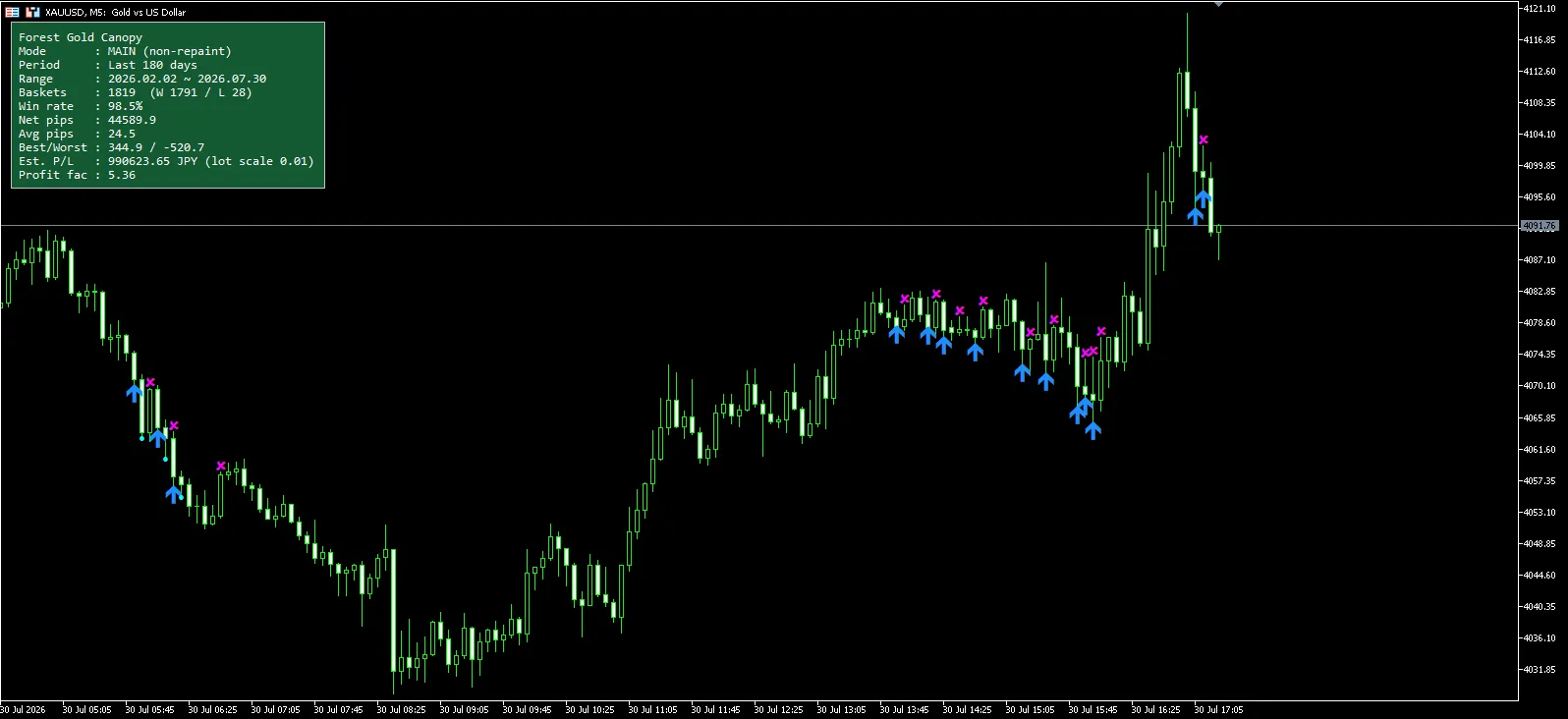
To align what a human sees (the arrows) with what the machine executes
To avoid skipping visible chart visualization and running automation only
To automatically stop trading if the sign is removed (to prevent misfires)
When the button shows NEED SIGNALS, semi-automatic cannot detect a sign yet.
Please attach a sign first. This is the specification.
Even if you rename the file, it may work, but the short-chart name (Gold Canon Signals-start name) is important.
As mentioned in Part 1, signs have display names. Semi-automatic looks for the prefix match of that name.
Setup procedure (the shortest correct method)
Since it’s easy to be indecisive, we’ll write only the order recommended by the lab.
Open a Gold instrument’s M5 chart.
Attach Gold Canon Signals (Mode: MAIN, Preset: M5 is the starting point)
First time, wait a bit during history calculation (Building may appear)
Attach Gold Canon Semi Linked to the same chart
Ensure the button becomes RUN: OFF.
Only when you’re ready to trade, set RUN: ON
Common mistakes are as follows.
Chart timeframe and Preset are misaligned
EA is placed on a different chart
Deciding that “it doesn’t respond” while NEED SIGNALS
Semi-automatic is a device that binds visibility and execution.
It is normal that it does not run when there is no sign to bind.
Translate the RUN button meaning into operational terms
Display | Meaning | What humans should do |
|---|---|---|
NEED SIGNALS | No sign detected. Do not trade | Attach the sign to the same chart |
RUN: OFF | Stand by. Do not open new trades or close | Monitor, learn, and defer |
RUN: ON | Execute according to the sign | Set the rules before leaving |
Strength of OFF is clear.
Can stop right before an indicator
Can decide not to trade in weeks when capital decreases
Create a day to view discretionary judgment
The responsibility of ON is also clear.
While ON, orders, additions, and exits progress according to the confirmed bar signs
After turning OFF, existing positions are not automatically closed (design)
If you want to close, turn ON until a close signal appears, or manage manually
If misinterpreted, you’ll end up with remaining positions that you intended to stop.
From the lab’s stance, OFF = new-order stop, not guardian angel for existing positions.
Mechanism — what does semi-automatic read?
Semi-automatic reads three buffers of signs.
New orders (blue arrow)
Additions (light blue mark)
Closings (magenta ×)
And, basically, it responds at the moment the confirmed bar switches.
As in Part 1, signs themselves are based on confirmed bars, so semi-automatic breathes the same way.
Processing priority, practically, is as follows.
First close
Then add (averaging)
Finally new orders
“Close first, then enter” is for rule consistency.
Important practical point — when the same bar has both “close” and “new order”
In Gold’s signals,sometimes on the same confirmed bar, a close mark and the next blue arrow overlap.
In simulation, this is the moment when the next starting point arises right after the basket finishes.
If semi-automatic is poor here,
Close happened
But the next new order doesn’t enter
This misalignment can occur.
Gold Canon’s semi-automatic handles this case by
Processing close on the same bar first
Then entering new orders after it becomes flat
If close misses the timing, retry on the next tick
This is the flow.
Also, when the same bar involves “close, add, and new”do not add to the closing basket; prioritize close → new.
There is no rationality to averaging into a dying basket.
If you observe discretion, it may look like a bar with many arrows, but for machines it’sa sequence of events with priority.a sequence of events with priority.
Will the add (namping sign) actually appear?
Yes. The light blue mark is an add signal.
Semi-automatic, when reading that mark while holding a position, will attempt to add at a lot size according to the Mode.
However, it will not enter next time.
RUN is OFF
Spread exceeds MaxSpread
Basket total lots reaches cap (BasketLotCap. If 0, uses Mode default)
There is no position to add to
“There is a mark = it will surely increase” is not guaranteed.
There is a mark = it is a candidate to add by rules. Guards may win.
MAIN and SAFE — what should be aligned on the semi-automatic side
Align mode with signs and semi-automatic.
Mode | Image |
|---|---|
MAIN | Standard. Adds strength and total lot cap roughly 0.20 |
SAFE | Conservative. Adds strength and total lot cap roughly 0.10 |
If BasketLotCap is set to0, the above Mode default is used.
“Sign is MAIN, semi-automatic is SAFE” causes a mismatch between visibility and execution, so it is not recommended.
Semi-automatic strengths (in operational terms, not sales copy)
1. You retain control
The fear of fully automatic trading lies more in psychology than in technology.
Worry about running it without knowing how to stop.
Gold Canon can be stopped by RUN.
(However, as noted above, handling existing positions is a separate matter to be mindful of.)
2. What you see is what you do
You can make the machine execute only the rules you have understood from the signs.
This reduces distrust that “the EA is making its own judgments.”
3. It can be a learning device
Start with OFF, just observe signs.
Then ON in a demo account.
Then trade small lots.
This progression is the benefit of semi-automatic.
Leaving NEED SIGNALS unattended
Crossing indicators while ON
Forgetting remaining positions when turned OFF
Immediately increasing lots after viewing a win-rate panel
Using M1 and complaining that responses differ(Recommendation is M5)
Conversely, those who use it well
First understand the rules
Manage execution permission with their own calendar
Decide lots based on Worst
These people are. Not a difference in tools, but a difference in operation design.
Connection with Part 1 — The meaning of a confirmed bar becomes effective in semi-automatic
In Part 1, we said signs are based on confirmed bars and no-repainting.
Semi-automatic moves on the same timeframe.
As a result,
Compared to a live tick EA, closings may be slower in actual operation
Conversely, the arrows you see and the actions taken are less misaligned
This is the trade-off.
Gold Canon favors “consistency” over “speed.”
That is why semi-automatic exists.
If you want the fastest fully automatic, there are other options.For those who want visualization and permission control, Gold Canon semi-automatic fits.
For those who want visualization and permission control, Gold Canon semi-automatic fits.
Demo or minimum lots
Observe signs OFF for 1 day to several days
On a bar where both close and new order overlap, visually confirm once
Turn ON for a short time and review the log (BUY/NANPIN/EXIT)
Decide BaseLot by looking at capital and Worst
“Going ON immediately and leaving it unattended” is one of the worst ways to use semi-automatic.
Semi-automatic is not for idle use.
Summary (Part 2)
Gold Canon’s semi-automatic EA is:
Sign-required (on the same chart)
RUN gives execution permission to humans
Responds to confirming-bar signs in the order: close → add → new
Handles overlapping close and new on the same bar
Controls added strength via Mode and lot cap
This is the mechanism.
If Part 1’s sign is “recording and visualization,” Part 2’s semi-automatic is an “execution device with permission.”
Next time (Part 3), we will cover
lot management and how to read Worst
“Even if the panel is positive, how to load money to avoid blowing the account”