
Adequate lot size alone isn’t enough. An MT4 money management indicator “RM-LOT” that shows before entering the trade the margin maintenance rate and the stop-out price up to the point of entry.
RM-LOT
Just drag the stop-loss line.
You can know the appropriate lot size, margin maintenance rate, and stop-out price before entering.Before you enteryou will know.
Haven't you had these experiences?
- You installed a lot calculation tool, but you still had to separately check whether there was enough margin
- After entering, the maintenance rate turned out to be lower than expected and you panicked
- You can't grasp how many pips away you are from stop-out before taking a position
- Free tools from overseas are in English, and the amounts don’t feel right in yen accounts
- You operate with “risk 2%,” but never considered how many consecutive losses you can endure
RM-LOT shows you everything before you enter
Typical lot calculation tools answer only “what lot to enter.”
RM-LOT adds the question of“What happens to the account after entering with that lot?”to be displayed.
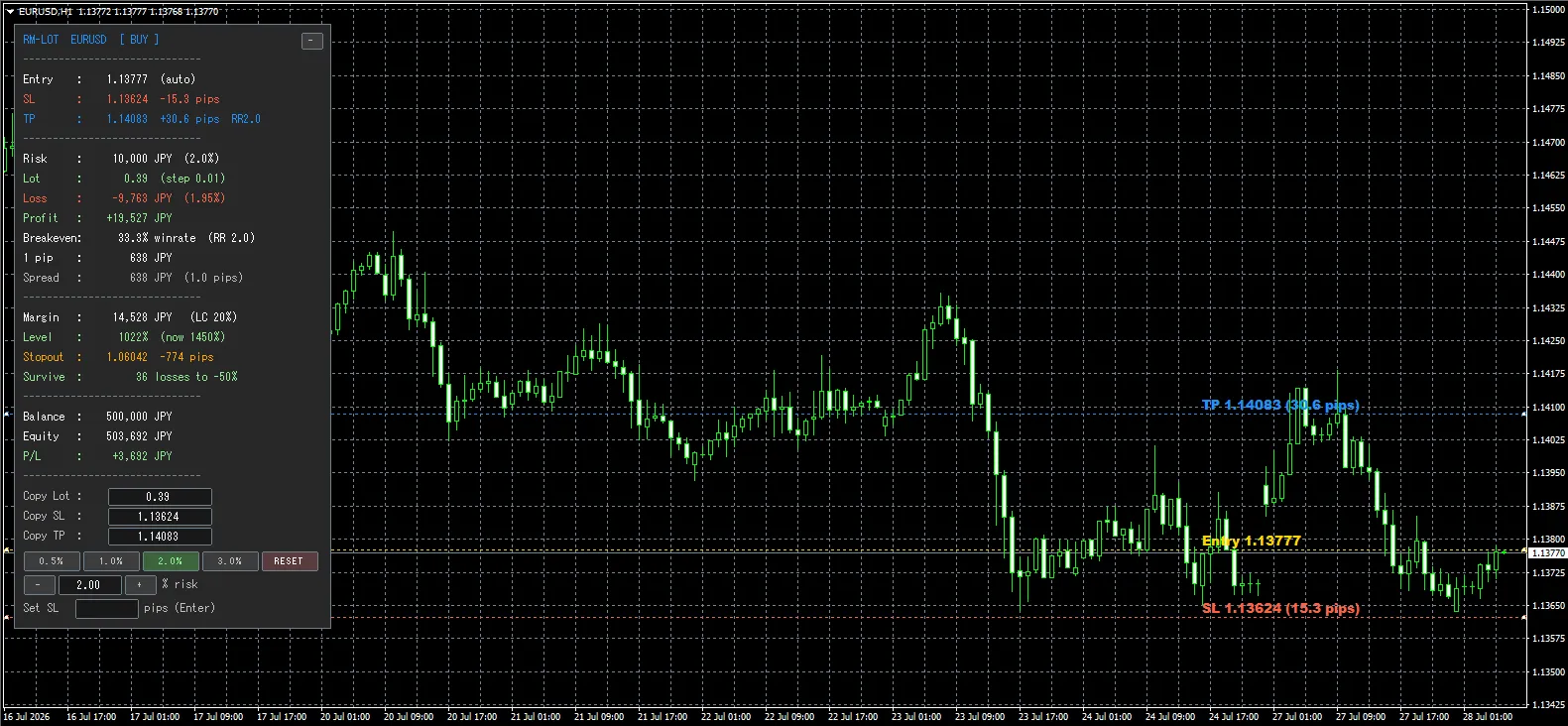
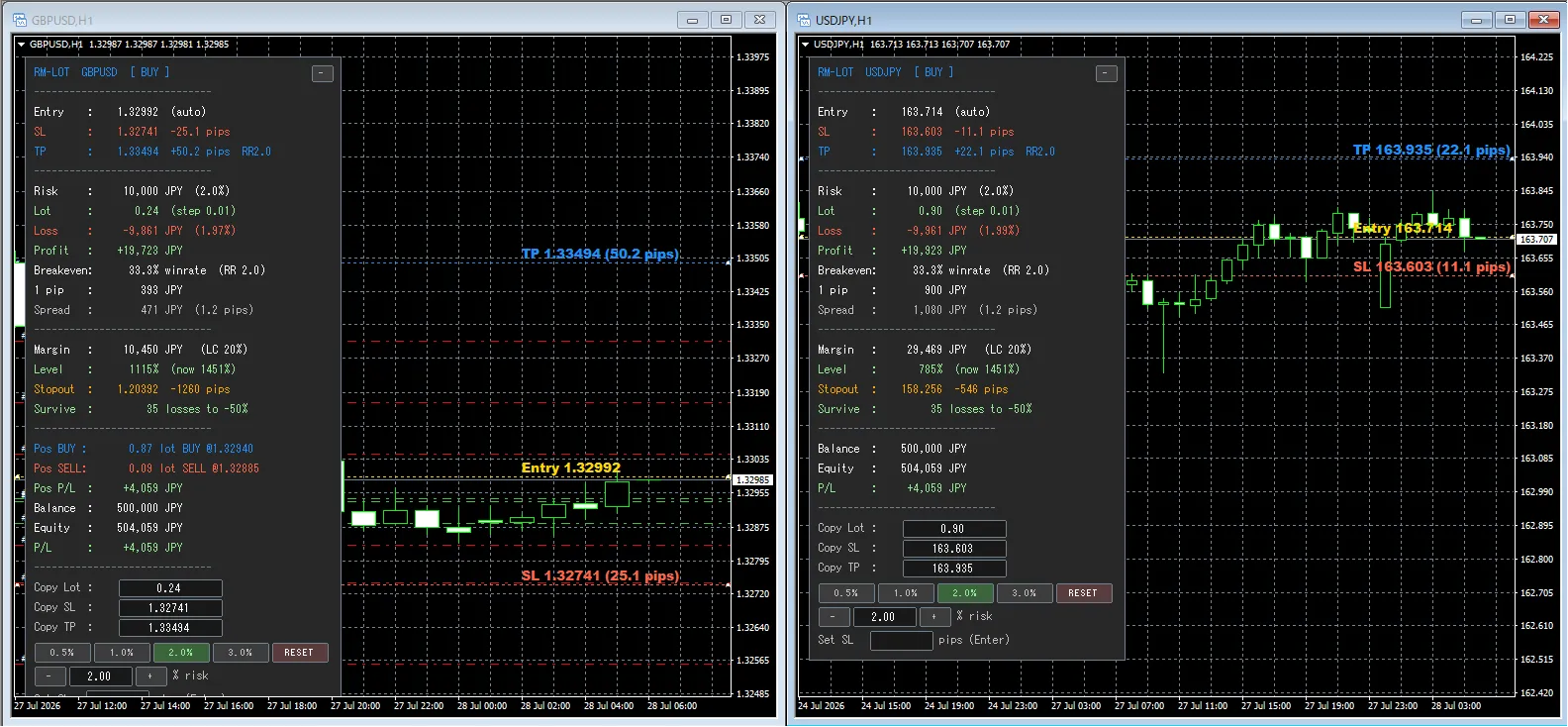
Operation isdrag the SL line. You don’t even need to choose the trading direction (if SL is below entry, it automatically determines BUY; if above, SELL).
Features
Automatically calculate appropriate lot from allowable risk
Risk can be set bypercentage or amountand can be based on Balance / Equity. Lot size is automatically rounded to your broker’s minimum units and tick size.
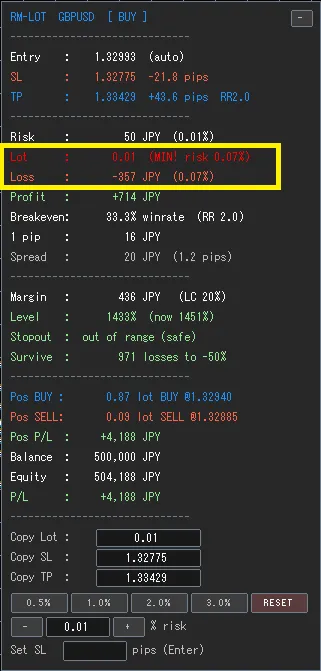
Show “real loss” rather than “theoretical loss”
Since lots are rounded to the tick size, the theoretical risk may not match. RM-LOTrecalculates the loss amount using the rounded lotand displays it. If the minimum lot still exceeds the acceptable risk, the actual risk percentage is highlighted in red.
Display the maintenance rate before entry
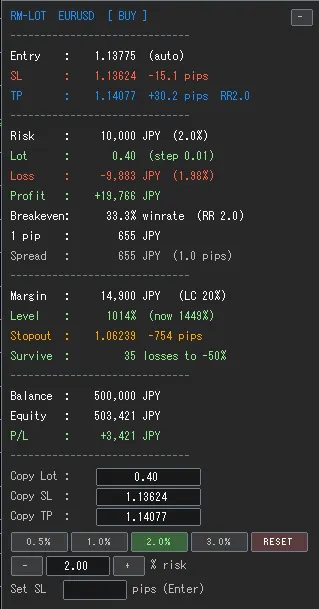
You can first confirm the required margin and how far the maintenance rate drops based on the calculated lot.What happens to maintenance margin after thatis shown. The required margin for existing positions is also included, aiding decision making for additional entries. When approaching danger levels, text color changes from yellow to red.
Distance to forced stop-out shown in price and pips
How far in yen until stop-outis shown in concrete price. The stop-out level is automatically obtained from your broker, so no setup is required.
Furthermore,automatically detects and warns when stop-out occurs before stop-lossis reached. Even if you intend to place a stop-loss, if the lot is too large, you may be force-liquidated at an unintended level. Detecting this before entry is the key feature of this product.
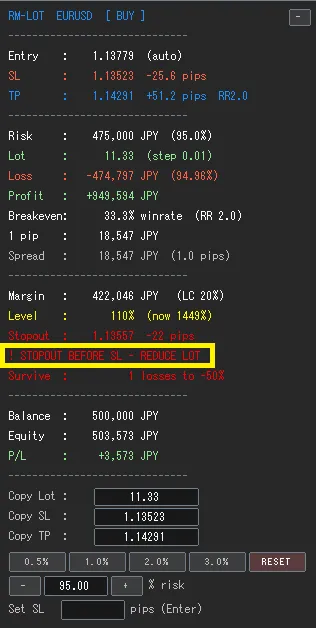
How many consecutive losses you can endure with the current risk setting
If you continue with the current risk setting,the number of losses until funds halveis shown. A smaller number indicates a riskier setting and provides a basis for reviewing the risk percentage.
Automatically positioned from RR ratio, manual adjustment by dragging possible
According to the set RR ratio (e.g., 2.0), the TP line is automatically placed and the expected profit is shown. Dragging the TP line manually recalculates the actual RR at that position.
Switch risk% with a button and compare on the spot
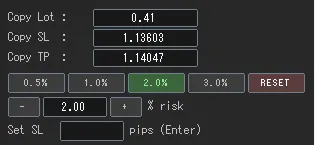
With the buttons at the bottom of the panel,risk% can be switched with one clickwithout reopening the parameter screen. By pressing 0.5% / 1% / 2% / 3% in order, lot size, loss, margin maintenance, and consecutive losses tolerance all switch simultaneously, allowing you to compare settings suited to the moment. The button values can be freely changed, and RESET returns the line positions and risk% to the initial state.
Display required win rate, 1-pip value, and spreads cost
With the set RR ratio,the win rate at which the account breaks evenis shown (e.g., RR2.0 implies 33.3%). This helps judge whether the setting is realistic. Additionally, the computed lot showsthe value per 1 pipandthe actual spread coststo visualize often overlooked trading costs.
Copy Lot/SL/TP to order screen
Displayed values are shown in athat you can click to select and paste into the order screen. Only numbers are present, preventing misreads or typos.
Alerts
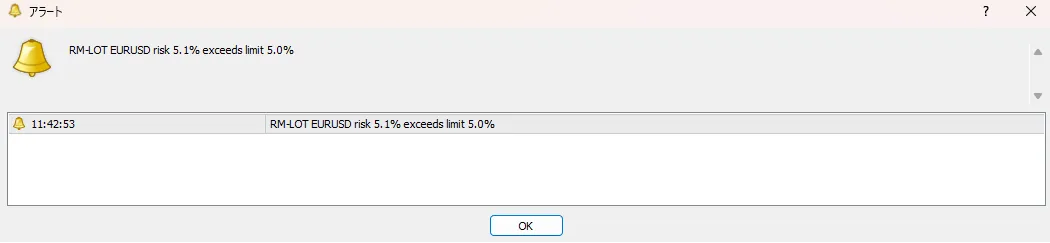
To prevent entering with dangerous settings, three warnings are provided.
Notification methods arepopup / push notification / soundthat can be turned ON/OFF individually.
| Warning | Trigger |
|---|---|
| Risk exceeded | The set risk% exceeds your self-imposed limit |
| Maintenance rate drop | The planned maintenance rate after entry falls below the set level |
| Stop-out comes first | Forced stop-out occurs before the stop-loss is reached |
| Lot upper limit | Calculation exceeds the broker’s maximum lot and tops out |
Customization
How to decide risk
Supports switching between percentage-based and amount-based, and switching between balance-based and effective equity-based.
Display ON/OFF
You can hide margin information, consecutive losses tolerance, TP line, and labels beside lines individually.
Appearance adjustments
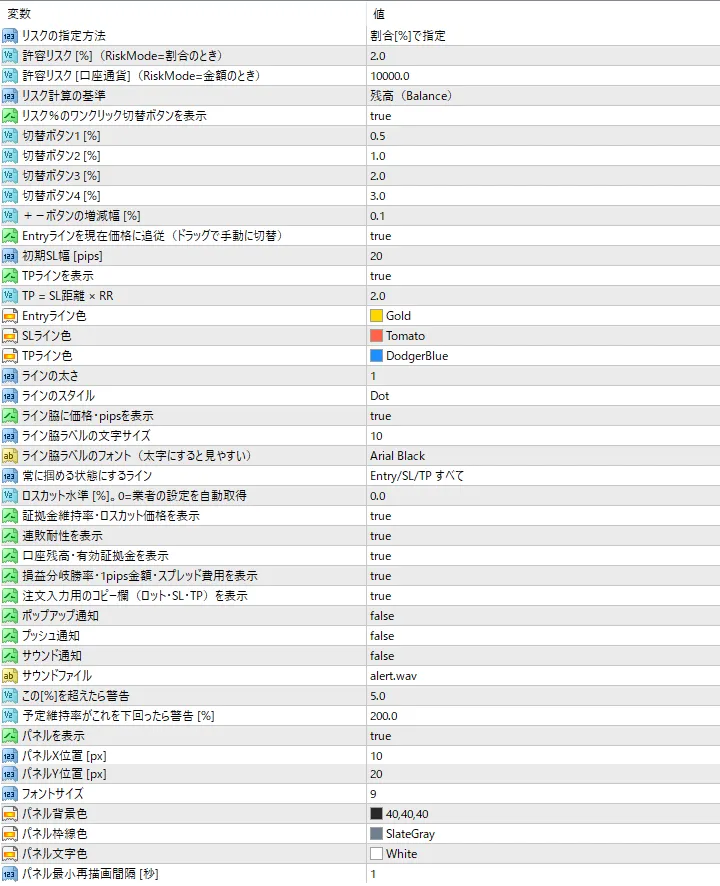
Panel position, font size, background color, border color, and the color, thickness, and style of each line.
Specifications
| Platform | MetaTrader 4 |
| Supported currency pairs | All currency pairs (account currency automatically detected) |
| Supported timeframes | All timeframes (not dependent on timeframe) |
| Supported brokers | Automatically supports 3-digit/5-digit brokers. Usable domestically and internationally |
| Number of parameters | 38 items (all in Japanese) |
| External dependencies | No DLLs required; no external indicators needed |
| Repainting | None (not a tool that provides buy/sell signals) |
Please read before purchase
- This product is a dedicated tool for calculation and visualization.In MT4 indicators, due to the仕様, you cannot place orders. Automatic ordering and one-click order are not included (there is a feature to copy calculated values into the order screen).
- Stop-out levels are automatically retrieved from your broker. In rare cases where a broker does not return values, manual input into parameters is required.
- In calculating stop-out price, unrealized P/L for positions in other currency pairs is treated as of the calculation time. Real stop-out price may vary with market moves.
- This product does not provide trading signals nor guarantee profits. Investment decisions are entirely your responsibility.