
List of price moves across nine timeframes — MTF tool that speeds up environmental recognition UD-MTF #07
This time, we will introduce a time-saving tool for market environment recognition.UD-MTF(Up Down Multi Time Frame)will be introduced.
In a word,
a tool that displays in color, for nine timeframes from M1 to monthly, how many pips the price moved from the opening price
How many times do you switch timeframes in a day?
Everyone knows that multi-time frame analysis (MTF analysis) is important.
Don't go against the trend of the higher timeframe. Take timing on the lower timeframe. But in practice, the work tends to go like this.
From monthly → weekly → daily → H4 → H1 …continuously switch timeframesto confirm
While switching,you forget the content of the timeframe you just looked at
If you focus on the lower timeframes,you won’t notice changes in the higher timeframes
Missing the mismatch where the upper timeframe goes up and the lower timeframe goes downcauses counter-trend trading
Environmental recognition is important. But the time and concentration for it should be as small as possible. UD-MTF is a tool for that purpose.

What is UD-MTF — nine timeframes in one list
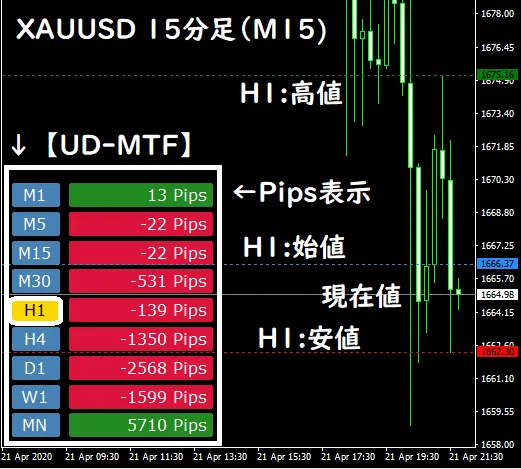
UD-MTF places on the current chartM1 / M5 / M15 / M30 / H1 / H4 / D1 / W1 / MNside by side,
and displays the “Pips from the opening price to the current price” for each.
Positive is green, negative is red, zero is graycolor-coded
The numbers arePips notationso you can immediately grasp the magnitude of momentum
For example, if D1 is +80 pips (green), H4 is +30 pips (green), and M15 is −10 pips (red), it may indicate a pullback within an uptrend — in other words, you can read the overall picturewithout switching timeframes at alland you can understand the overall setup.
When all timeframes are the same color, that is the so-called all-timeframe consensus trend. If the colors are mixed, you may suspect a range or a reversal.The color arrangement becomes the environmental recognitionin this tool, which is its pleasant aspect.
Click to choose a timeframe and the high/low/open lines will appear
Another main feature is this. The timeframes in the list can beselected by clicking, and for the chosen timeframe (yellow highlight) —
High line (green)
Low line (red)
Open line (light blue)
will be automatically drawn on the chart you are viewing.
For example, while trading on M5, if you click “H4,” the H4 high/low/open lines will immediately appear on the M5 chart.The work of pulling the higher-timeframe milestones down to the lower timeframeis completed with a single click.
For those who aim to break yesterday’s high/low, or who are conscious of the higher-timeframe opening price, this becomes a practical weapon in trading.
Customization
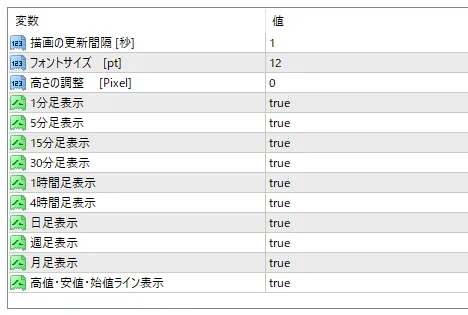
Display ON/OFF per timeframe: remove unused timeframes (e.g., MN, W1) to keep it compact
High/Low/Open lines ON/OFF: you can disable the lines if you only want the list
Update interval: default is 1 second. Can be adjusted to match PC specs
Font size and display positionadjustments
Why it was created
I used to confirm the environment by stepping down from monthly to lower timeframes before entering a trade. The more careful I was, the more time it took, and as soon as I focused on the lower timeframes, the information on higher timeframes became outdated.
“If I could keep the current position of all timeframes in sight at all times, would the confirmation work itself disappear?”——That was the starting point of UD-MTF. After creating it, the first thing I do when opening a chart changed from “switching timeframes” to “looking at the color arrangement.”
Suitable for these people
People who use MTF analysis but aretired of going back and forth between timeframesin their analysis
People who trade with awareness of the higher-timeframe high/low/openin mind
From scalping to swing trading,want to habitualize environmental recognitionin their routine
If you want to extend to comparing momentum across pairs, combining with the CP-POW momentum ranking is highly compatible. With UD-MTF you capture the vertical (timeframe) of the current pair, and with CP-POW you capture the horizontal (strength) between pairs.CP-POWis well-suited for this combination.
Sales information
UD-MTF is sold on GogoJungle.
Disclaimer
This tool does not provide investment advice. The displayed Pips and lines do not guarantee trading directions or profits; they are estimates to assist discretionary judgment. The final trading decision is up to you. Depending on broker data, display may differ from expectations.
Thank you for reading until the end.
If environmental recognition can be completed in 10 seconds, the remaining time and concentration can be used for “waiting.” I would be glad if UD-MTF can help with that. If you found the article helpful, a follow would be encouraging.
With that, I wish you good trading.