
[MT5 Discretionary Tool] MA line display makes the rebound line easy to identify
Table of Contents:What you can doYour concernsProduct comparison tableRecommended for such usersOther features▶ See price & comparison table
※ You can view from any section by clicking the table of contents.
■ What you can do
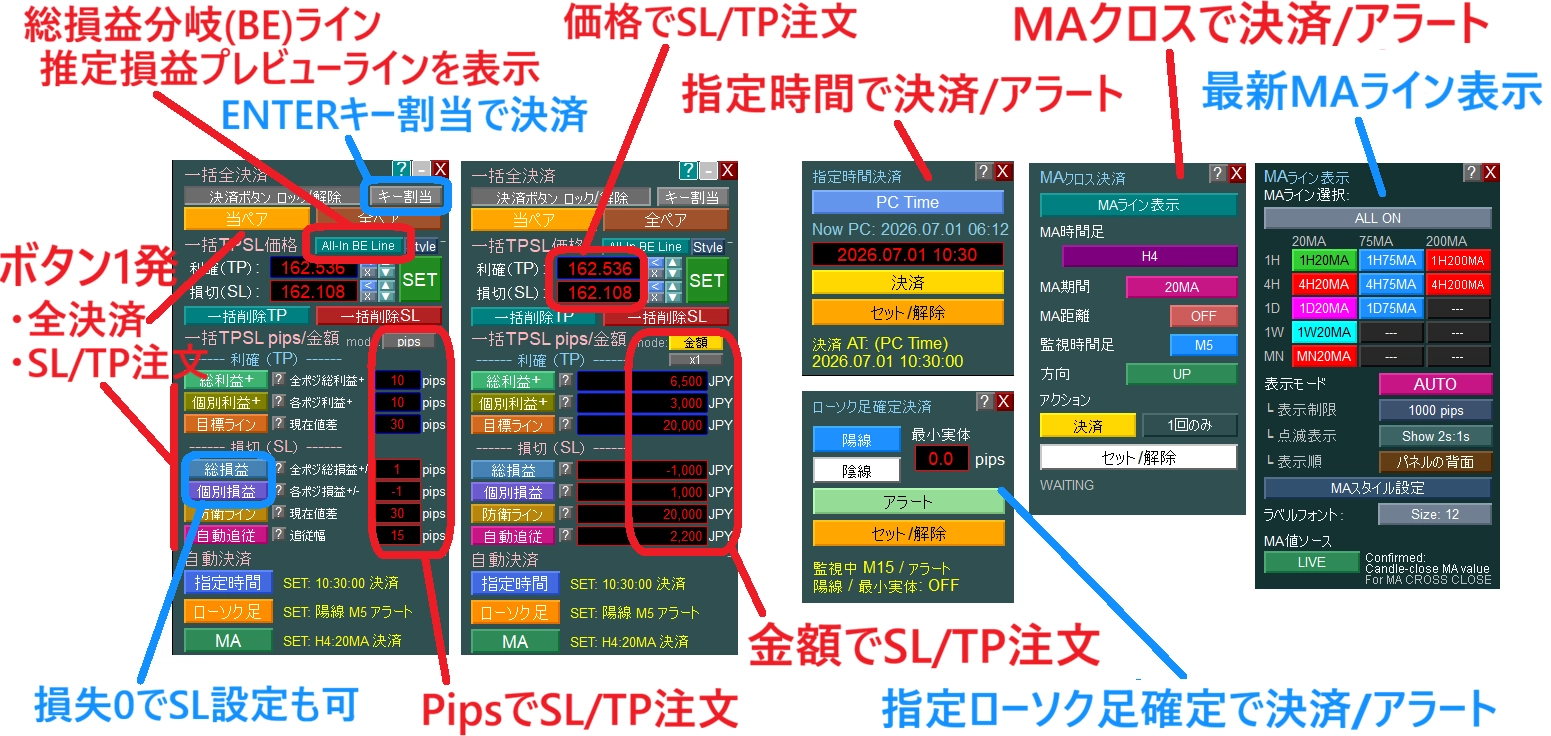
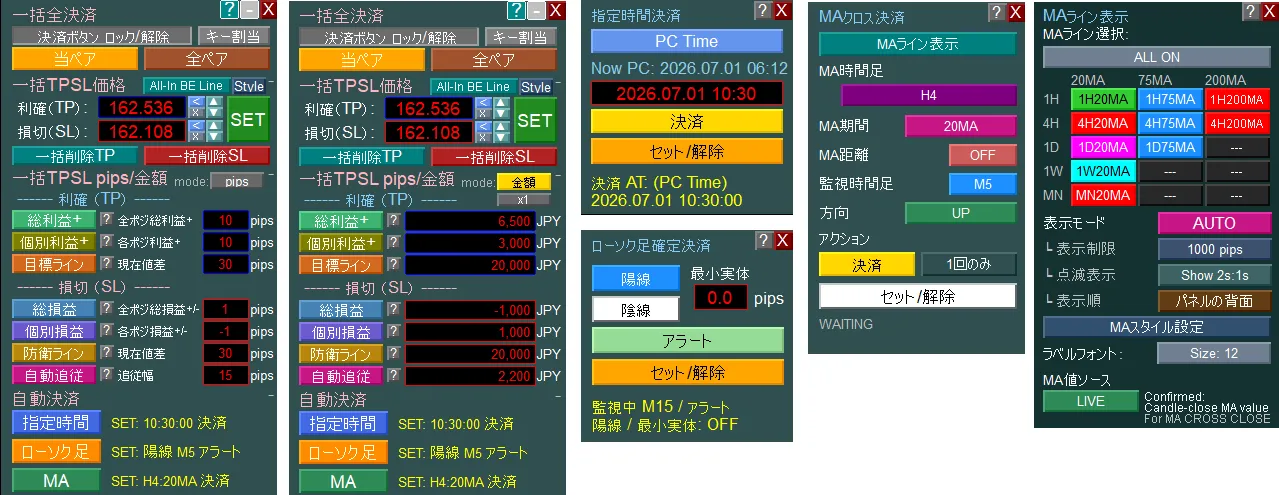
Traders make their own judgments, and this product supports from verifying the necessary information to setting and executing orders. All features are designed to make it easier for discretionary traders to follow their rules.
✓
With one click, set SL/TP for all positions at once
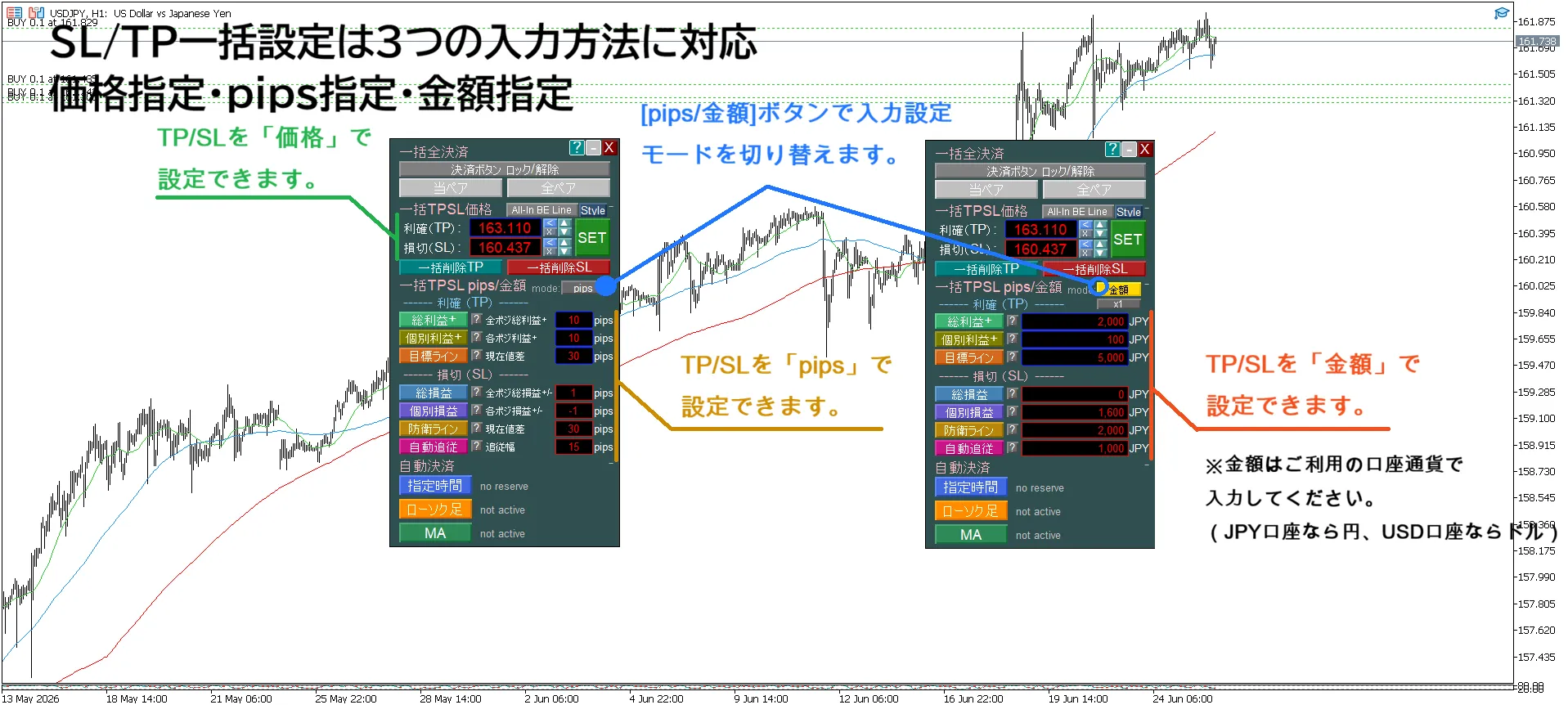
Supports amount, pips, and price specification
In amount or pips mode, you can set all at once based on entry price or a chosen profit/loss amount
→ Quickly set SL/TP in a way that suits you without hesitation
✓
Automatically set SL/TP by specifying target profit and acceptable loss
Supports amounts in account currency
→ No need for troublesome price conversions
✓
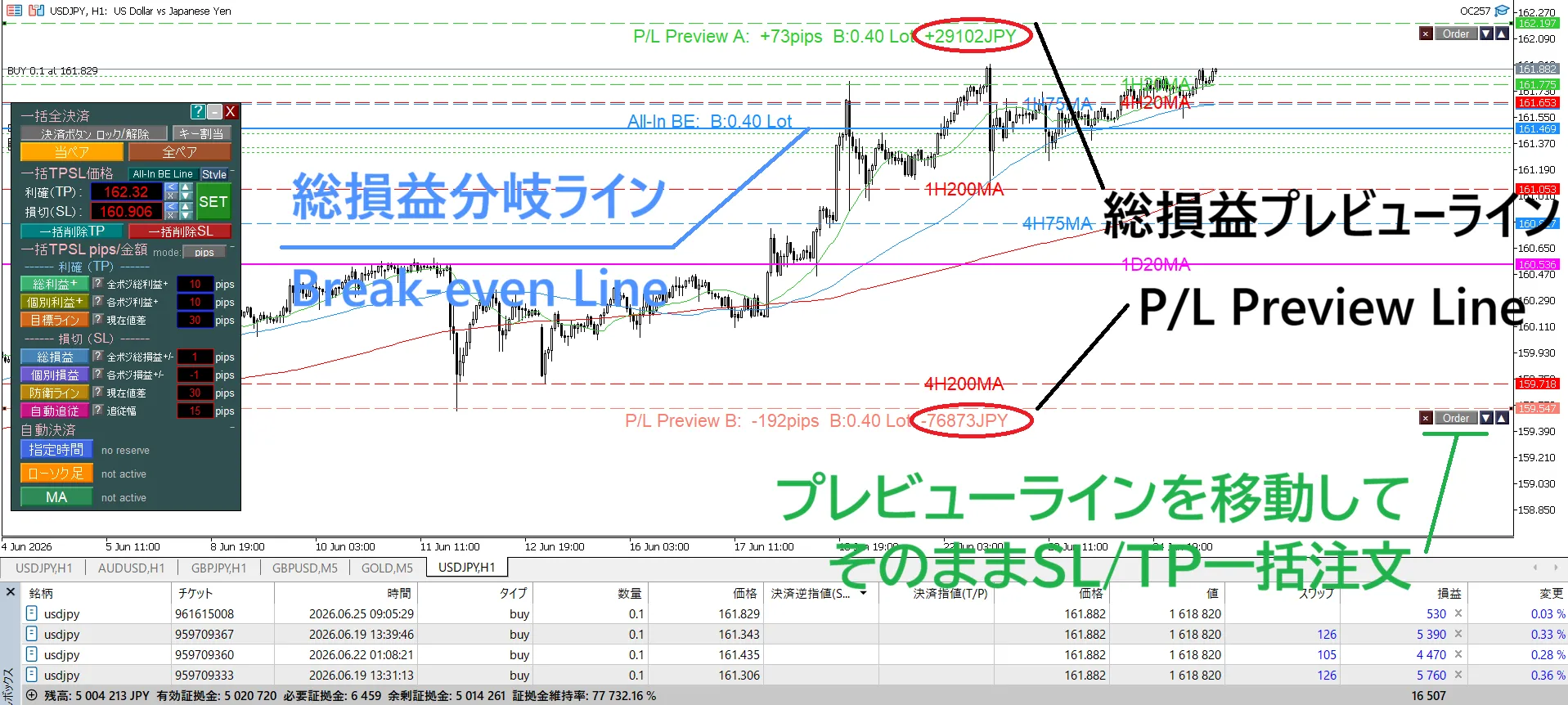
Shows break-even price considering spread, fees, and swaps (All-In BE line)
→ Quickly grasp the overall break-even point for multiple positions
✓
Displays estimated net profit/loss for multiple positions at a chosen price
(Profit/Loss Preview Line)
→ See total profit/loss where the line is moved
✓
Drag the Profit/Loss Preview Line and set TP/SL for all positions directly on the chart
→ No input needed, just click buttons to set TP/SL
✓
Auto settlement based on time / candle proximity / MA cross
→ Prevent missed settlements and support rule-based exits
✓
Display MA for 1H, 4H, daily, weekly, and monthly charts without switching charts
Display only when price approaches or with blinking
→ Reduces missing higher-timeframe MAs
✓
Instantly settle with Enter key
→ Focus on the chart and decide faster
■ Reducing the feeling of “I knew it, but I couldn’t do it”
Regret in trading isn’t only when your market reading is wrong.
“I decided to close, but waited a little more, thinking it might go higher.”
“I decided to cut losses, but hesitated to realize the loss.”
“I intended to set SL, but postponed because setting for multiple positions was messy.”
“I thought I checked the higher timeframe, but missed an important MA.”
“I couldn’t respond at the decided timing while sleeping or at work.”
This product is a tool to help you implement your own rules.
Batch setting, profit/loss lines, automatic settlements, higher-timeframe MA display, and key settlements.
At first glance, these may seem different, but they all share the aim to
“reduce the gap between what you knew and what you could do.” by even a little.
■ Do you have experiences like this?
【Centralized management】
・After delaying TP/SL settings for multiple positions, price moved and you missed the entry
→“If only I had set it then,” and you regret after losses.
→“If only I had set it then,” and you regret after losses.
・Even after deciding target profit and acceptable loss, you don’t know the TP/SL setting price
・Don’t know the break-even price including costs for pullback or small gains
・“If price reaches this, what is the total profit/loss?” cannot be judged immediately
・Don’t know the break-even price including costs for pullback or small gains
・“If price reaches this, what is the total profit/loss?” cannot be judged immediately
【Settlement】
・Even with decision rules, you can’t follow them due to emotions or circumstances
- Couldn’t settle before an indicator announcement while at work
- Planned to cut losses if the next candle confirms a reversal, but couldn’t decide
- Planned to settle if price fell below the 20MA, but watched instead
→ Hesitation or carelessness that violates rules can erode profits and capital
- Couldn’t settle before an indicator announcement while at work
- Planned to cut losses if the next candle confirms a reversal, but couldn’t decide
- Planned to settle if price fell below the 20MA, but watched instead
→ Hesitation or carelessness that violates rules can erode profits and capital
【Chart Analysis】
・It’s tedious to switch charts multiple times to confirm higher-timeframe MAs
・Even when you’ve checked a higher-timeframe MA, you may forget it and react after a bounce
・Even when you’ve checked a higher-timeframe MA, you may forget it and react after a bounce
【Settlement operations】
・In moments when a few pips can move profit, moving the mouse even slightly closes the settlement menu, diverting focus from price action
■ Product comparison table
| Product name | SL/TP Batch Setting | Line Drag Order | Key Settlement | Profit/Loss line | Auto settlement | MA Line Display | Price | |||
|---|---|---|---|---|---|---|---|---|---|---|
| Profit/Loss Branch BE | Estimated Profit/Loss | MA Cross | Candle | Time | ||||||
| 1 Click PROThis product Batch settings [Stop Loss & Take Profit] & Auto settlement [MTF MA cross・Specified time・Specified candle] MT5 | ✓ | ✓ | ✓ | ✓ | ✓ | ✓ | ✓ | ✓ | ✓ | 13,980円 |
| 1 Click PLUS Batch settings [Stop Loss & Take Profit] & MTF MA line display MT5 | ✓ | ✓ | ✓ | ✓ | ✓ | – | – | – | ✓ | 8,980円 |
| 1 Click BASIC Batch settings [Stop Loss & Take Profit] MT5 | ✓ | ✓ | ✓ | ✓ | ✓ | – | – | – | – | 7,480円 |
| 1 Click AUTO Auto settlement [MTF MA cross・Specified time・Specified candle confirmation] MT5 | – | – | – | – | – | ✓ | ✓ | ✓ | ✓ | 6,980円 |
| 1 Click MTF MA Auto settlement [MA cross] & MA line display MT5 | – | – | – | – | – | ✓ | – | – | ✓ | 3,980円 |
| 1 Click CANDLE Auto settlement [Specified candle confirmed] MT5 | – | – | – | – | – | – | ✓ | – | – | 1,680円 |
| 1 Click TIME Auto settlement [Specified time] MT5 | – | – | – | – | – | – | – | ✓ | – | |
| 1 Click MTF MA display MT5 | – | – | – | – | – | – | – | – | ✓ | 1,880円 |
※Click the product name to link to each product page.
■ Recommended for these traders
①
Traders who hold multiple positions
②
Discretionary entry
+ rule-based exit
+ rule-based exit
③
Higher-timeframe analysis
emphasis
emphasis
【Traders who hold multiple positions】
(averaging down / pyramiding / hedging / split entries, etc.)
When you hold multiple positions, there are more concerns than for a single position.
・Cannot change SL/TP for all at once
・Don’t know the price to retreat at entry or small gains
・Even after deciding target profit and acceptable loss, you don’t know the setting price for SL/TP
・When price moves to an arbitrary price, you don’t know the overall profit/loss
・Don’t know the overall break-even point for multiple positions
What this EA can do:
✓Batch set SL/TP for all multiple positions with single click (amount, pips, price specifications supported)
✓Automatically set SL/TP by inputting entry price or any profit/loss amount or pips(If retreating at entry price, just input 0 yen or 0 pips)
✓Show entry price retreat price for all positions (All-In BE line)
✓Display estimated profit/loss for multiple positions at arbitrary prices
✓Drag the profit preview line and set TP/SL on the chart directly
✓Enter key for immediate full settlement (focus on chart)
・Batch setting isn’t just to speed up tasks. It reduces missed settings and input errors, making it easier to implement the decided risk management.
・All-In BE line and Profit/Loss Preview Line aren’t just for display. You can drag the line to see the estimated total profit/loss, and set TP/SL for all positions at the price where you want to settle, completing the process on the chart.
・Enter key settlement isn’t to speed settlements. It’s designed to minimize being drawn to the chart by focusing your attention on price movement.
・All-In BE line and Profit/Loss Preview Line aren’t just for display. You can drag the line to see the estimated total profit/loss, and set TP/SL for all positions at the price where you want to settle, completing the process on the chart.
・Enter key settlement isn’t to speed settlements. It’s designed to minimize being drawn to the chart by focusing your attention on price movement.

※ If text is hard to read, switch the video quality to 1080p from the gear icon at the top-right of the video for a clearer view.

※ If text is hard to read, switch the video quality to 1080p from the gear icon at the top-right for a clearer view.
【Discretionary Entry + Rule-based Settlement】
Entries can be discretionary, but settlements should be dictated by rules, not emotions or life circumstances.
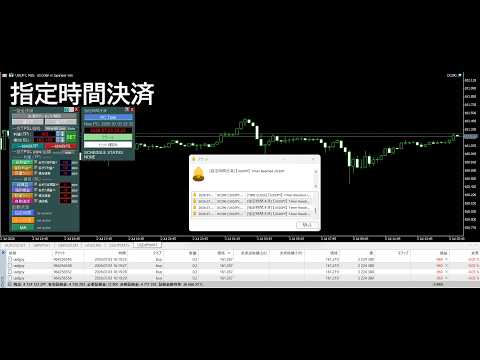
✓Automatic settlement at specified times (before indicators, before sleep, etc.)
✓Automatic settlement when the candle of the specified timeframe closes bullish or bearish
✓Automatic settlement when MA cross is confirmed or when approaching a specified distance
✓Flexible combination of specified time (TIME), candle completion (CANDLE), and MA cross (MA CROSS) for use
✓All settlements can be configured for alerts only, too
We support implementing predetermined settlement rules without being swayed by emotions or life circumstances.


※ If text is hard to read, switch the video quality to 1080p from the gear icon at the top-right for a clearer view.
【Higher-timeframe Analysis Emphasis】
Switching charts to confirm higher-timeframe MAs every time is tedious. If you forget, the market can move without you realizing the higher-timeframe MA.Higher-timeframe MAs being missed as the market moves and you may end up judging while not noticing an old MA line.
✓Display MA prices for 1H, 4H, daily, weekly, and monthly as horizontal lines on the current chart
✓AUTO mode to show only when price approaches
✓Blinking display is possible to maintain visibility of Fibonacci and trendlines while reducing misses
Higher-timeframe MA display is not about changing analysis methods. It allows you to confirm higher-timeframe MAs on the current chart, so you can continue analyzing without switching charts.

※ If text is hard to read, switch the video quality to 1080p from the gear icon at the top-right for a clearer view.
■ Other features
Designed for daily trading use, not only in features but also in readability, ease of setup, and recoverability.
✓
Multilingual EA display, built-in guides, and alert are available in 9 languages: English, Japanese, Russian, Chinese, Korean, Portuguese, Spanish, Indonesian, and Thai
✓
Built-in user guide (34 pages; exportable as a text file)
✓
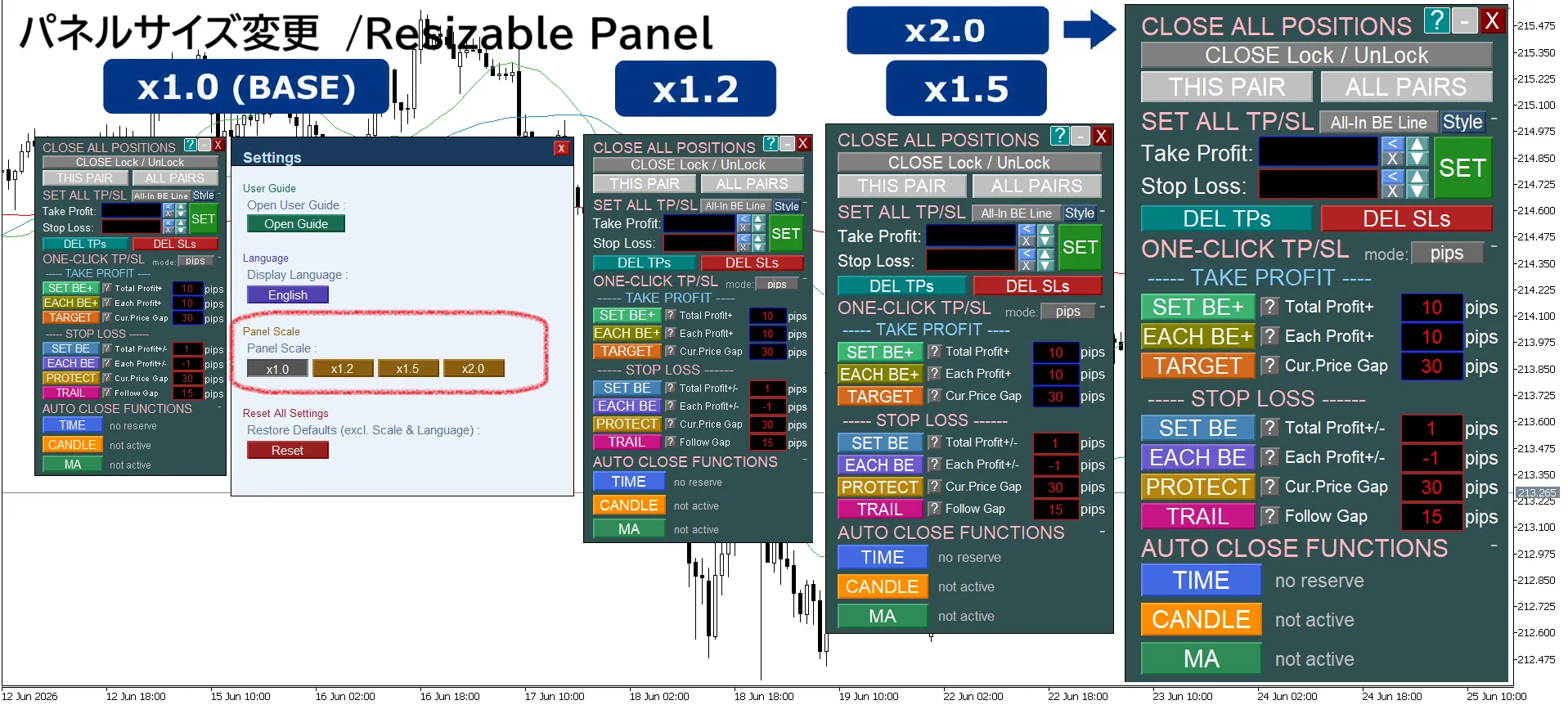
Supports panel size change (1.0× to 2.0×)
✓
Collapsible unnecessary panel items for compact display
✓
Saves various panel and line settings and restores automatically after restart
✓
Reset function to return to initial settings
✓
freely change line colors, styles, thickness, label font size, and label positions (settings are saved)

※ If text is hard to read, switch the video quality to 1080p from the gear icon at the top-right for a clearer view.

※ If text is hard to read, switch the video quality to 1080p from the gear icon at the top-right for a clearer view.

※ If text is hard to read, switch the video quality to 1080p from the gear icon at the top-right for a clearer view.
■ Finally
This product is not an EA that makes decisions on behalf of traders. It is built to help you implement what you decide and to reduce regrets of “I knew it, but I couldn’t do it.”
This product and the series were not created solely from my own ideas.
I transformed the inconveniences I experienced in actual trading and the requests from users who have traded XAUUSD for years into this product, refining it to completion.
That is why every feature has a reason for its necessity.
More practicality than flashiness.
More focus on things that truly help daily trading than just the number of features.
From now on, we will continue to listen to users and improve it into a more user-friendly and reliable tool.
This product and the series were not created solely from my own ideas.
I transformed the inconveniences I experienced in actual trading and the requests from users who have traded XAUUSD for years into this product, refining it to completion.
That is why every feature has a reason for its necessity.
More practicality than flashiness.
More focus on things that truly help daily trading than just the number of features.
From now on, we will continue to listen to users and improve it into a more user-friendly and reliable tool.
If you have questions or requests, please send a message.