
Removing the task of “searching” for a perfect order on MT5 — MT5 version of “CP-POL” that monitors up to 30 currency pairs on one screen has arrived
“CP-POL, isn't it usable in MT5?”
We have received several inquiries like this about the indicator “CP-POL,” which has been released for MT4 for some time.
Thank you for waiting. This time, we have released the MT5 version.
※ It took about five years, and we apologize for the delay…
Moreover, this is not a mere port. In the MT5 version,“Click to switch charts” and “display of PO duration bars”among other features,
significantly reinforcing the workflow from monitoring to execution. In this article, we will again introduce CP-POL for MT5 users to explain what kind of tool it is.
- Weary of switching currency pairs one after another to search for a perfect order
- Missed early moves because you realized PO formation too late
- Cannot tell whether the current PO is just formed or in the late stage
For those who capture trends with moving averages using a perfect order, this is a problem many have felt at least once. CP-POL is an indicator that automates the entire “searching and watching” process into a single display.
■ What CP-POL is
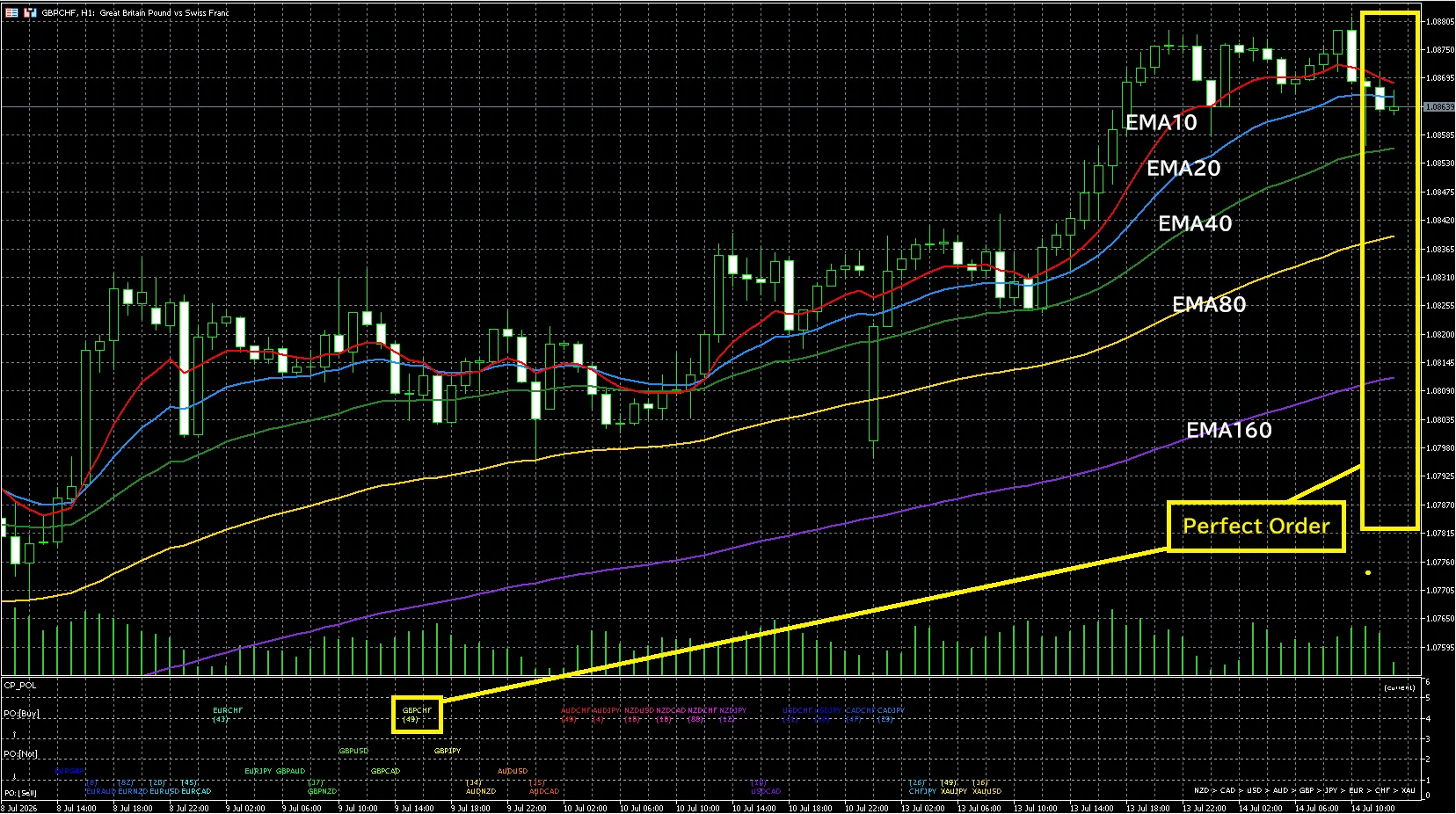
In one sentence,“A monitoring tool that can list the perfect order state for up to 30 currency pairs in one sub-window”.
Five moving averages (default EMA 10/20/40/80/320) are auto-ranked by a score from 0 to 4, and each pair is placed in a row according to its score.
- Top row PO: [Buy] … bullish perfect order is forming
- Bottom row PO: [Sell] … bearish perfect order is forming
- Middle rows … the degree of the “one more step” breakdown
You can see at a glance which pair currently has a trend just by looking at the screen, without opening charts one by one. The monitoring pairs can be freely rearranged, color-coded, and shown/hidden in all 30 slots.
■ Notification of PO formation and breakdown moments
When a buy/sell PO is formed or broken in any pair, you will be notified by a popup or push to your smartphone. The corresponding pair is highlighted on its chart for a certain period, so you won’t miss where the change occurred.
The time when you are not attached to a chart is exactly when the trend’s initial momentum is born. This feature helps reduce “I noticed too late.”
■ MT5 version new feature ①: Click the pair name to switch charts instantly
When you find a pair of interest in the list, simply click its label to switch to that pair’s chart. “Find in list → check details” is completed in one click.
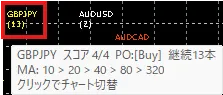
If you hover the mouse over a pair name, you can check the score and the order of moving averages (e.g., 10 > 20 > 40 < 80 < 320) via a tooltip. You can see which MA order is broken without opening the chart.
■ MT5 version new feature ②: “Freshness” indicated by PO continuation bar count
Personally, this was the feature I wanted to include the most.
For pairs where PO is forming, a continuation bar count (e.g., (42)) is displayed. The value is calculated by looking back the past 500 bars the moment it is applied to the chart, so
- (3) … just-formed early movement. It may grow from here
- (58) … long-standing mature trend. Waiting for pullback or cautious profits
Thus, even within the same “PO forming,” the meaning is completely different, and you can judge it with a single number.

■ MT5 version new feature ③: Currency strength ranking + click-to-filter
From the scores of all pairs, currency strengths are calculated and displayed at the bottom-right in descending order (e.g., EUR > GBP > … > JPY).
In MT5, if you click a currency name, only the pairs including that currency are highlighted, while others fade to gray. The task of finding the combination of the strongest currency and the weakest currency can be completed in seconds. Click again to clear.

■ About repaint
CP-POL’s display reflects the moving average values at that moment. It does not repaint like some signal tools where arrows disappear or move later. The PO continuation bar counts are determined deterministically from past bars, so re-plotted values reproduce the same results.
■ Differences from MT4 version
The judgment logic (the five MA order score) and basic screen layout are the same as the MT4 version. If you are using MT4, you can migrate with the same feel.
Additionally, the following are MT5-only features.
- Chart switching by clicking a pair name
- Tooltip display of scores and MA order
- Display of PO continuation bar counts (past 500 bars backfilled)
- Currency strength ranking with click-to-filter
- Automatic detection of symbol suffixes (such as .raw)
One MT5-specific behavior: immediately after first attaching, some pairs’ history data may be waiting to sync, showing the pair name with a gray display and a “?” (especially on H4 or higher timeframes). Once synchronized, they automatically move to their proper positions, so don’t worry. From the second time onward, the data is cached on the device and they display immediately.
■ System requirements and specifications
- Platform … MetaTrader 5 (MT5)
- Monitored currency pairs … up to 30 pairs (default: 28 majors + XAUUSD, XAUJPY; all adjustable)
- Supported timeframes … all timeframes (fixed evaluation timeframe also possible)
- DLL usage … none
- External indicators … not required (CP_POL.ex5 runs standalone)
Designed to be useful from selecting pairs for scalping to environment awareness for H4 and daily swings.
■ How to obtain
CP-POL MT5 version is published on GogoJungle.
https://www.gogojungle.co.jp/tools/indicators/82552
Pricing follows a stepped increase policy. To celebrate release, the first 10 copies are 2,980 yen, then 3,980 yen → final price 4,980 yen (tax included).
For MT4 users, there is also the conventional MT4 version.
https://www.gogojungle.co.jp/tools/indicators/23647
Note: This indicator is an analysis aid based on the order of moving averages. It does not guarantee future profits or trading results. The displayed scores, continuation bar counts, and currency strengths are analytical benchmarks, and final investment decisions are the user’s sole responsibility.
From here on, we introduce how I actually use CP-POL (morning screening procedure, continuation bar count guidelines, strength filter usage).
If you like, please sign up to view the rest.
