
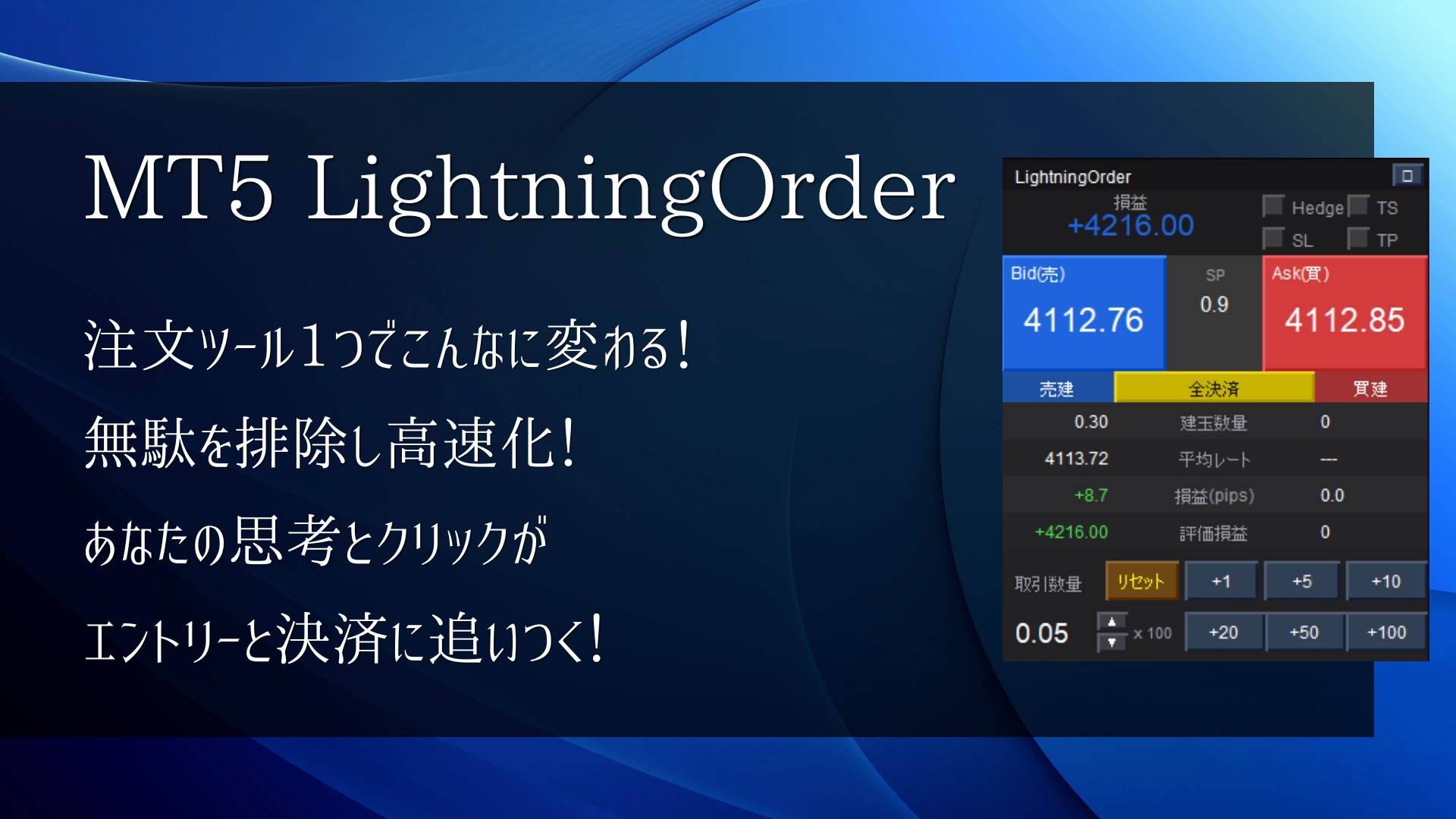
【Scalping Specialization!】One order tool can change this much! Eliminate waste and speed up! Your thinking and clicks catch up with entries and settlements!
Introduction
“The moment I tried to enter, the price moved” — A scalper’s eternal dilemma
When scalping gold, this happens many times. You see a perfect entry opportunity on the chart, open MT5’s order window, enter the lot size, confirm the price, and press “Submit order”—and in those few seconds, the price has already moved 10 pips.
Scalping is a world of seconds. Even pressing the OK in the dialog box can cause you to miss a chance. “If only I could place the order faster”—many scalpers have thought this at least once.
Buttonswith one presssend the order instantly. No confirmation dialog, no price entry.
In this article, we explain concretely what LightningOrder does and how using it can change your scalping.
Before / After
Compare standard order operation with LightningOrder
First, let’s lay out the normal MT5 order flow next to LightningOrder’s operation flow. By comparing the differences, you can see at a glance what changes.
This difference can be decisive in scalping: trades you can grab vs. trades you miss.
Feature Explanation
LightningOrder solves five problems
LightningOrder condenses features specialized for scalping. Each feature is designed to address a concrete concern of scalpers.
Panel composition
Everything is contained in the chart panel
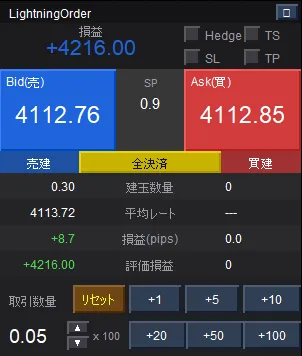
LightningOrder is a panel EA that resides on the chart. No need to open a separate window; from order to P/L confirmation, everything is done on the chart you’re viewing. The panel layout is simple, so first-time users won’t get lost.
| Area | Content |
|---|---|
| Title bar | EA name and ↺ refresh button (brings to front if hidden by other objects) |
| Total P/L / Checkbox | Real-time total unrealized P/L displayed (blue for profit, red for loss). Four checkboxes for Hedge, TS, SL, TP |
| Bid/Ask buttons | Displays current price prominently. Left = Sell (Bid), Right = Buy (Ask). Center shows spread |
| Position information | Open quantities for Sell/Buy, average rate, pip profit/loss, unrealized P/L. Center has a Close All button |
| Lot control | Step adjust with ▲▼, reset, and bulk add +1/+5/+10/+20/+50/+100 |
Practical usage
Four steps to maximize LightningOrder in scalping
To use the tool correctly, outline the workflow from setup to actual trading.
Set parameters once
When applying the EA, set SL width (InpSL), TP width (InpTP), and TS width (InpTrailPips) in pips. This is only done once. After that you don’t need to input each time; just switch with ON/OFF checkboxes. Default lot size can also be configured.
Check the checkboxes before entry
Set checkboxes according to your trading style. For example, “TS ON・SL ON・TP OFF” emphasizes trailing stops for scalping, or “SL ON・TP ON” for stricter risk management. Switch with one click to fit that day’s strategy.
Quickly adjust lot size on the panel
Use the panel’s lot control area to adjust order size. The +1/+5/+10 bulk add buttons are handy for rapid incremental increases. If you make a mistake, press “Reset” to revert to the minimum lot.
When a setup presents itself, go for it with one button
When an entry opportunity arrives, simply press “Bid (Sell)” or “Ask (Buy).” SL/TP/TS are automatically assigned. Position info updates on the panel in real time. When profit targets are reached, use “Close All” to exit in one click. All operations are contained within this single panel.
Key design points
To realize an effective trailing stop
Trailing Stop (TS) is common in order tools, but many have a flaw: all SLs converge to the same price as the price moves. With multiple positions, the TS action of later positions can overwrite the favorable SL of earlier positions.
LightningOrder fundamentally solves this. When ordering, it embeds in the order comment: “This position TS width is XX pips,” giving each position its own TS width. As a result, even with multiple positions, each is managed by its own trailing stop.
Recommended environment / Specs
Supported environments and key parameters
| Item | Content |
|---|---|
| Supported platform | MetaTrader 5 (MT5) only |
| Order method | Market orders (one-click) |
| Processing mode | Asynchronous mode (non-blocking / fast) |
| Panel update interval | 100 ms (real-time) |
| Recommended instruments | XAUUSD (GOLD), XAGUSD, major FX pairs |
| Recommended timeframes | M1–M5 (scalping-focused design) |
| Magic number management | Completely separated from other EAs and manual positions |
| Panel position | freely adjustable via parameters |
| Main parameters | Description |
|---|---|
| InpSL | SL width (pips). Auto-assigned when SL checkbox is ON |
| InpTP | TP width (pips). Auto-assigned when TP checkbox is ON |
| InpTrailPips | Trailing Stop width (pips). Individually managed per position |
| InpLotStep | One-step increment/decrement of lot |
| InpMagic | Magic number. Identifies positions managed by this EA |
| InpPanelX / InpPanelY | Panel display position (pixels) |
Summary
“Speed” cannot be fully achieved by skill alone
To win at scalping, you need more than quick judgment. The speed of order operations is equally important. No matter how well you read the market, if prices move while you're placing an order, it defeats the purpose.
LightningOrder aggressively reduces the “wasted time” in order operations, making your decisions catch up with price. It isn’t complicated to set up. There’s little to remember. Place the panel on the chart and press a single button.
- ⚡Don’t miss opportunities with one-click market orders
- ⚡Asynchronous processing prevents panel operations from blocking
- ⚡Pre-set SL/TP/TS and auto-assignment on each order
- ⚡Multiple positions with TS that do not interfere with each other
- ⚡Real-time total P/L and one-click close all
- ⚡XAUUSD and major FX pairs supported
※This EA is MT5-only. Please make investment decisions at your own risk. There is a risk of principal loss in FX/CFD trading. Past performance does not guarantee future profits.