

[Instant Key Complete Guide 6] Set take-profit lines in bulk. Press the "T" key and click once to complete TP for all positions
Entries and settlements can now be done with a single key.
Next isFine-tuning the exitsettings.
Setting TP (take profit) for multiple positions one by one is tedious.
With瞬キー,T key+one chart clickyou can set TP for all positions at once.
Why is batch setting convenient?
For example, when you hold 2–3 positions at the same time,
there are times when you want to align the take-profit lines at the same price.
With a mouse, you need to open the modification screen for each position.
Keyboard + one-click makes it all done at once.
Because the operation is simple,
it reduces the time spent wondering, “Where should I place profit-taking?”
How to use it (3 steps)
STEP1:T key press (start TP setting mode)
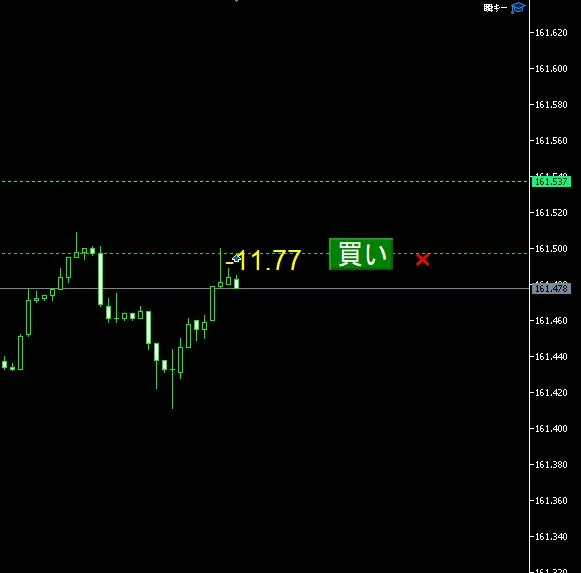
STEP2:Move the mouse to display a green dotted preview
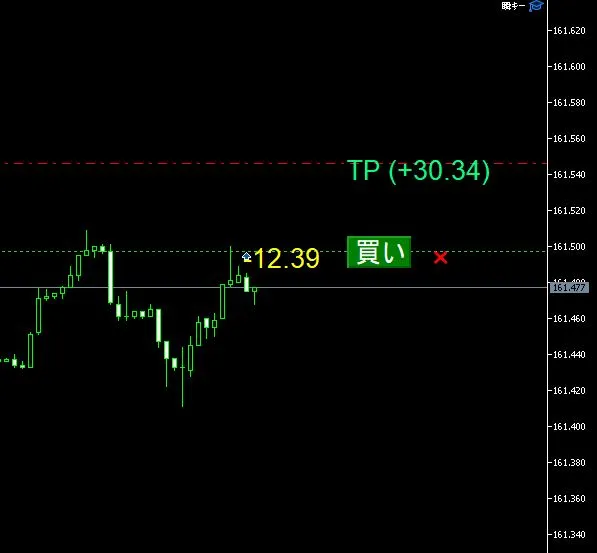
STEP3:Place the take-profit price you wantclick→ TP for all positions is set at once
When the setting is finished, the mode automatically exits.
The preview line also disappears.
If you want to stop midwayEsc key to cancel.
Notes
- 対象はpositions only(not applicable to pending orders)
- Existing SL (stop loss) remains as is
- Only TP is changed in batch
If you hold multiple positions,T keyis an essential feature.
Summary
瞬キー TP batch setting, remember like this.
- T key→ Turn on setting mode
- One click → Confirm take-profit lines for all positions
- Esc key→ Cancel
It’s a perfect feature for those who don’t want to waste time adjusting profits.
On a demo accountB key to buy →T key to set TP, please try it.
〇 Previous article
→【瞬キー Complete Guide⑤】Batch cancel of pending orders. Clear the chart with the "Z" key
◎ Next article
→ 【瞬キーComplete Guide⑦】Stop loss in batch as well. Use the "Q" key to set all positions’ SL in an instant