

One-key market order! The speed of entry changed by the "B" key 【Instant Key Complete Guide Part ②】
In the first installment, we conveyed the overall picture of "瞬キー". Shun-Key
This time, we will finally start with the most frequently used function.
"Buying."
MouseBuy vsKeyboardBuy
When you normally buy in MT5, it usually goes like this.
① Open the order screen
② Enter the lot size
③ Press the market buy button
Even though the chart is visible, your eyes and hands move to a different place on the screen.
Those few seconds cause stress, especially for beginners.
If you have瞬キー,press B keyjust once.
Buying occurs while you look at the chart.
It’s not just “fast.”
Because the operation becomes simpler, you can refocus on market judgment.
This isthe true strengthof keyboard trading.
What happens with B key?Pressing the B key
瞬キーwill automatically execute the next step.
- Currency pair: the instrument of the currently open chart
- Order type: market buy
- Lot size: the "order lot size" set in EA
In other words, you don’t have to enter the lot size each time.
If you set it beforehand, everything else isB keyfrom then on.
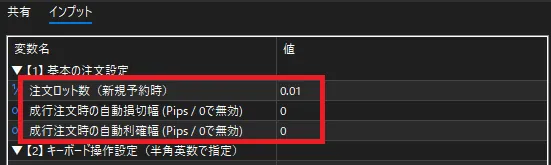
Stop loss and take profit can also be assigned automatically in the settings.
(Effective if you set non-zero values for "Auto stop loss width for market orders" and "Auto take profit width")
Checkpoints for settings (before buying, just once)
Double-click the EA on the chart to open the Input tab.
- Order lot size … what amount to buy
- Auto stop loss width (Pips)… 0 means no stop loss
- Auto take profit width (Pips)… 0 means no take profit
Beginners are recommended to start with a demo account and small lots.
Actual usage (3 steps)
STEP1: Find the buy timing on the chart
STEP2:Press B key
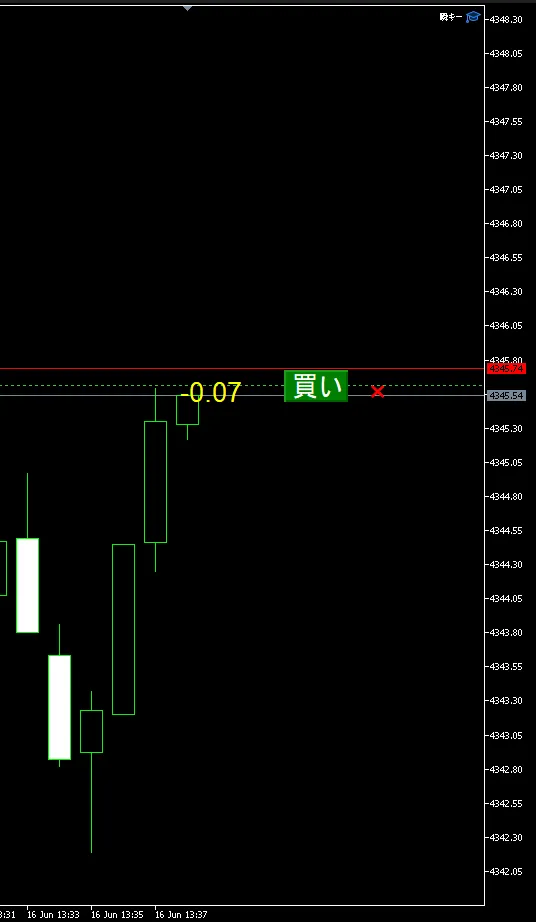
STEP3: If the buy button and profit/loss display appear on the right of the chart, you’re successful
Settlement isC keyfor an instant.
Buying and settling are completed with only two keys.
Common stumbling blocks
Q.B keydoes not respond
A. Please click on the chart and then press. If another window has focus, it won’t work.
Q. The lot size is different from expected
A. Check the EA setting "Order lot size." Settings may differ by chart.
Q. Stop loss doesn’t attach
A. Make sure the auto stop loss width is not zero.
Summary
瞬キーbuy operation is simple.
- B keyfor a single market buy
- Lot size is fixed by pre-settings
- Look at the chart and enter without hesitation
Those who have paused at the moment of buying will notice the difference.
If you haven’t tried yet, open a demo account todayB keyand press it once.